Contact Us
Introduction
At times, analysts need to account for heat generation or power dissipation in certain regions of a model. When setting up an Ansys Fluent heat source, the following actions can help produce a higher-quality result.
- Separate the heated generation zone from other zones while preprocessing.
- (option 1) A volumetric heat addition (source) option is preferred. In this option, the cell zone is meshed. The following figure shows the steps to assign heat source. In the Fluent cell zone window check the “Source Terms” box. Select “Source Terms” tab, click “Edit” next to Energy and enter W/m3 value.
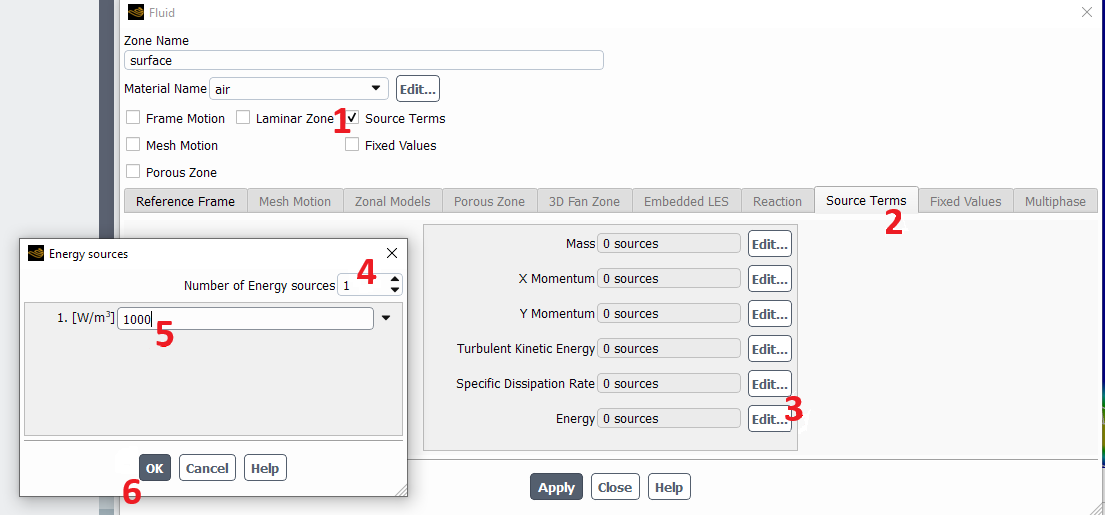
- (option 2) The heat source may be applied at the boundaries of the heating zone. The limitation with this approach is that the heat conducts away from the heater uniformly on the faces. If one side of the heater is colder than the other, more heat will not transfer to the colder side (which is the case in real life).
In this option, the heating zone is not meshed. At the walls between the heating zone and the neighboring zones a “heat flux” boundary condition in W/m2 is applied as shown below.
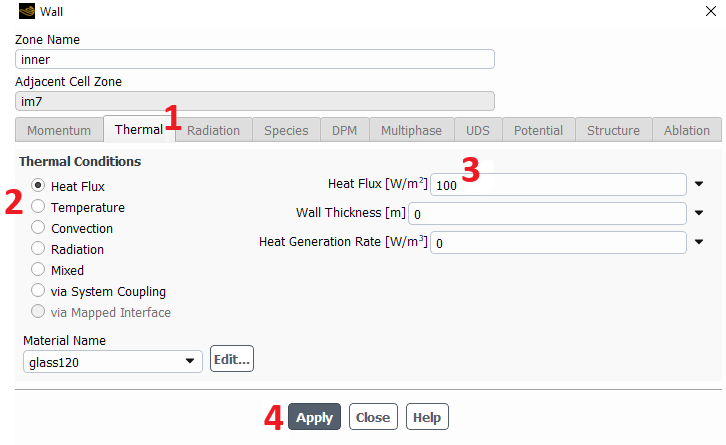
- If only the heat flux (W/m2) is known, it can be converted to volumetric heat generation (W/m3) using the following relation for an extruded heater geometry:
HeatGeneration = HeatFlux x Depth / Volume
- For 2D analysis in Fluent, the Depth value is equal to the length specified in the “Reference Values” window. This value is 1 m by default.
If heat flux option is selected to handle heat addition, user may directly enter the heat flux value into the wall boundary condition tab.
Using the right Ansys Fluent heat source method helps analysts represent heat generation more accurately across 2D and 3D thermal simulations.
Need Help Setting Up an Ansys Fluent Heat Source?
SimuTech Group’s CFD consulting team can help you set up, troubleshoot, and optimize thermal models in Ansys Fluent, including volumetric heat generation, heat flux boundary conditions, and 2D or 3D heat transfer workflows.

Mert Berkman, PhD Aerospace Engineering
Lead Engineer – Fluids, SimuTech Group
Mert Berkman is an aerospace engineer with a PhD in Aerospace Engineering and extensive experience in computational fluid dynamics, combustion, thermal-fluid analysis, and advanced engineering simulation. At SimuTech Group, he supports customers across complex fluids applications, helping engineering teams model challenging flow behavior, evaluate thermal and combustion performance, and apply simulation more effectively to real-world design decisions. His background spans aerospace research, automotive systems, power generation, turbomachinery, and technical consulting, giving him a broad perspective on how CFD can be used to understand performance, improve reliability, and reduce development risk across highly engineered systems.