Contact Us
Thermal Challenges in Battery Cell Design
One of the primary challenges in battery thermal management is ensuring temperatures are below maximum operating limits. Higher temperatures can lead to reduced efficiency, accelerated aging, and potential safety hazards. Engineers must understand the heat generated by a battery to design cooling systems effectively.
Understanding and predicting the thermal behavior of battery modules requires integrating the heat rejection of a battery with the electrical-mechanical properties of the battery cell. By linking the electrical properties of a battery cell, better battery heat rejection rates can be made available for cooling system design.
Using HPPC Data and Twin Builder for Battery Heat Rejection
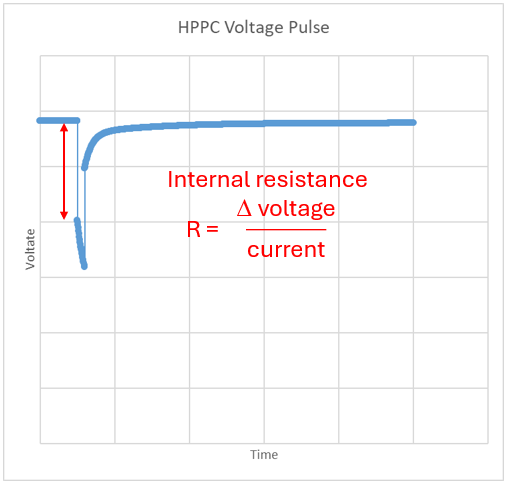
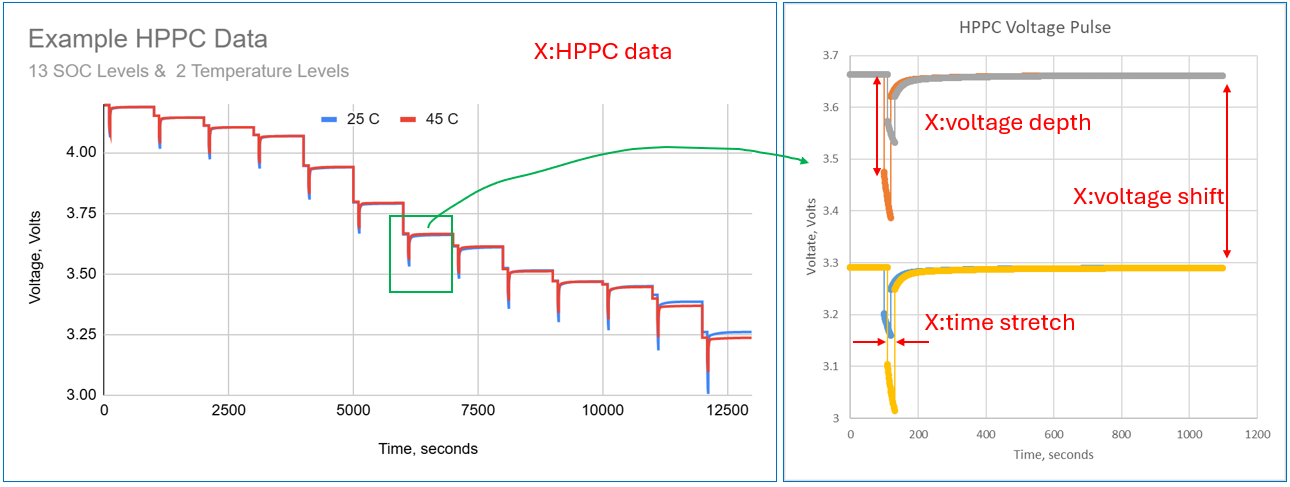
Simulating battery thermal behavior can be enhanced via physical test data of battery cells. One type of battery testing is called Hybrid Pulse Power Characterization (HPPC). This testing can enable the calculation of the battery’s internal resistance. Below is an example of one pulse from an example HPPC data set. The internal resistance of a battery cell is proportional to the voltage drop divided by the current. Twin Builder generates resistance values from an entire HPPC data set, which can include multiple temperature and State of Charge (SOC) levels. This resistance is used, along with the circuit current and voltage, to predict the power loss in the cell.
Ansys Twin Builder software provides tools for simulating and analyzing the thermal behavior of battery cells and modules. With its Battery Wizard capabilities, Twin Builder allows engineers to model complex thermal interactions and evaluate different battery discharge behaviors. Twin Builder can use HPPC data to quickly generate heat-rejection values.
By using Twin Builder, engineers can conduct parametric studies to explore various design configurations. This enables the identification of solutions that ensure uniform temperature distribution and efficient heat dissipation, ultimately improving battery performance and safety.
To address thermal management challenges, engineers can evaluate multiple inputs using Ansys software. These inputs can include different cell capacity, C-Rate, and HPPC data. Twin Builder’s simulation capabilities allow for the evaluation of these different inputs.
Simulation Setup: Thought Map, Product Map, and Twin Builder Configuration
Setting up battery simulations with Ansys Twin Builder involves several steps. These steps include the thought map, product map, and Twin Builder case setup.
Thought Map
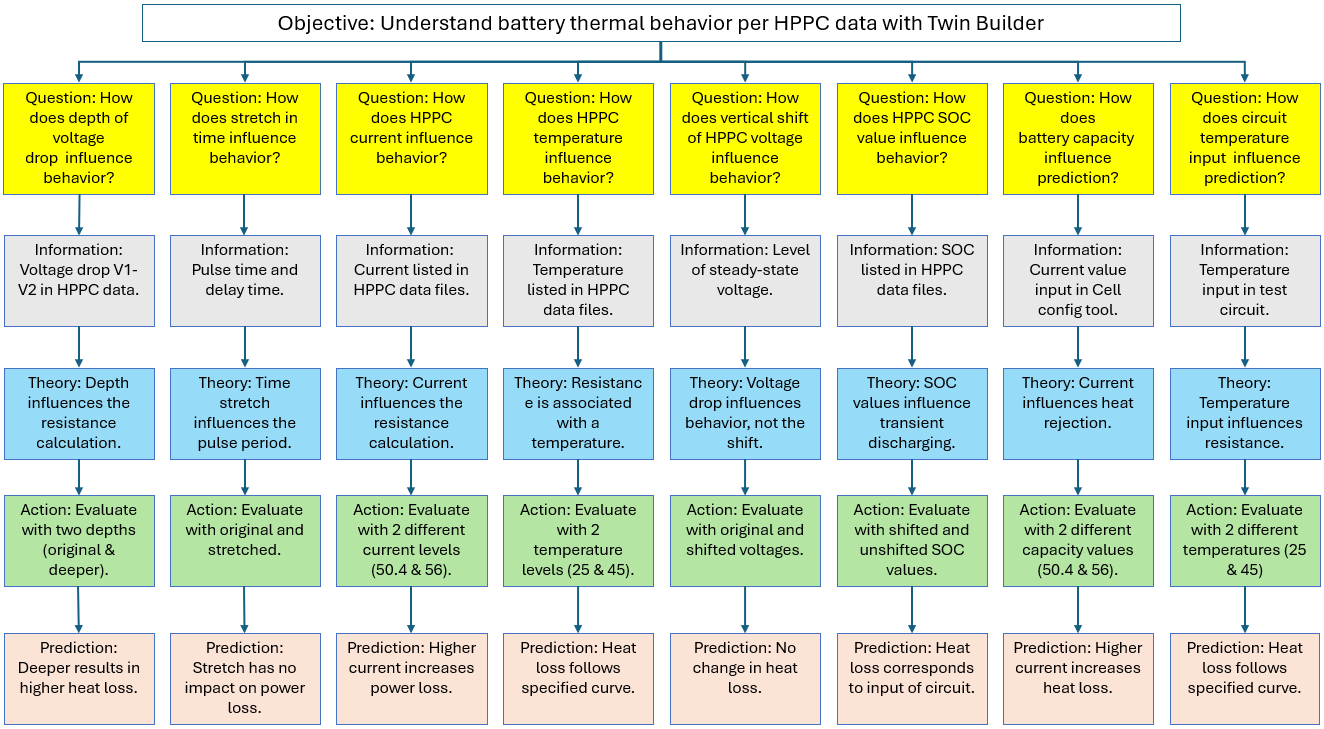
A thought map of the battery cell is generated to organize and represent ideas, concepts, or information in a structured way. The thought map below shows the simulation study’s objective and the questions asked to address it. Each question is followed by a theory, an action, and a prediction. Results would also be added to the bottom of each branch as they are generated.
Product Map
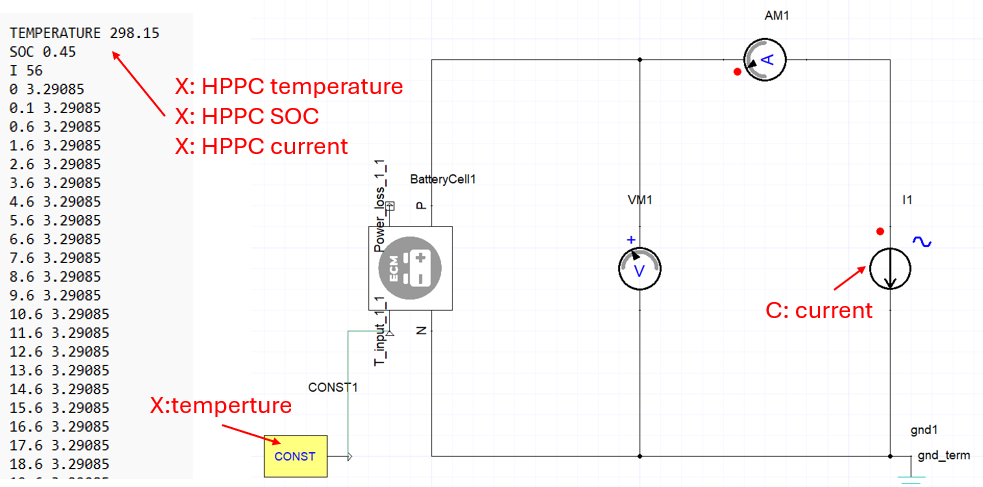
A product map of the battery cell in circuit is generated to list and categorize product features. A product map indicates factors that correspond to theories/actions in the thought map.
The map below shows an example battery HPPC data file and a Twin Builder circuit. Text items in red are variable or constant factors.
The map below shows an example battery HPPC data set and the manipulated voltage pulses used in the study. Text items in red are variable factors.
Twin Builder Simulation Setup
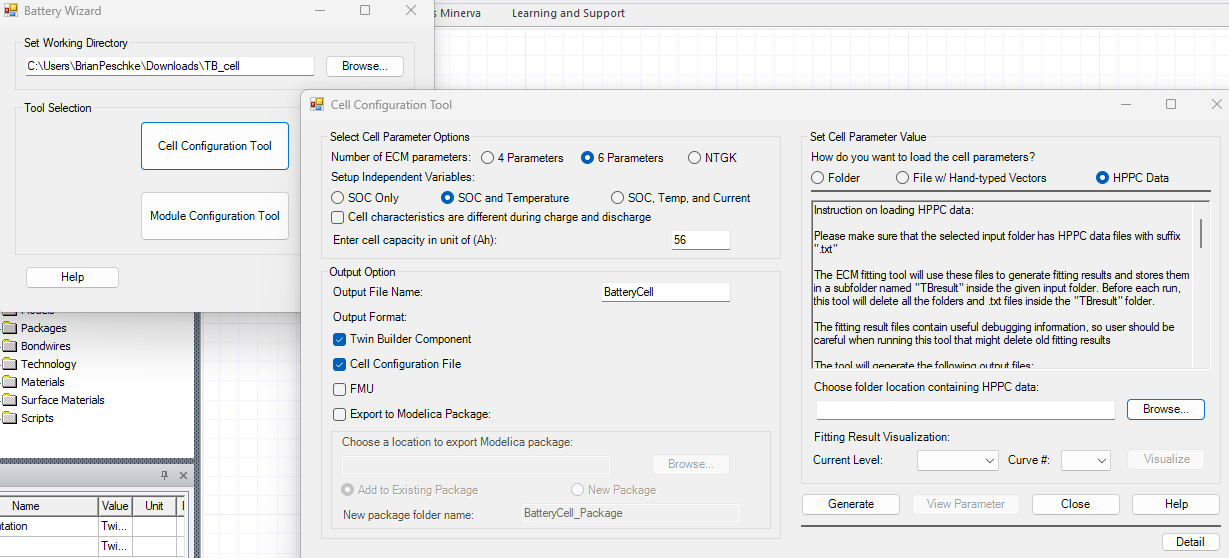
Twin Builder models are generated per the studies produced by the thought map. In this case, a 7-factor, 2-level fractional factorial DOE is employed, yielding 8 unique Twin Builder treatments. The images below show the sequence of steps for populating inputs for the battery model. The first image shows the Cell Configuration Tool in the Battery Wizard, and the second shows the resulting cell in a circuit.
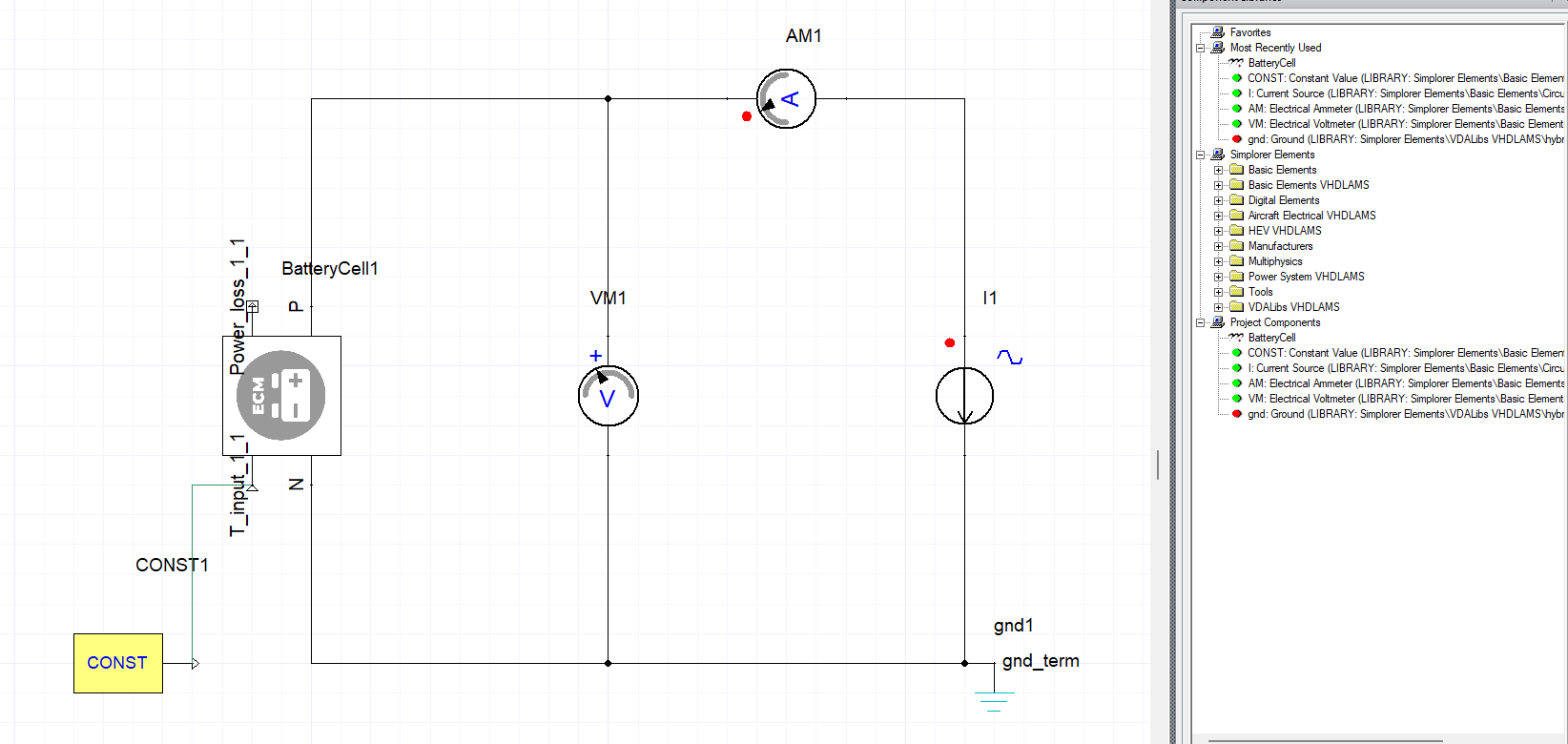
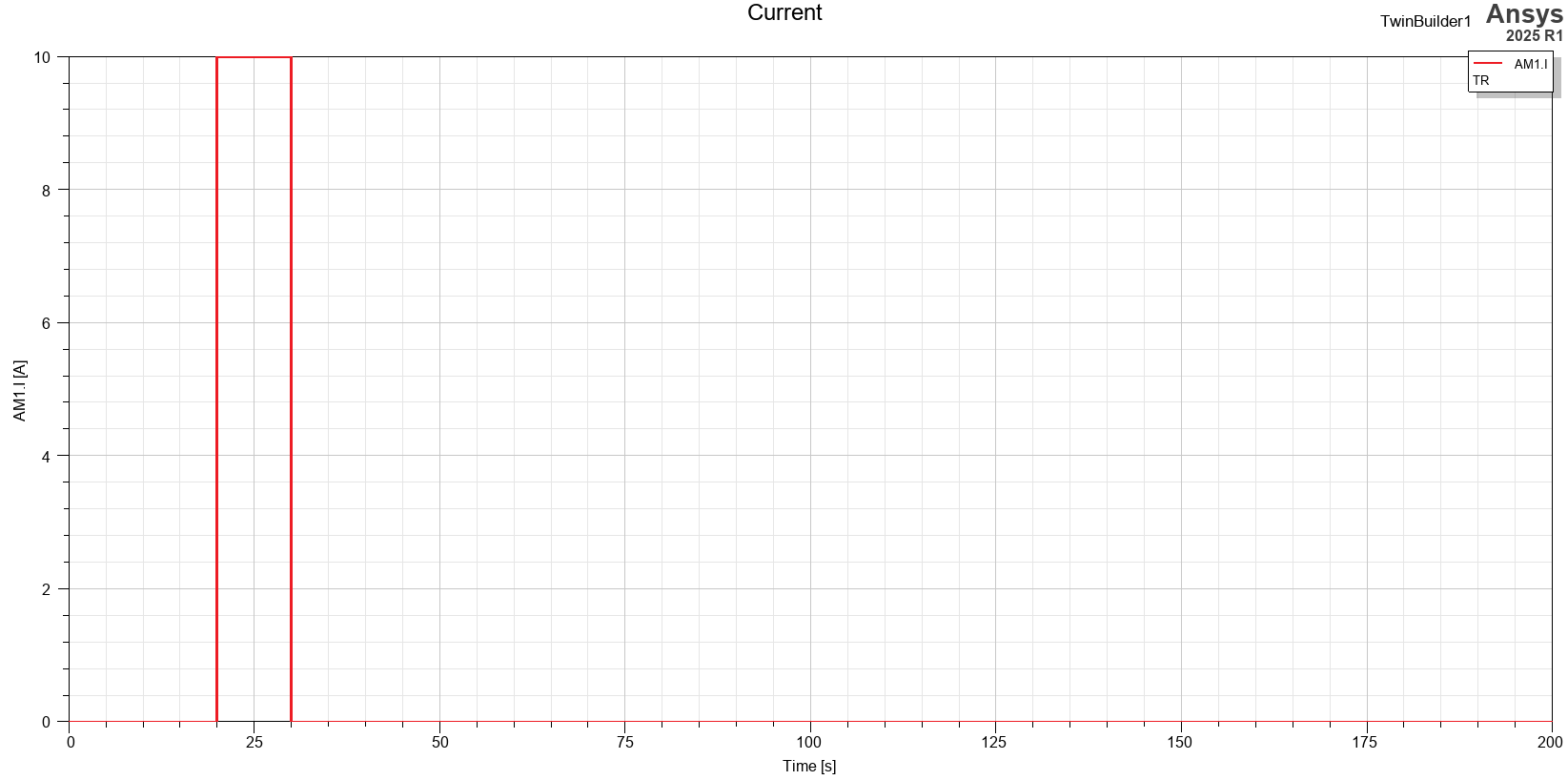
The current source uses a trapezoidal profile with an amplitude of 10 Amps for 10 seconds, following an initial delay of 20 seconds.
The simulation calculations are executed to generate the results, focusing on battery cell heat loss, voltage, and current. The heat loss treatment data are analyzed to answer theoretical questions and to confirm or contradict predictions.
Results: Identifying the Most Significant Factors in Battery Heat Loss
Graphical Analysis
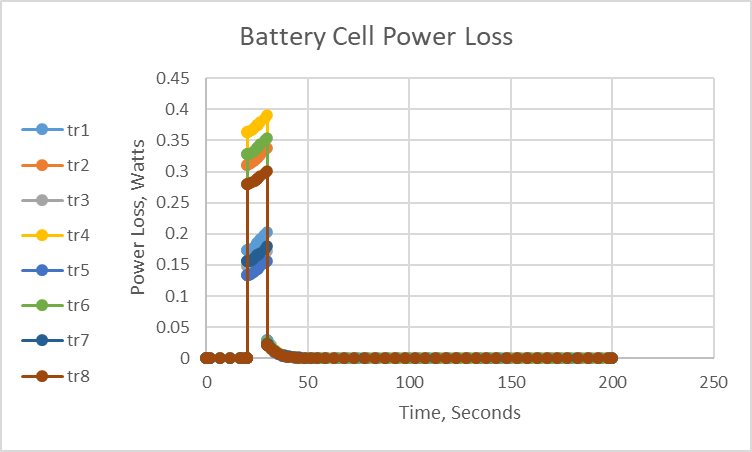
The chart below displays the transient battery cell power loss results for the treatments. The chart indicates that voltage depth is the most significant factor. When the voltage drop in the HPPC data is larger, the battery resistance is higher, resulting in higher power loss. Other input factors cause a smaller variation in heat loss.
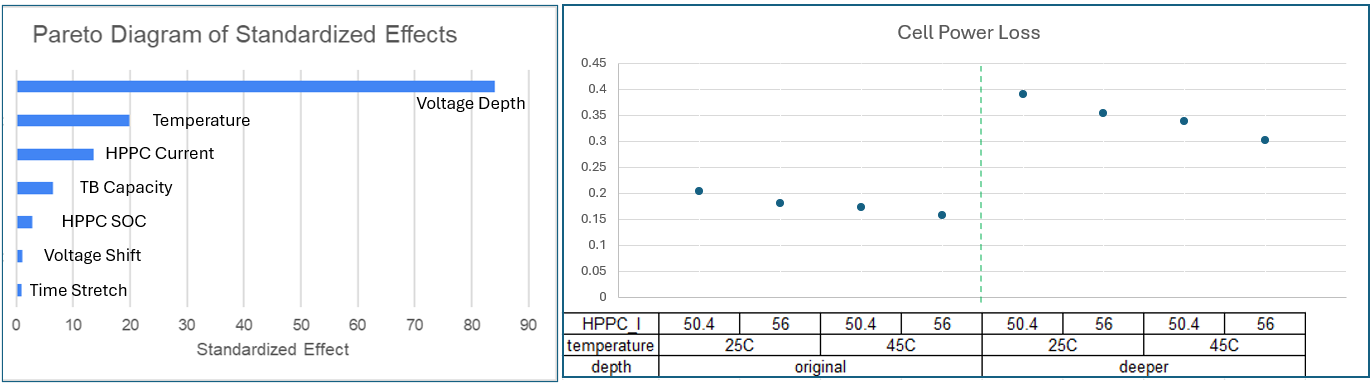
The charts below also each display that the HPPC voltage depth is the most significant factor in cell power loss. Circuit input temperature, HPPC current, and Twin Builder battery capacity are mildly significant. Voltage shift and time stretch have a negligible influence.

Key Observations from the DOE
Voltage Drop Depth: Higher voltage drop depth in an HPPC pulse results in higher internal resistance and, therefore, higher heat loss.
Circuit Temperature: Circuit temperature influences resistance mildly because the voltage drops for pulses at 25 °C are larger than those at 45 °C. Larger voltage drops result in higher resistance and higher heat loss.
HPPC Data Current: A higher current specified in the HPPC file results in a smaller resistance and, therefore, smaller heat loss.
Battery Wizard Cell Capacity: Cell capacity had a minor influence on resistance and, consequently, on heat loss.
HPPC SOC: HPPC SOC had a minor influence on resistance and, therefore, on heat loss.
Voltage Shift: Voltage shift has a negligible influence on resistance and, therefore, on heat loss.
Voltage Time Stretch: Time stretch has negligible influence on pulse voltage drop and, therefore, negligible influence on heat loss.
Why Twin Builder Solves Battery Heat Loss in Seconds
The Twin Builder simulations each took less than 2 seconds to solve. The engineer can quickly determine the thermal heat loss for a battery cell from the HPPC data.
The following video highlights the setup.
Ansys Tools for Battery Cell and Module Performance Evaluation
Ansys offers advanced capabilities for simulating battery cells and modules, which offer numerous benefits, including enhanced design optimization, improved safety, and cost savings. By accurately predicting cell or module performance, manufacturers can design batteries that meet specific requirements more efficiently.
Applications of these simulations span industries such as electric vehicles, consumer electronics, and renewable energy storage solutions. They help develop batteries with higher energy densities, longer lifetimes, and improved thermal management, which are critical for advancing these technologies.
Ansys Twin Builder enables the evaluation of multiple design/input factors, such as capacity, SOC, temperature, and discharge-pulse voltage. A thermal engineer can evaluate multiple design options to understand the cell’s thermal and electrical behavior. Beyond Twin Builder, Ansys provides tools such as LS-Dyna, DesignXplorer, OptiSLang, and Fluent for further design parametrization and evaluation.
Evaluating battery cell heat loss or building equivalent circuit models for thermal design? SimuTech Group’s CFD and thermal consulting engineers work with Ansys Twin Builder, Fluent, and the full battery simulation suite. For more on battery thermal simulation, see our article on SVD reduced order models for battery module thermal analysis. Learn more about Ansys Twin Builder or contact us to discuss your project.
References