Contact Us
How to Build a Diffuser Model in Non-Sequential Mode
Building a diffuser in Ansys Zemax OpticStudio involves creating a surface or object that scatters or diffuses light. Here’s a general guide on how to create a diffuser in Zemax OpticStudio:
- Switch to Non-Sequential Mode (NSC). NSC is useful for modeling non-sequential rays that interact with objects rather than surfaces.
- Create the diffuser object. Create a new object where you want the diffuser placed. Objects can be 2D or 3D shapes. Specify the object’s shape, size, and position, and define its material properties.
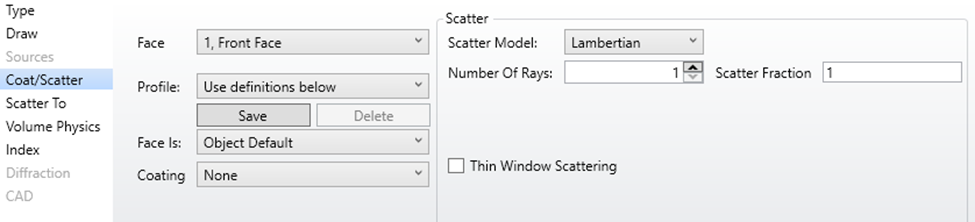
- Assign scattering properties. To make the surface or object act as a diffuser, specify its scattering properties using the “Scatter” property. Set the scattering characteristics depending on whether you’re using a surface-based or object-based diffuser.
Configuring Scattering Parameters
Specify the scattering angle distribution, scattering efficiency, and other relevant parameters based on the type of diffuser you want to create. The choice of these parameters will depend on the specific characteristics of your diffuser.
Setting Up Ray Tracing for Analysis
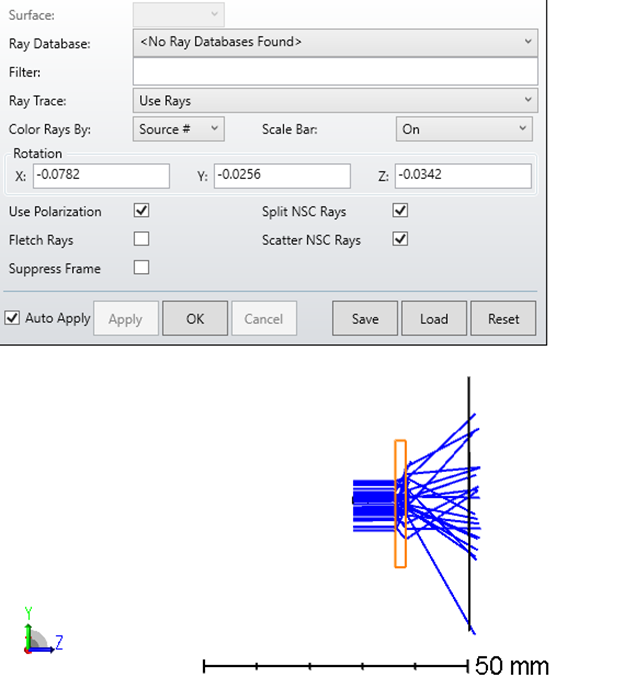
Then configure your ray-tracing settings to analyze the diffuser’s performance. You may want to use a source that emits rays at various angles and positions to observe how the diffuser scatters light.
Want to go deeper with non-sequential modeling in Zemax? SimuTech Group’s Zemax 101 training course covers the fundamentals, and for more on Zemax’s full capabilities, read our guide to maximizing optical workflows with Ansys Zemax. Contact us to discuss your optical simulation needs.