Contact Us
Challenges in External Aerodynamics Simulation
One of the primary challenges in external aerodynamics is accurately capturing the complex flow structures around simplified automotive shapes, such as the Ahmed Body. Variations in turbulence, separation points, and wake formation can significantly affect simulation accuracy.
Additionally, ensuring that computational resources are used efficiently without compromising result fidelity remains a persistent challenge. Balancing computational cost with the need for high-resolution data demands sophisticated simulation tools and methodologies.
Understanding the Ahmed Body Benchmark
The Ahmed Body benchmark is a critical test case in the study of automotive aerodynamics. It provides a simplified yet realistic representation of a car’s shape, allowing researchers and engineers to study the effects of aerodynamic forces and flow patterns (Figure 1).
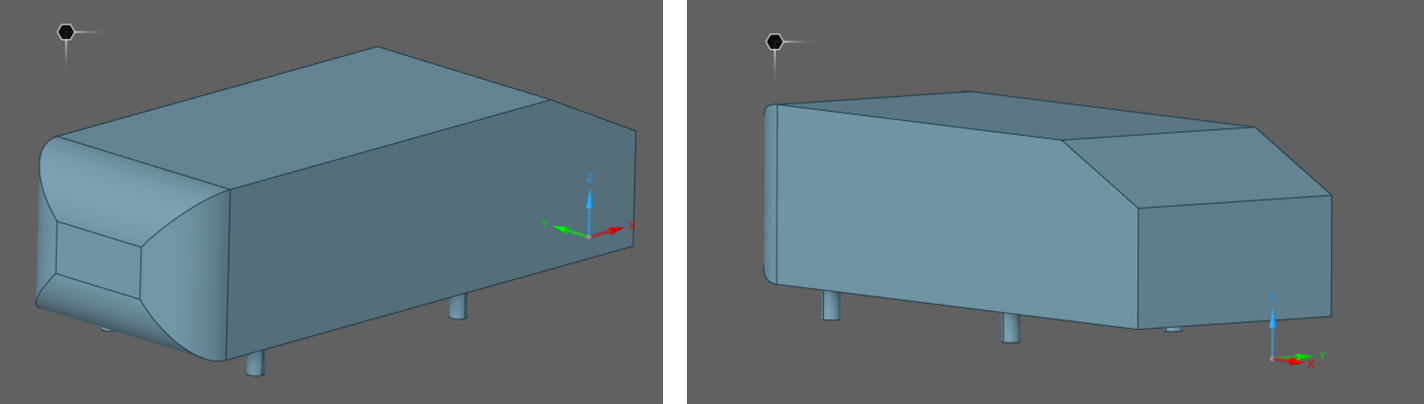
Figure 1. Ahmed Body Benchmark
Developed by S.R. Ahmed in 1984, the Ahmed Body has become a standard for validating computational fluid dynamics (CFD) codes and comparing experimental data. Its straightforward geometry makes it an ideal candidate for understanding flow separation, vortices, and wake behavior behind vehicles.
Engineering Solution: Ansys Discovery
Ansys Discovery offers a robust solution for tackling the challenges associated with the Ahmed Body benchmark. By leveraging its advanced simulation capabilities, engineers can perform high-fidelity aerodynamic analyses with ease.
The use of Ansys Discovery enables the integration of parametric studies, allowing the optimization of aerodynamic performance by adjusting design variables. This leads to a more efficient and streamlined engineering process, ultimately resulting in better-performing automotive designs.
Ansys Discovery has two distinct simulation modes: explore mode and refine mode. The former one is designed for rapid design exploration and uses GPU power to provide real-time simulation results. The latter, on the other hand, is used for high-fidelity simulations and leverages CPU-based solvers, such as those in ANSYS Mechanical or Fluent.
We used both simulation modes on this application. The explore mode is the focus of the current blog.
Model Geometry and Boundary Conditions
The fluid regions and the corresponding measures are shown in Figure 2. Note that, a half of the body is utilized, and there are two fluid regions as near field and the far field.
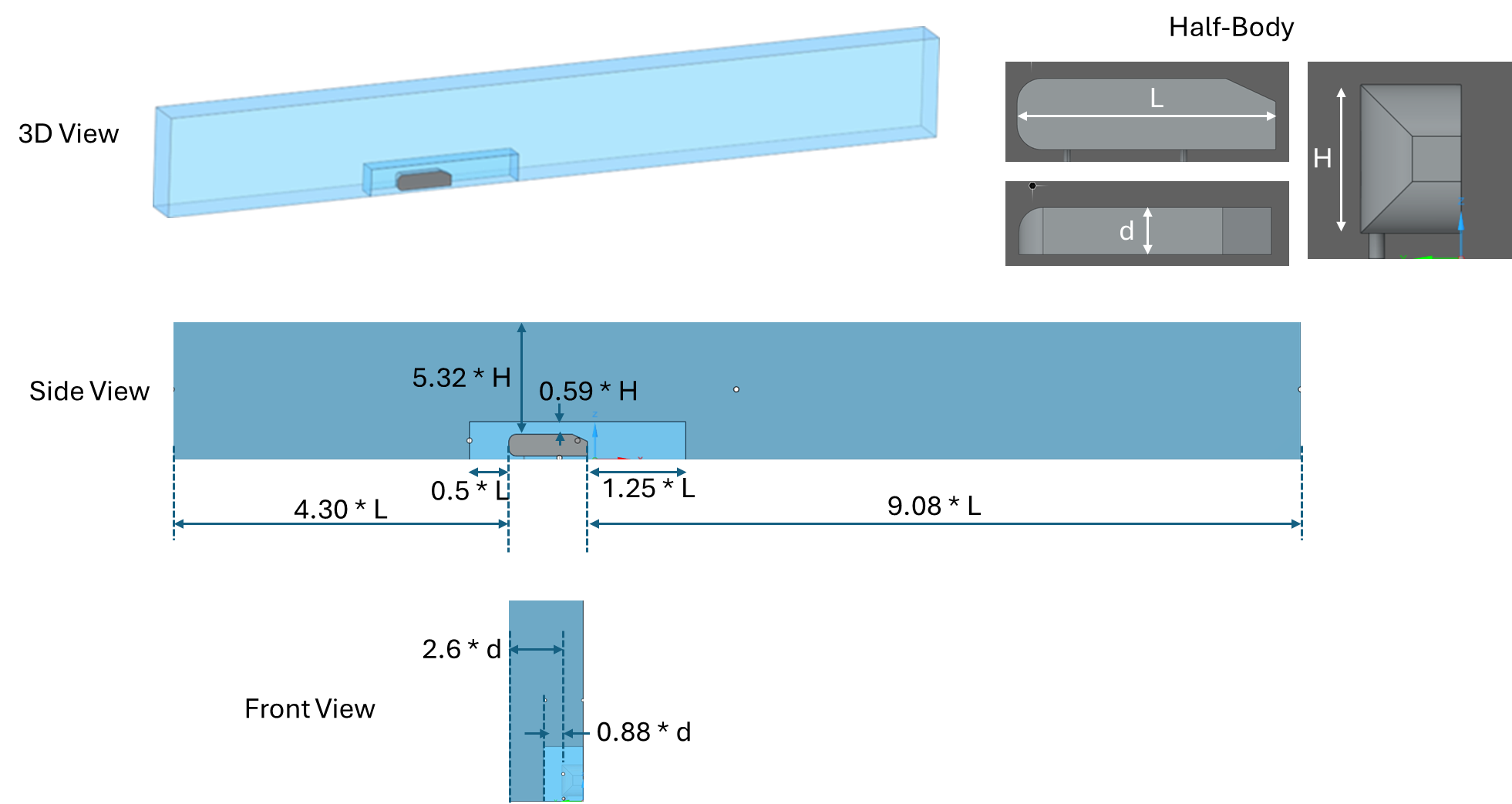
Figure 2. Model Geometry
The symmetry boundary condition was applied to the side walls of the fluid regions where the body was cut in half. Velocity inlet and zero-pressure outlet conditions were imposed. The bottom and the body walls were set to a non-slip condition. The remaining outer flow-field walls were set to free-slip conditions.
Explore Mode Setup and Results
Local Fidelity Adjustments
The local regions within the near field were set to a fine mesh (Figure 3).
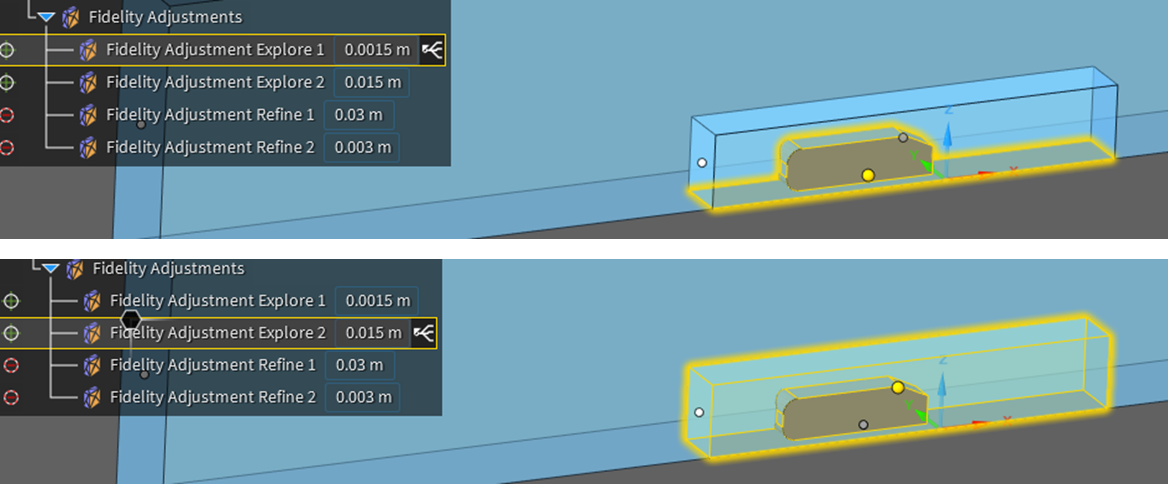
Figure 3. Local Fidelity Adjustments
Four different inlet velocities were considered as a parameter. The above local high-fidelity adjustments were complemented by an overall solution fidelity of about 15% (Figure 4).
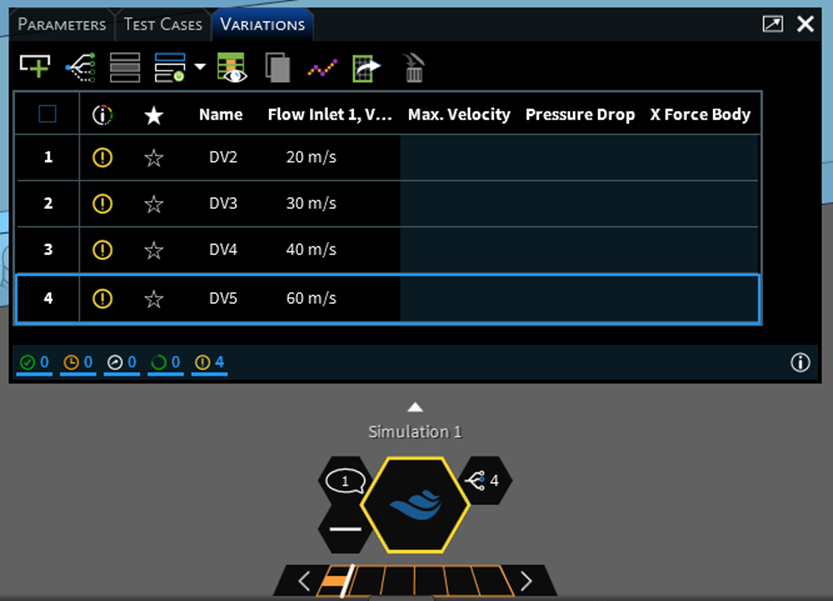
Figure 4. The Parametric Inlet Conditions, and Overall Fidelity Adjustment (Slider)
Generated Mesh
The mesh in the explore mode is shown in Figure 5.
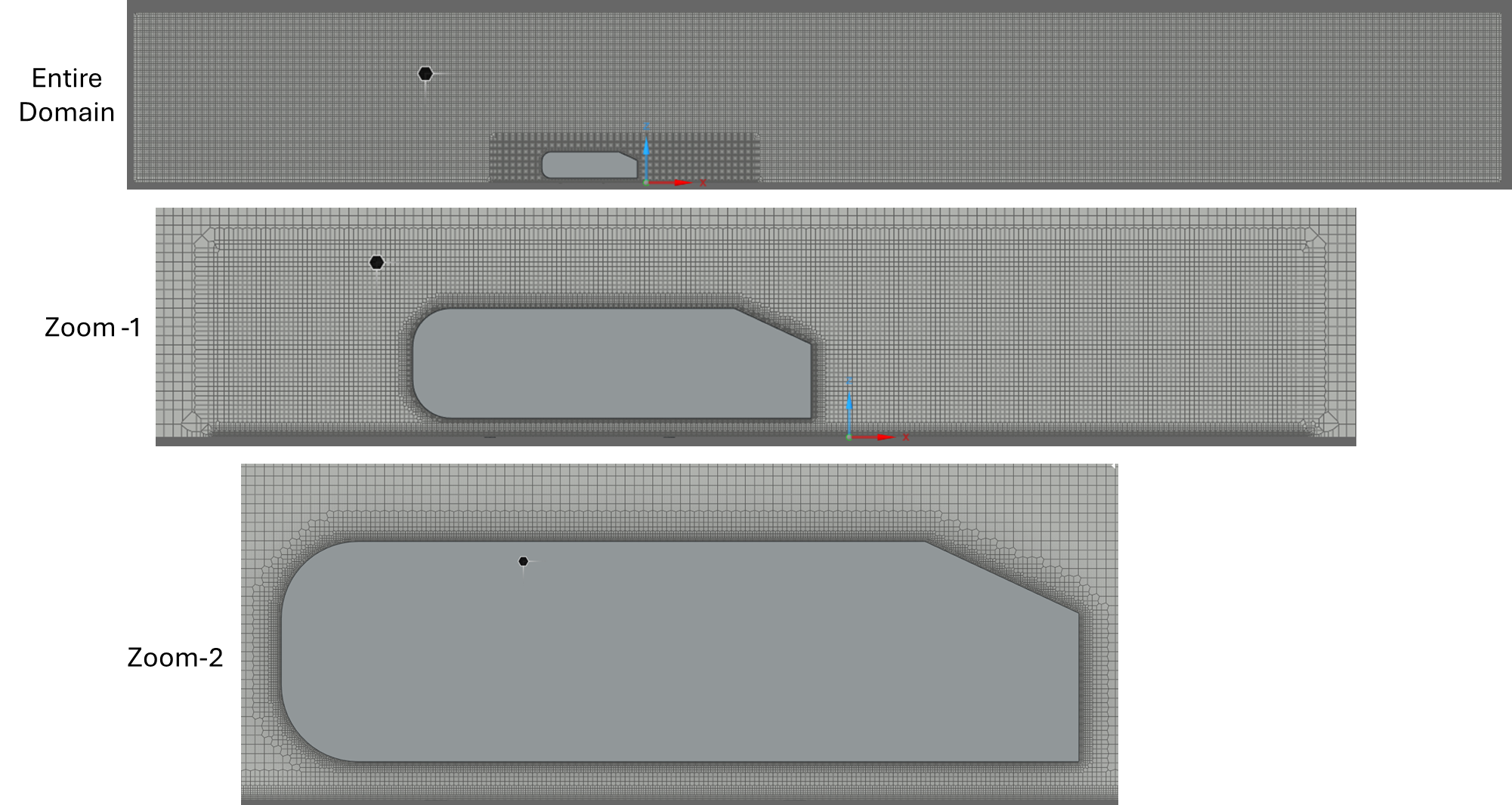
Figure 5. Generated Mesh in Explore Mode
Drag Coefficient Comparison
The explore mode drag coefficient predictions are compared to the reference¹ below:
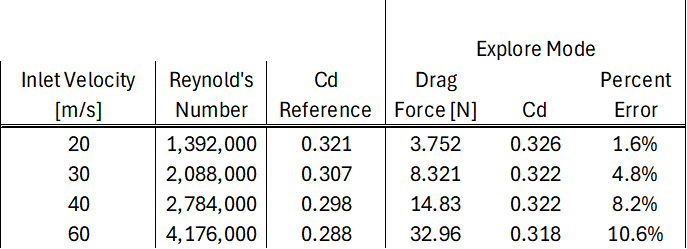
The error range is 1-10%, indicating that the explore mode correlates well with the reference data.
Wake Vortex Visualization
The characteristic “horseshoe vortex system” in the wake region was captured for all inlet conditions (Figure 6).
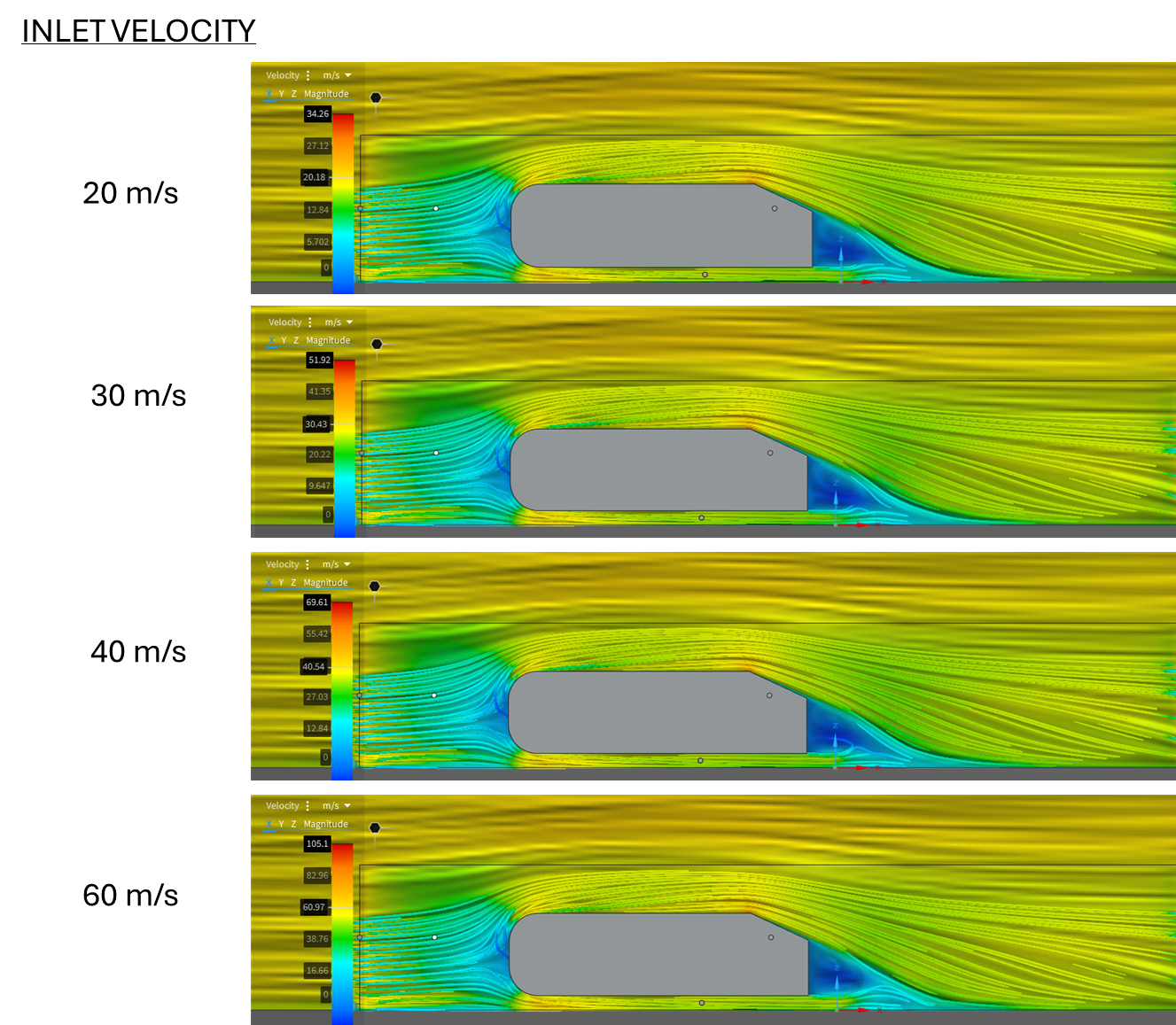
Figure 6. The Streamlines over the Ahmed Body for all Inlet Velocity Conditions
The calculations were performed in a Dell Precision 5680 laptop computer with an i7 processor and an NVIDIA RTX 3500 graphics card. The simulations for all of the velocity conditions took about 27 minutes to complete.
Benefits of Ansys Discovery
Utilizing Ansys Discovery for aerodynamic analysis of the Ahmed Body provides several key benefits. It enhances simulation accuracy, ensuring reliable results that can be confidently used for design decisions.
The software’s intuitive interface and powerful solvers reduce the time required to set up and run simulations, leading to faster turnaround times for projects. This efficiency is crucial in a competitive industry where time-to-market can be a decisive factor.
Video Walkthrough
The following video walks through the details of the model, settings, and simulation results:
Working on external aerodynamics or automotive CFD? SimuTech Group offers Ansys Discovery training and CFD consulting services to help you set up and validate aerodynamic simulations. For more on Fluent’s CFD capabilities for deeper analysis, see our article on the evolution of user-friendly CFD in Fluent. Contact us to discuss your simulation needs.