 Contact Us
Introduction
Space capsule re-entry is one of the most demanding aerodynamic problems in engineering. Space capsule aerodynamic simulation must account for hypersonic speeds, controlled angles of attack, and their effects on stability, heating, and deceleration. Accurately capturing how velocity and orientation influence the flow field is critical—and this is where simulation software like Ansys Fluent becomes a powerful tool.
Challenges in Space Capsule Entry Simulation
The two dominant parameters for the entry simulations are velocity (Mach number) and angle of attack (AoA), and they strongly couple with each other. At hypersonic speeds, even small changes in AoA can significantly alter shock structure, pressure distribution, and surface heating.
Although hypersonic capsule flow is inherently complex, setting up aerodynamic simulations for a wide range of entry conditions can be made surprisingly efficient with the right approach. One of the key practical challenges is not just capturing the physics, but doing so in a way that allows rapid exploration across many scenarios.
During early-stage design, engineers are rarely interested in a single condition. Instead, they need to evaluate hundreds of combinations of Mach number and AoA to understand trends in aerodynamic forces, stability, and flow structure. Traditionally, this could require repeated geometry rotations or mesh regeneration, which quickly becomes time-consuming and error-prone.
Engineering Solutions in Ansys Fluent
For a given study, engineers often define a matrix of simulations across different Mach numbers and angles of attack to map the aerodynamic and thermal response.
A key setup element for external aerodynamics at hypersonic speeds is the use of the pressure far-field boundary condition. This boundary type is specifically designed for compressible flows and allows you to define freestream conditions such as Mach number, static pressure, static temperature, and flow direction. It is particularly well-suited for space capsule simulations because it naturally accommodates supersonic inflow and outflow without requiring separate inlet and outlet definitions. When studying angle of attack, the flow direction within the pressure far-field condition can be adjusted to impose the desired AoA, ensuring consistency across simulation cases while keeping the domain setup clean and robust.
Space Capsule Aerodynamic Simulation Case Study
For this simulation, generic space capsule geometry was created and embedded within a pressure far-field domain. The computational domain consists of the main flow domain, and a cylindrical domain where the capsule is positioned at the origin of the coordinate system (Figure 1). Defining the capsule at the origin is a recommended practice, as it simplifies the application of rotated flow directions in later stages of the Fluent setup without requiring any geometric modifications.
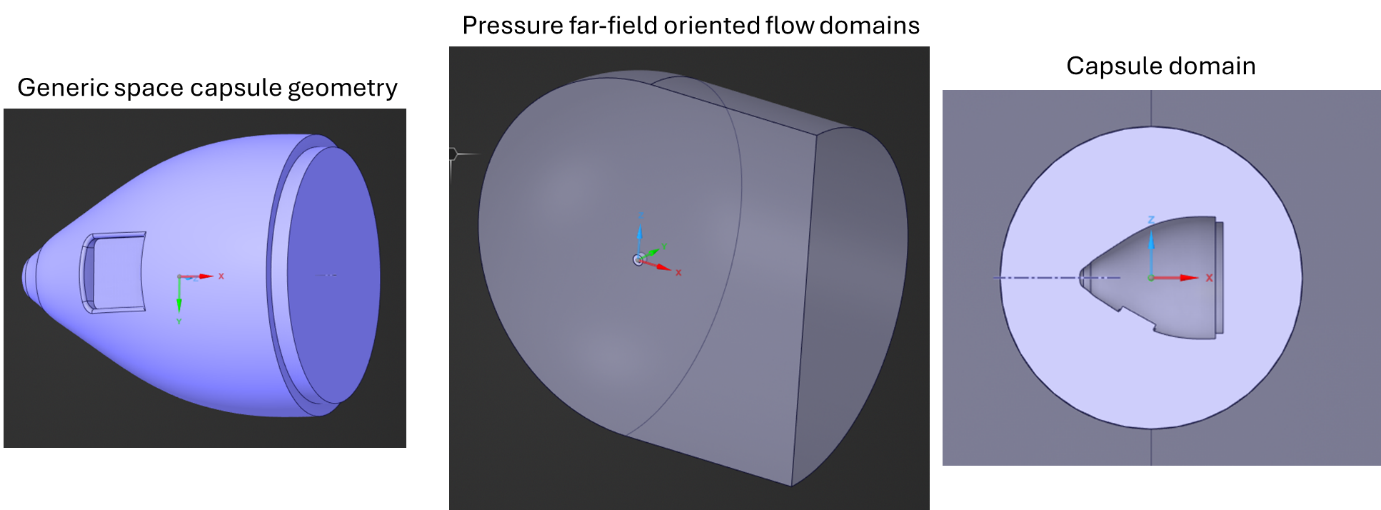
Use of two different domains is a useful strategy to solve steady or rotating capsule simulations with the same geometry model.
Meshing details are omitted here to keep the focus on Fluent setup. However, it is recommended to include adequate inflation layers with refined mesh near the capsule surface and within the surrounding flow region to ensure solution accuracy. In particular, the near-wall resolution should be sufficient to maintain a dimensionless wall distance of y+ ≈ 1.
The Fluent input settings for steady space capsule aerodynamic simulation:
The inlet boundary condition is defined using the pressure far-field option, with typical settings illustrated in Figure 2. For this application, the primary inputs are the freestream Mach number and the flow direction components (X and Z).
A recommended approach is to define these inputs using Named Selections or parameters, allowing them to be easily controlled within the model. The Mach number is specified directly, while the flow direction components are computed from the prescribed angle of attack (AoA). Since Fluent requires angular inputs in radians, the AoA in degrees must be converted using AoArad = AoAdeg × π/180.
For parametric studies, both Mach number and AoA can be defined as input parameters. This enables efficient sweeping across multiple conditions, with automatic updates to the corresponding flow direction components, eliminating the need for manual adjustments.
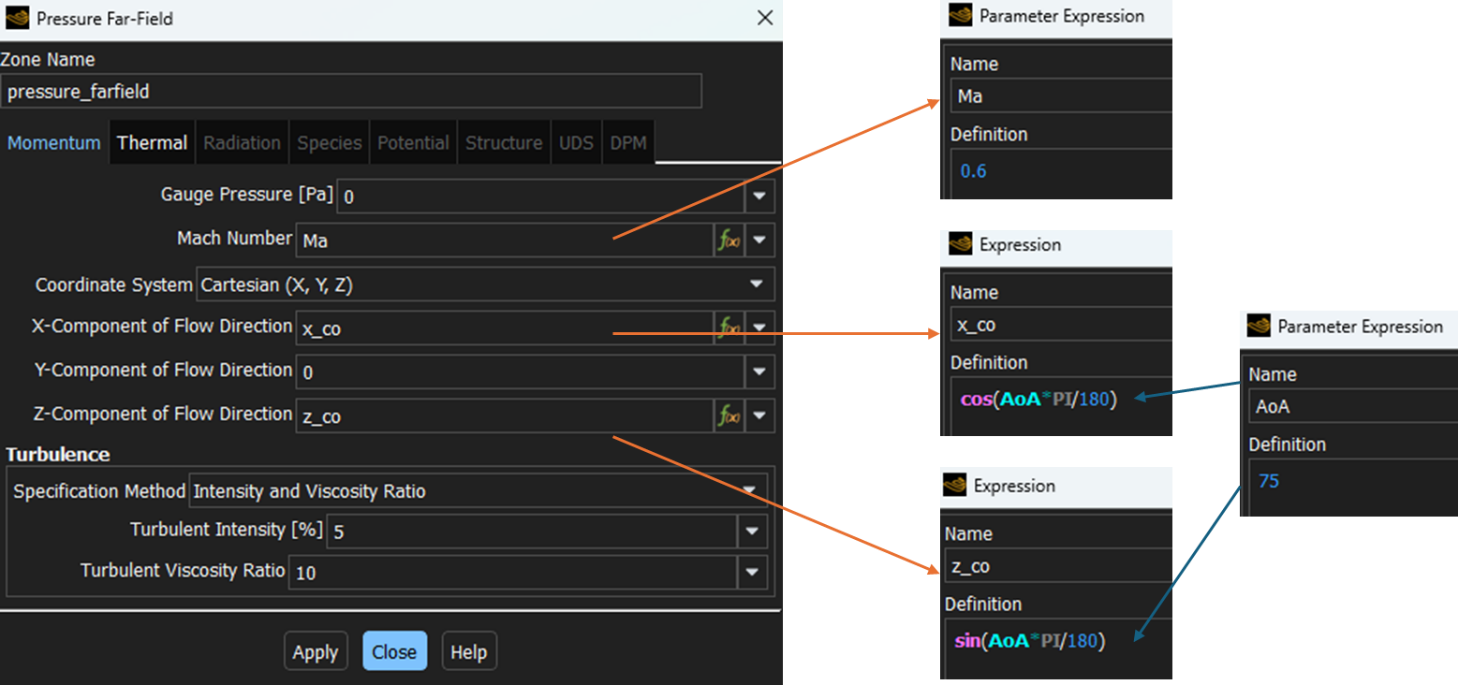
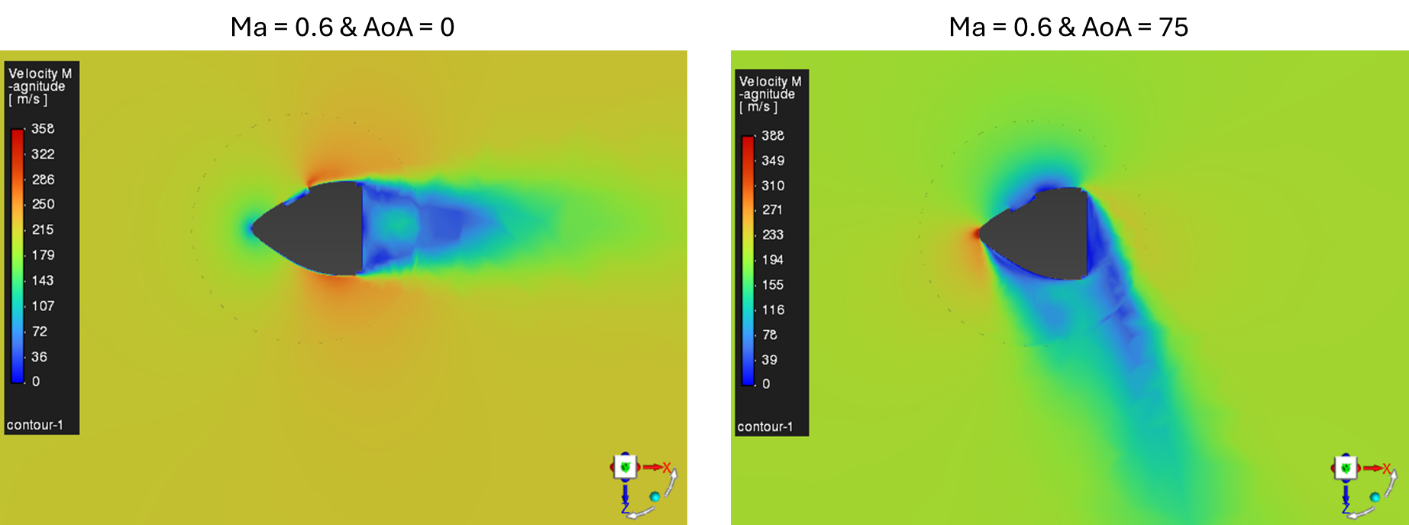
Figure 3 shows the velocity distribution for two different angles of attack. It should be noted that, for this test case, the mesh resolution is relatively coarse; as a result, the velocity contours are not as smooth as would be expected with a more refined mesh.
The Fluent input settings for swinging capsule simulation:
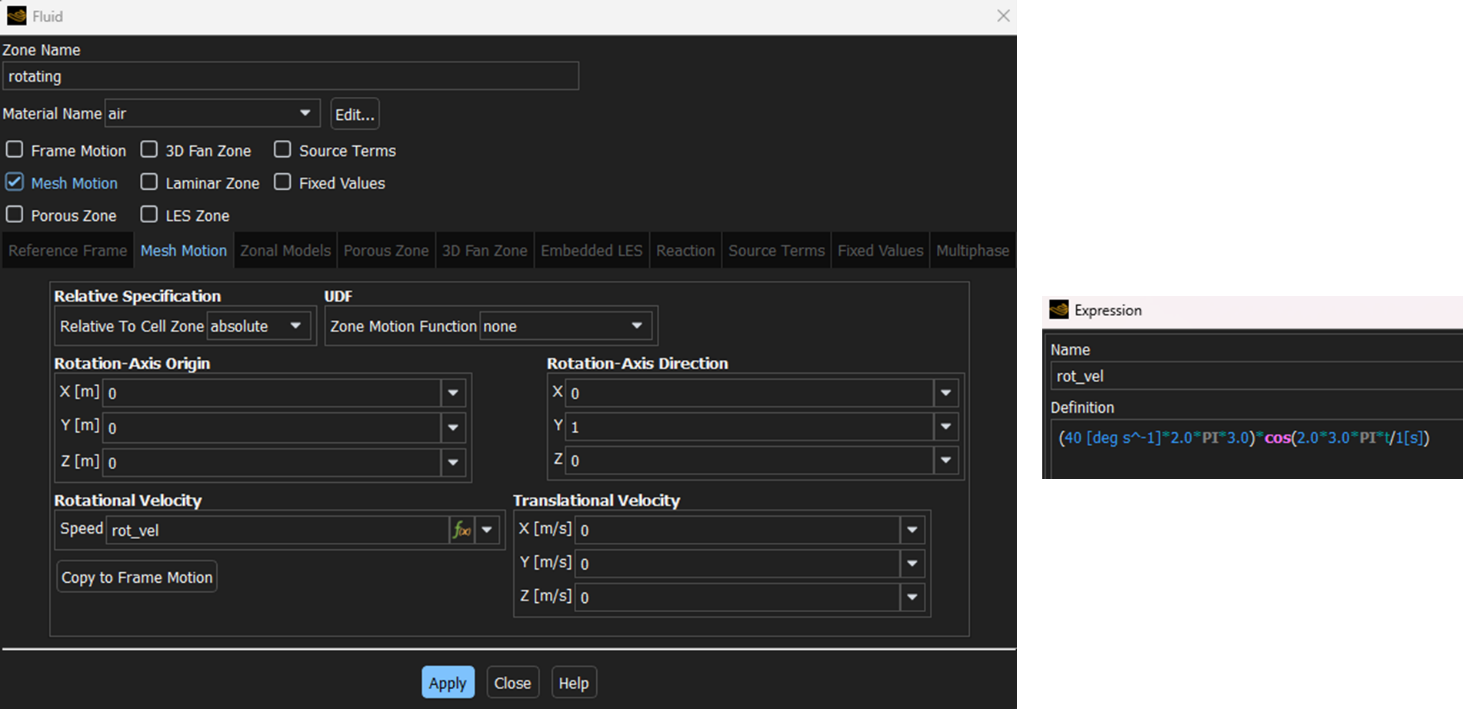
In addition to the pressure far-field boundary setup, this case requires specifying rotational motion for the capsule domain. The rotation is defined through an angular velocity expression.
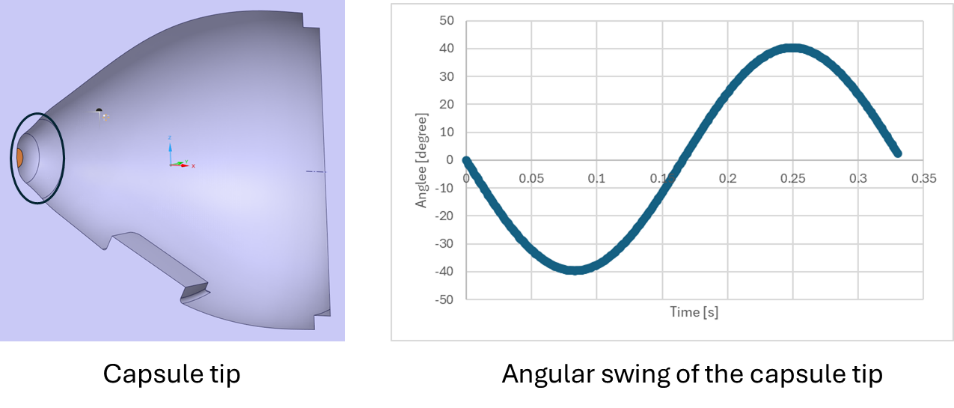
For example, consider a capsule oscillating with an amplitude of at a frequency of 3.0 Hz. The angular displacement can be described as ϴ(t) = 40 [deg] sin(2π· 3.0·t).
However, Fluent requires angular velocity as input rather than angular displacement. Therefore, the time derivative of this expression must be used. Differentiating gives the angular velocity: ω(t) = 40 [deg/s] (2π· 3.0) cos(2π· 3.0·t).
This expression can then be directly used to define the rotational velocity of the capsule (Figure 4).
The angular swing was verified by tracking the capsule tip coordinates and computing the corresponding angle at each time step using a spreadsheet (Figure 5).
Model output settings:
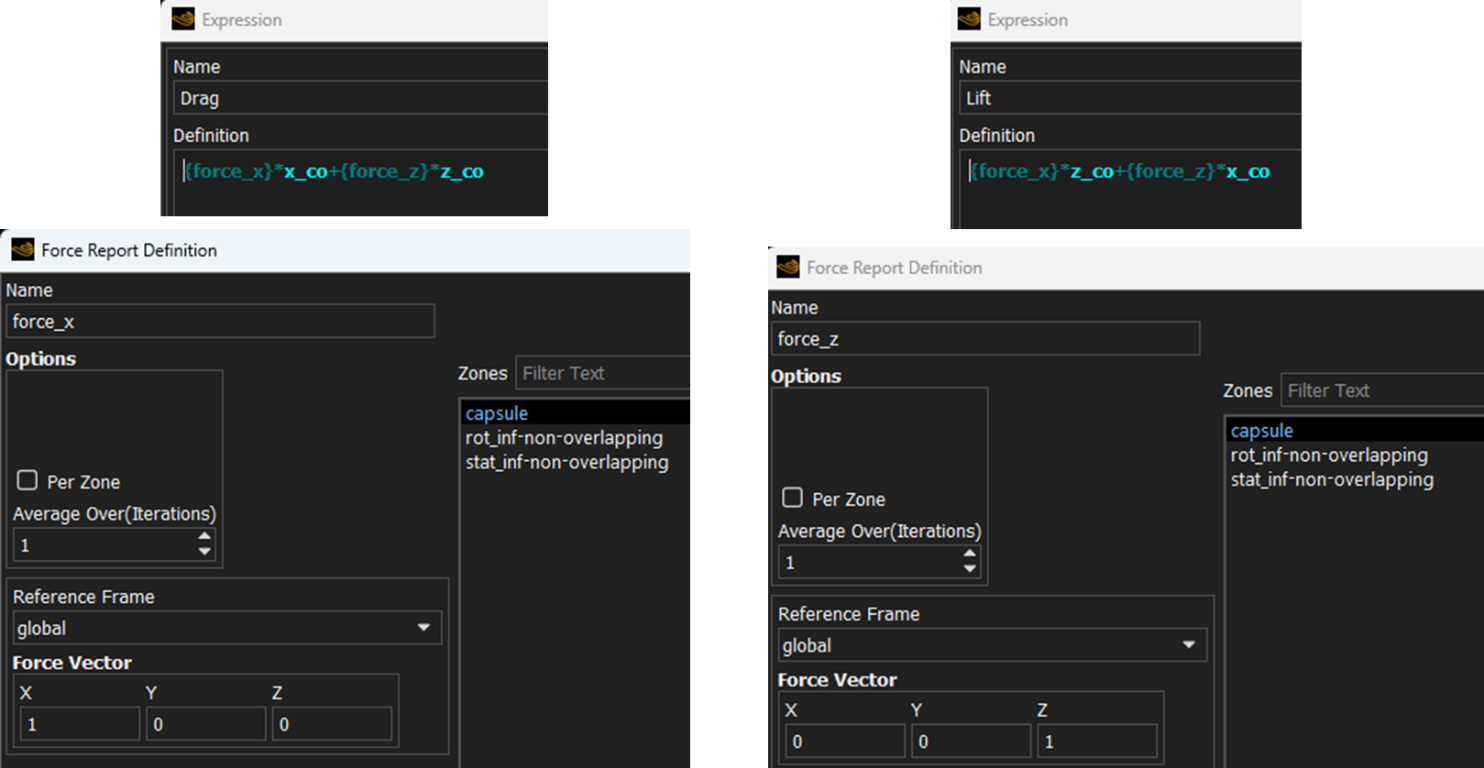
For both types of input settings, the primary quantities of interest are the drag and lift forces. These can be evaluated by considering the X and Z components of the flow direction (shown before), along with the corresponding force components computed on the capsule surface in those same directions (Figure 6).
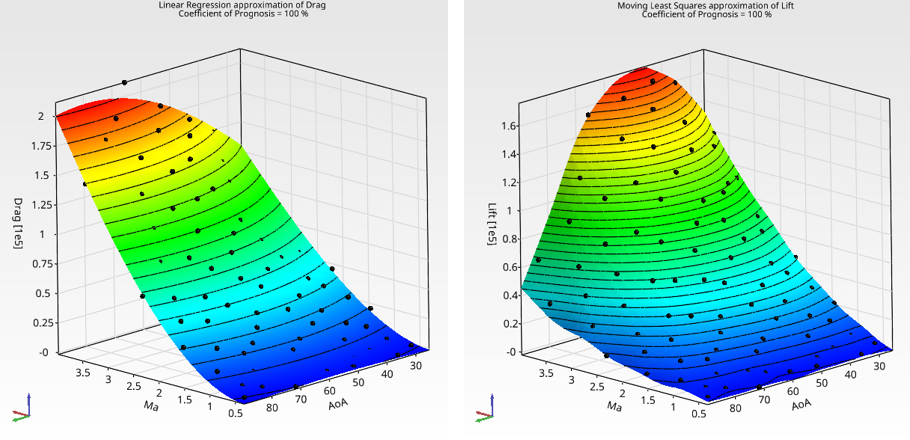
These quantities can also be defined as output parameters, enabling efficient extraction of aerodynamic coefficients during parametric studies.
The details of the Fluent model and the corresponding procedure can be found in the following video:
Benefits of Using Ansys Fluent for Space Capsule Aerodynamic Simulation
Ansys Fluent provides a highly efficient platform for evaluating space capsule aerodynamics across a wide range of entry conditions. By leveraging the pressure far-field boundary condition and parametric inputs, engineers can explore variations in Mach number and angle of attack without modifying the geometry or mesh, enabling rapid and consistent analysis.
One of the key advantages is the ability to perform large parametric sweeps. Fluent allows users to define input parameters such as velocity and AoA, along with output parameters like lift and drag forces, making it straightforward to generate aerodynamic databases. This capability is particularly valuable for early-stage design, where hundreds of scenarios may need to be evaluated to understand performance trends and stability characteristics.
Another important advantage is Fluent’s GPU acceleration capability, which can significantly reduce simulation turnaround time. For supported models and solvers, running on GPUs enables faster convergence and higher throughput, making it especially effective for large parametric studies. This allows engineers to evaluate more design points in less time, accelerating the overall analysis cycle.
Overall, Fluent serves as a powerful and flexible tool that bridges the gap between simplified aerodynamic studies and more complex re-entry simulations, allowing engineers to efficiently build insight, reduce design risk, and accelerate development.
Optimize Space Capsule Aerodynamics with Ansys Fluent
From steady entry conditions to oscillating capsule motion, Ansys Fluent helps engineers evaluate shock behavior, lift, drag, and aerodynamic stability across a wide range of Mach numbers and angles of attack. Explore Ansys Fluent Consulting
Explore More in the Series
Follow the full workflow from high-fidelity CFD through design optimization and AI-driven prediction. Explore the other articles in this series to see how Ansys Fluent, optiSLang, and SimAI Pro work together to accelerate space capsule re-entry analysis.

Ertan Taskin, Ph.D., Chemical Engineering
Principal Engineer, SimuTech Group
Ertan is a Principal Engineer with more than two decades of experience in CFD, fluid-structure interaction, and biomedical device design. He has advanced ventricular assist devices, transcatheter heart valves, and artificial lungs through hydraulic optimization, in vitro validation, predictive modeling, and AI-driven data analysis. His recent work integrates machine learning for performance prediction and design optimization. His career includes senior engineering roles at Medtronic, HeartWare, Roketsan, and Ozen Engineering, where he led projects spanning medical devices and aerospace propulsion. Ertan’s expertise includes blood damage modeling, uncertainty quantification, integrated thermo-fluid systems, and AI-assisted simulation workflows. He holds a Ph.D. in Chemical Engineering from Worcester Polytechnic Institute, along with Master’s and Bachelor’s degrees in Chemical Engineering from Middle East Technical University.