Contact Us
Introduction to What’s New in Ansys Discovery 2026 R1
Automotive engineering teams are under constant pressure to evaluate design performance earlier, reduce weight, improve durability, and accelerate development timelines. Whether working on suspension components, brackets, housings, thermal systems, or other structural assemblies, engineers need tools that help them explore ideas quickly without sacrificing confidence in the results.
Ansys Discovery helps meet that need by combining direct geometry modeling, rapid simulation, and design exploration in a single environment. With the 2026 R1 release, Discovery introduces several workflow improvements that make it easier to prepare geometry, evaluate structural behavior, review results, and transfer data into downstream Ansys tools such as Mechanical.
In a recent SimuTech Group webinar, Kohl Schoensee, Staff Engineer in FEA, demonstrated how these updates can support faster structural analysis and topology optimization workflows for automotive applications.
Why Ansys Discovery Matters for Early-Stage Automotive Design
In traditional simulation workflows, early design exploration can become slowed down by geometry cleanup, model preparation, meshing issues, and repeated handoffs between CAD and simulation tools. This can make it difficult for engineering teams to quickly answer important questions, such as:
- Where are stress concentrations likely to occur?
- How will a material change affect mass and structural response?
- Can material be removed without compromising performance?
- Which geometry features may create meshing problems?
- When should a concept move into higher-fidelity validation?
Ansys Discovery is designed to help engineers answer these questions earlier in the process. Its direct modeling environment allows users to modify geometry without relying on a feature-based CAD history tree, while its live physics capabilities allow teams to quickly evaluate the impact of those changes.
For automotive teams, this is especially useful during concept development and upfront design iteration, where speed and flexibility are critical.
Key Ansys Discovery 2026 R1 Updates
The 2026 R1 release includes several enhancements that improve model preparation, simulation setup, post-processing, and downstream data transfer.
Improved Geometry Detection
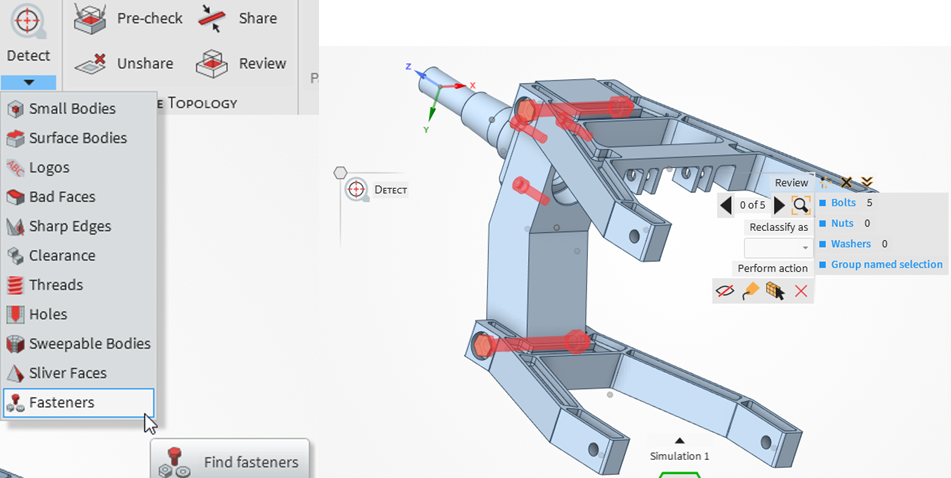
Geometry cleanup is often one of the most time-consuming parts of simulation preparation. Discovery 2026 R1 includes enhanced geometry detection tools that can automatically identify features that may interfere with high-quality meshing.
This includes sharp angles, problematic faces, small features, logos, fasteners (such as bolts, nuts, and washers), and more. Engineers can identify, reclassify, group, delete, or convert detected items into named selections. For assemblies with many repeated fasteners or detailed geometry features, this can significantly reduce manual cleanup time.
In Kohl’s automotive suspension demo, this feature was used to quickly detect fasteners within the assembly and organize them for simulation setup.
Named Selection Folder Enhancements and Query Editor
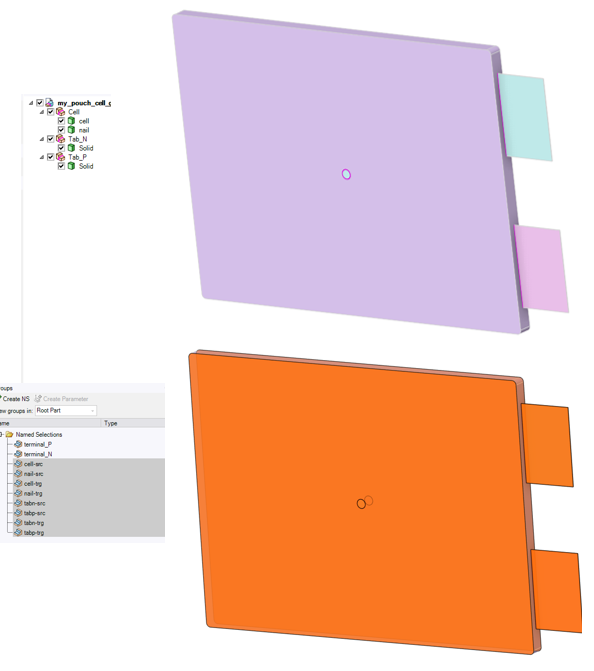
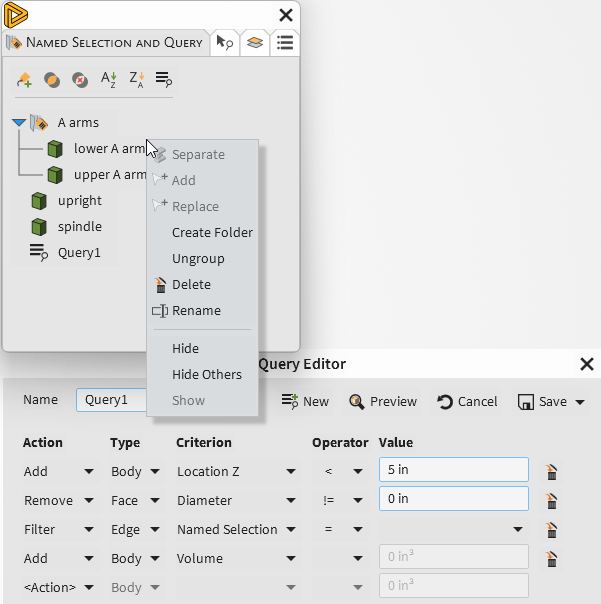
Discovery 2026 R1 also improves how users manage named selections. New folder options allow engineers to create, move, ungroup, sort, and drag named selections within the tree. This makes it easier to keep complex models organized, especially when working with assemblies that include many components, supports, loads, contacts, and regions of interest.
The new Query Editor adds another level of control by allowing users to define associative named selections using rules and criteria. These named selections can then be transferred downstream into flagship Ansys tools, supporting more consistent workflows between early-stage exploration and detailed analysis.
Results Persistence for Explore Mode
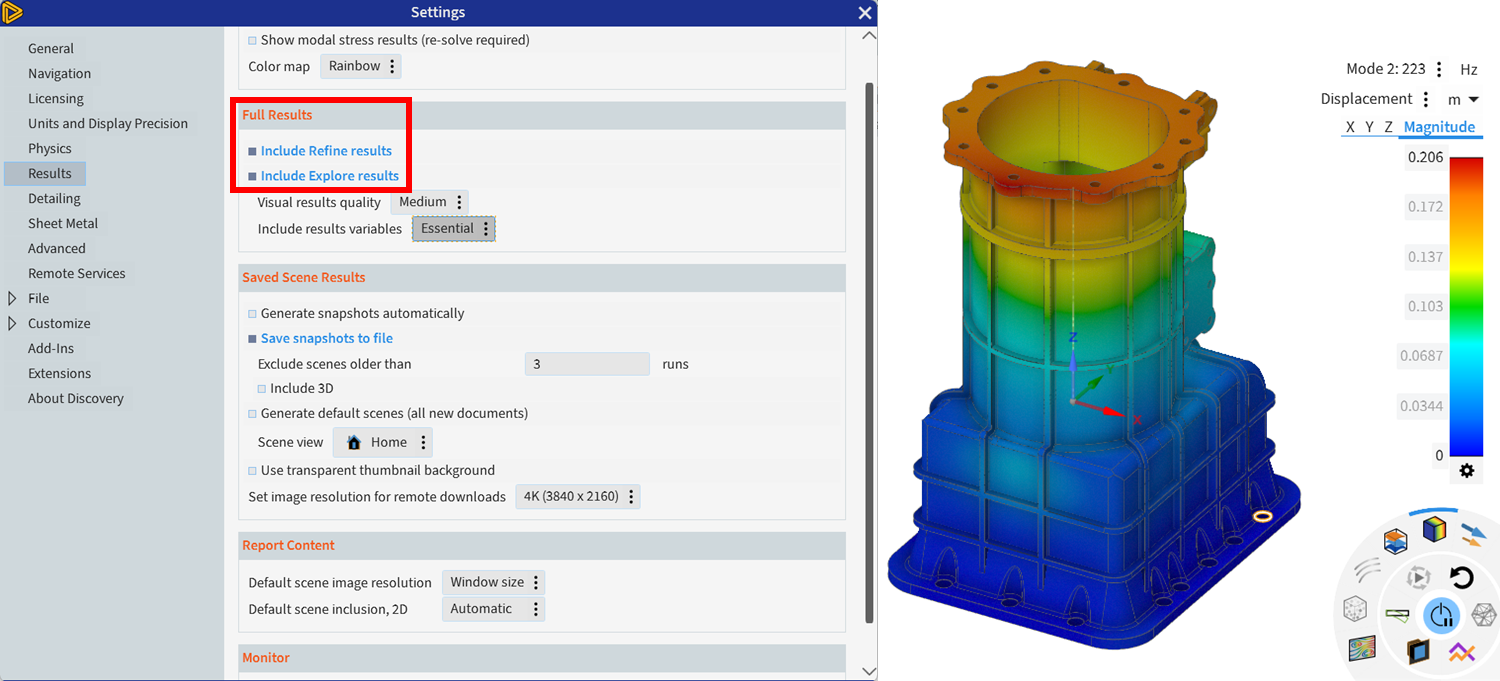
Another useful update is the ability to save Explore results directly within the Discovery file. This means users can reopen a file and continue reviewing saved results without needing to immediately re-solve the model.
For teams comparing multiple design iterations, this helps preserve simulation context and supports more efficient review and documentation.
Force and Moment Reaction Tables
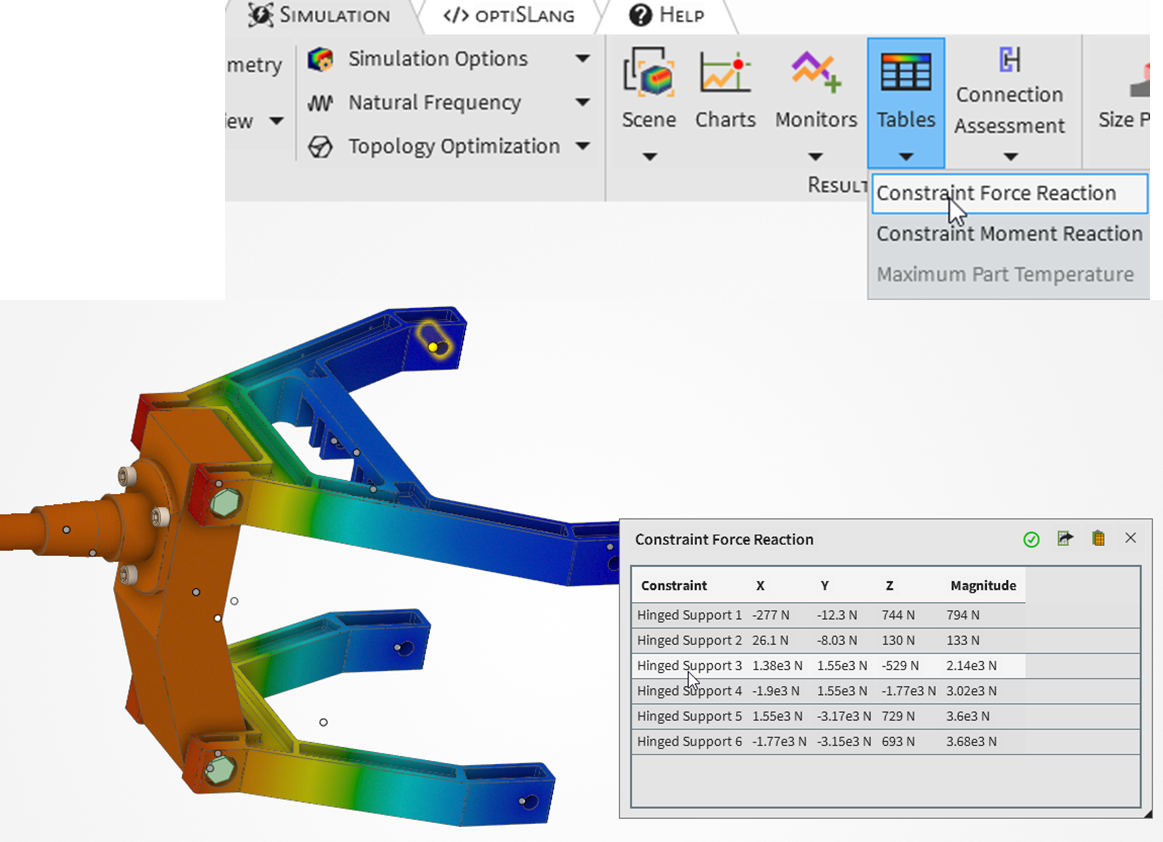
Discovery 2026 R1 introduces new force and moment reaction tables for structural constraints. These tables make it easier to review reaction data, verify force and moment equilibrium, and export results to CSV for additional documentation or comparison.
For structural workflows, especially those involving supports, joints, and load paths, this provides a more direct way to validate setup and interpret how the model is responding.
Structural Result Charts
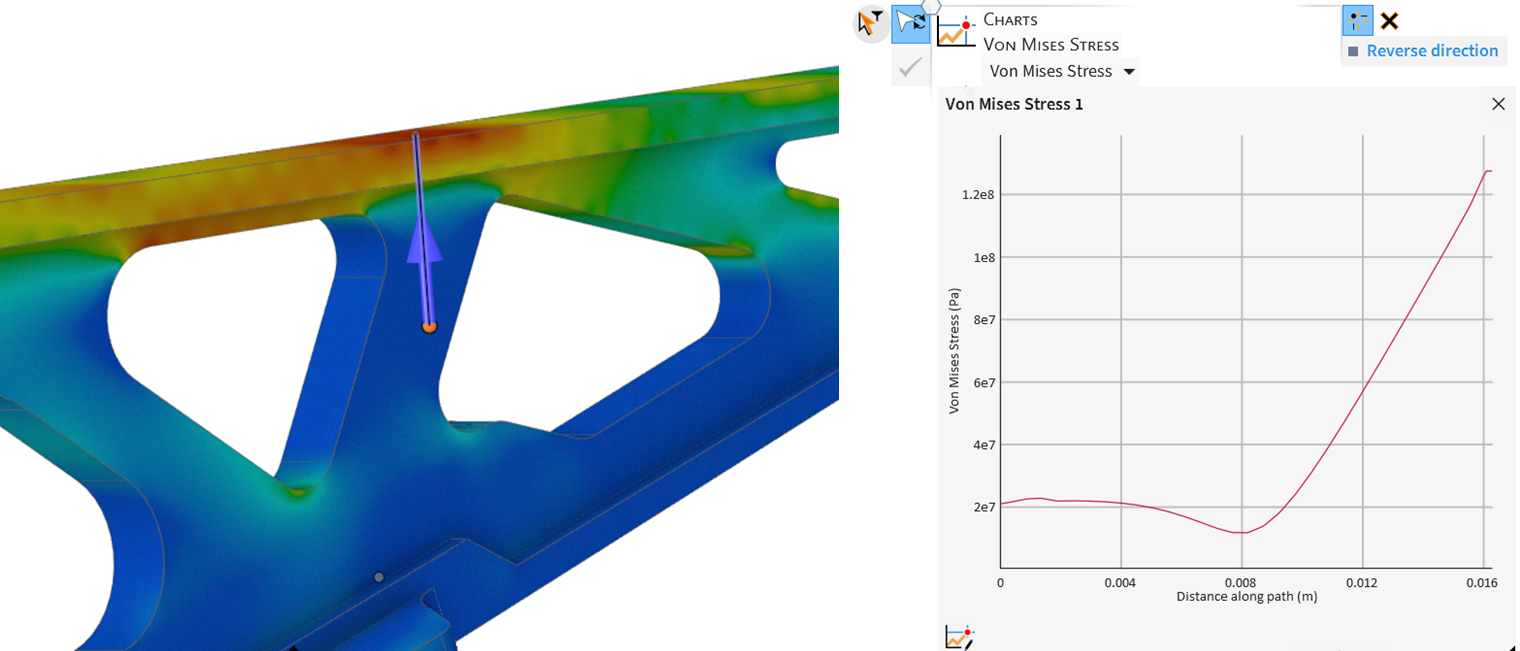
The new structural charting capabilities allow users to evaluate results along edges or sketch-defined paths. This supports through-thickness result evaluation and gives engineers more post-processing flexibility directly inside Discovery.
Instead of immediately moving to Mechanical for every deeper result review, users can now evaluate certain structural trends earlier in the Discovery workflow.
Updated Physics Condition Annotations
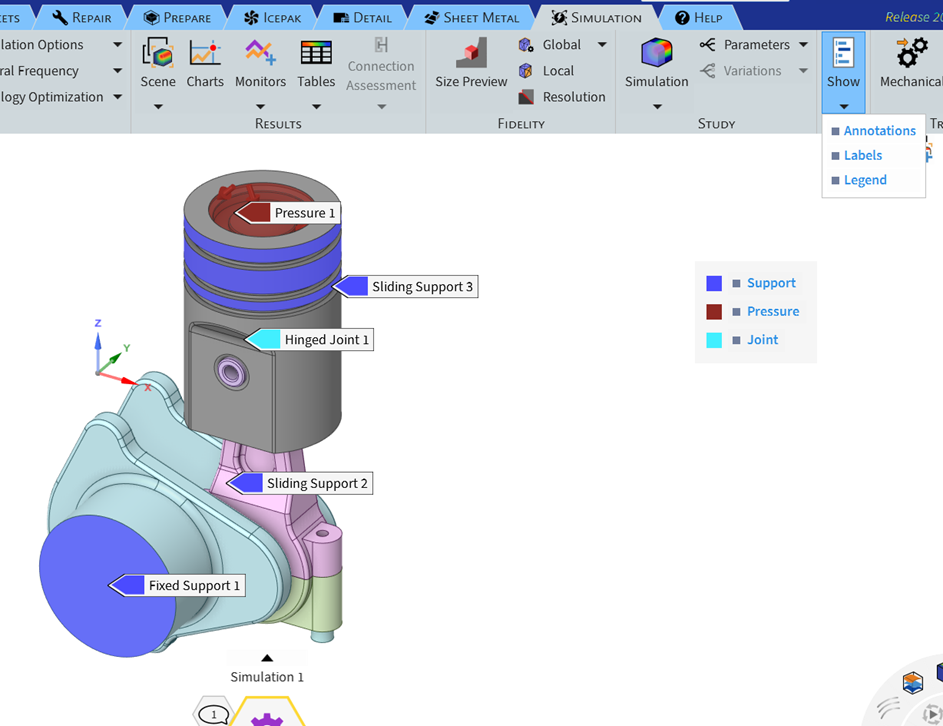
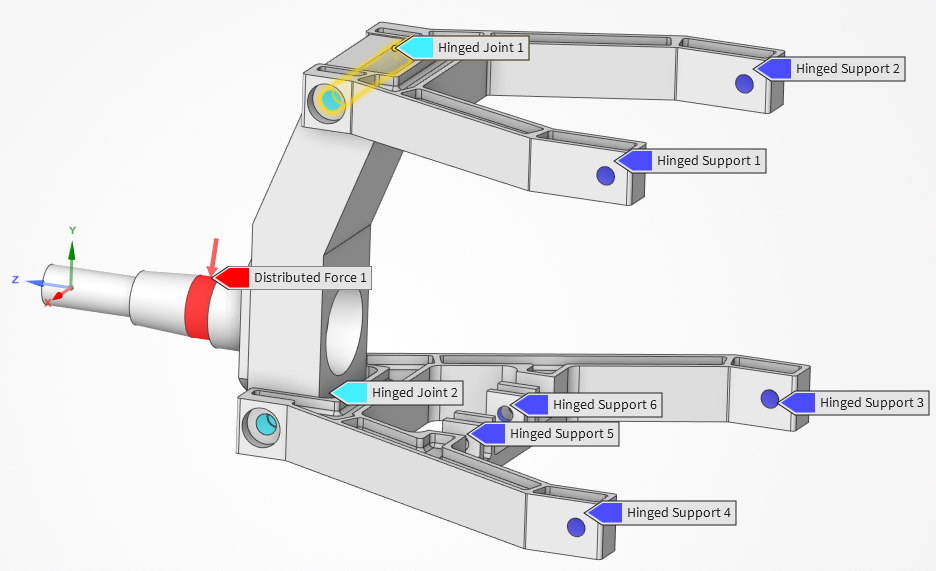
Discovery 2026 R1 also includes beta physics condition annotations that improve model review and communication. Updated colors, symbols, labels, and toggleable legends make it easier to see where loads, constraints, contacts, and other physics conditions have been applied.
This is especially helpful when capturing screenshots, reviewing setup choices with colleagues, or documenting simulation assumptions.
Discovery 2026 R1: Better Connection with Ansys Mechanical
One of the most important workflow improvements in Discovery 2026 R1 is the enhanced connection to Ansys Mechanical.
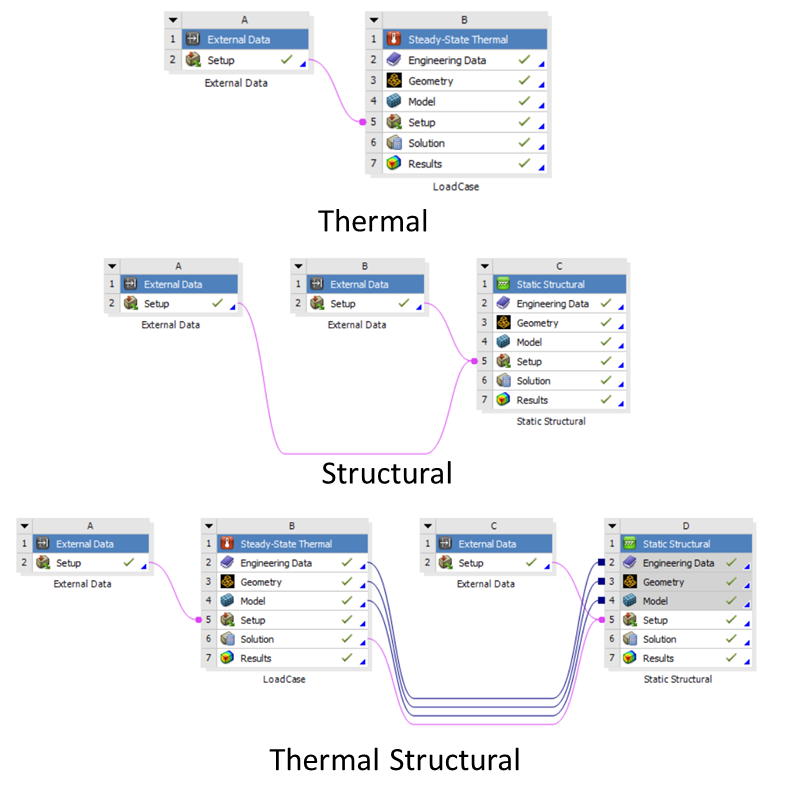
Users can now export result data from Discovery and bring it into Mechanical using External Data. Depending on the simulation type, this can include heat transfer coefficients, near-wall fluid temperatures, solid body temperatures, volumetric temperatures, and static pressure data.
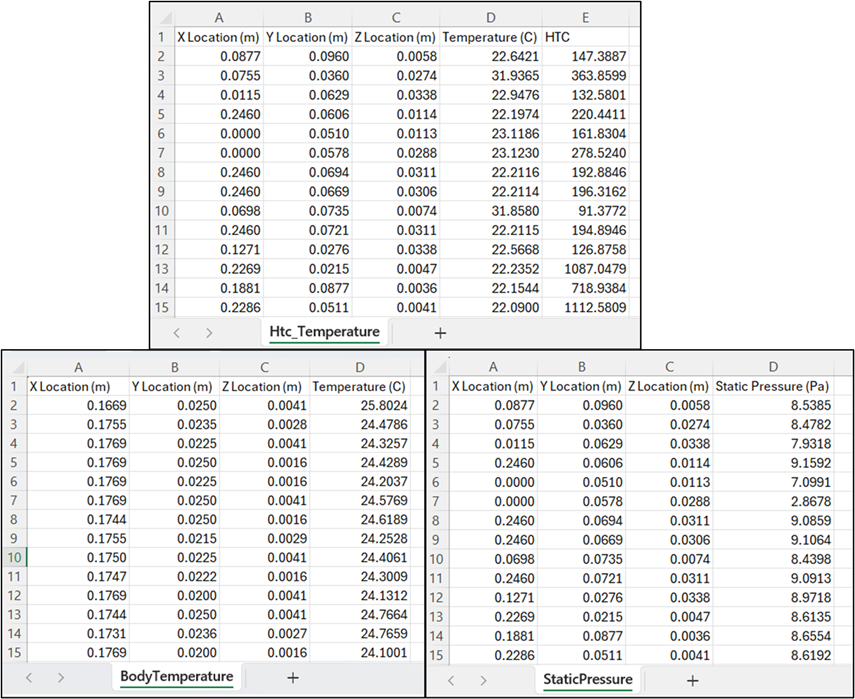
This creates more flexibility for thermal, structural, and thermal-structural workflows. For example, engineers can perform an initial fluid or conjugate heat transfer analysis in Discovery, export relevant data, and then use that information in Mechanical for more detailed structural or thermal-stress evaluation.
For automotive applications, this can be valuable in workflows involving external aerodynamics, electronics cooling, thermal loading, and pressure-driven structural response.
Automotive Structural Optimization Demo: From Setup to Lightweighting in Discovery 2026 R1
During the webinar, Kohl demonstrated a basic structural analysis and topology optimization workflow using an automotive suspension assembly.
The demo showed how Discovery can be used to:
- Detect and organize fasteners
- Suppress unnecessary components from the simulation
- Define supports, contacts, joints, and loads
- Review reaction forces and displacement charts
- Compare material changes, such as steel versus aluminum
- Evaluate stress response and mass changes
- Run topology optimization to identify areas where material can be removed
- Apply protected regions and manufacturing constraints
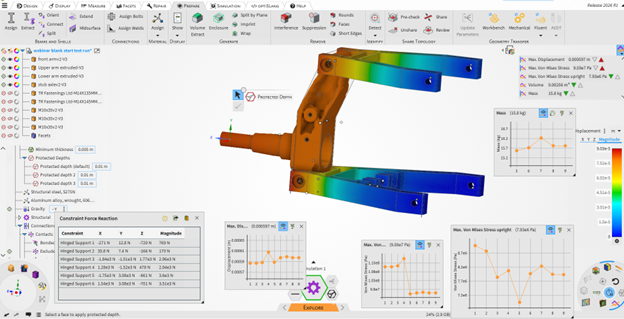
One of the key takeaways was the speed of the workflow. Kohl was able to move from geometry preparation into structural setup, simulation, design changes, and topology optimization in a relatively short amount of time.
That speed matters because topology optimization is often most valuable during early-stage design, when engineers still have room to influence geometry, material choices, and load path strategies. Discovery makes it easier to test those ideas before committing to a more detailed design direction.
Using Discovery to Explore Before You Validate
Ansys Discovery is not meant to replace detailed validation workflows in tools such as Ansys Mechanical. Instead, it gives engineers a faster way to explore design behavior upfront, identify promising concepts, and make better-informed decisions before moving into higher-fidelity analysis.
For automotive structural applications, this can help teams:
- Reduce unnecessary design iterations
- Identify weak points earlier
- Explore lightweighting opportunities
- Improve collaboration between design and simulation teams
- Prepare cleaner models for downstream analysis
- Move faster from concept to refined engineering validation
Discovery 2026 R1 strengthens that role with better geometry detection, improved result review, enhanced data export, and more flexible connections to Mechanical.
Getting More from Ansys Discovery 2026 R1
For teams already using Ansys Discovery, the 2026 R1 release offers practical enhancements that can improve everyday workflows. For teams new to Discovery, the software provides an accessible environment for geometry preparation, rapid simulation, and early-stage design exploration.
Whether you are evaluating automotive suspension components, thermal systems, brackets, housings, or other structural assemblies, Discovery can help your team make faster, more confident engineering decisions before moving into detailed validation.
To learn more, watch the on-demand webinar, What’s New in Ansys Discovery: 2026 R1 Updates and Automotive Structural Optimization Demo, presented by SimuTech Group.
Explore Faster Design Decisions with Ansys Discovery
See how Ansys Discovery 2026 R1 can help your team accelerate geometry preparation, structural analysis, and early-stage design optimization. Watch the on-demand webinar or connect with SimuTech Group to learn how Discovery fits into your simulation workflow.

Kohl Schoensee
Staff Engineer
Kohl Schoensee is a Staff Engineer at SimuTech Group with a bachelor’s degree, with honors, in mechanical engineering from the University of Utah. He specializes in topology optimization, structural nonlinearities, and aerospace applications. His notable project experience includes topology optimization mentoring for 3D-printed Formula SAE suspension uprights, large-deformation analysis of hyperelastic pipeline cleaning PIGs and seal mechanisms, fatigue analysis of helicopter components, and shock and random vibration analysis of missile components.