Contact Us
Introduction to Ansys Lumerical Licensing Options
Photonics design teams rely on simulation to guide device geometry, material choice and process flows.
The turn‑around time of those simulations directly affects project schedules and the number of design iterations you can explore.
Delays caused by undersized compute resources increase time‑to‑market and hinder innovation. Conversely, overspending on software licenses that remain under‑utilized drains budgets without a corresponding improvement in productivity.
Selecting the right Ansys Lumerical licensing strategy is therefore both an engineering and financial decision—one that balances solver availability, user concurrency, compute scalability and total cost of ownership.
This guide reflects the licensing model available in 2026 and incorporates the latest guidance from Ansys and the photonics community. It combines high‑level explanations with practical examples so you can make informed decisions about Standard versus Enterprise licensing, HPC packs, GPU scaling and cloud bursting.
The Lumerical Product Ecosystem
Ansys Lumerical includes a suite of simulation engines for designing and analyzing photonic devices and systems. Understanding which products you use helps determine what licenses you need. The table below summarizes the primary Lumerical tools and their purposes.
| Product | Purpose |
| FDTD | Electromagnetic simulation for nanophotonic devices, waveguides, resonators, metasurfaces, grating couplers, and other optical components. |
| MODE | Waveguide, fiber, and mode analysis including eigenmode and propagation calculations. |
| INTERCONNECT | Photonic integrated circuit and optical system simulation using compact models. |
| Lumerical Multiphysics | Multiphysics simulation workflows for optical, electrical, and thermal effects using solvers such as CHARGE, HEAT, DGTD, FEEM, and MQW. |
| CML Compiler | Compact Model Library generation for foundry PDKs and PIC design workflows. |
Why Licensing Matters
Selecting an appropriate licensing scheme has a direct impact on engineering productivity:
- Too few licenses or insufficient HPC packs lead to queues and idle engineers waiting for simulations to finish.
- Too many licenses with limited hardware can waste budget and result in under‑utilized compute resources.
- Mismatching hardware to license tier—such as using high-end GPUs with Standard licenses—can dramatically increase costs because additional solver or accelerator capacity may be required..
Think in Terms of GUI and Solver Layers
Licensing in Lumerical FDTD (and other Lumerical tools) is structured around two distinct layers, each of which plays a different role in the simulation workflow.
GUI license tasks:
- Build and visualize structures (define geometry, materials, sources and monitors).
- Set up simulations and parameter sweeps.
- Post‑process simulation data and export results.
- Multiple projects can be open on one GUI license; no solver resources are consumed until the simulation starts.
Solver license tasks:
- Run FDTD and other numerical solvers on CPU or GPU hardware.
- Execute parameter sweeps, optimization routines and statistical analyses.
- Support MPI for distributed computing and multi‑GPU jobs.
- Each simulation consumes one solver license, regardless of how many CPU cores or GPUs are used.
Think of the GUI license as your design seat, and the solver license as your compute engine. You can create and modify models without engaging solver licenses, but every simulation run will consume solver capacity.
Ansys Lumerical Licensing Options: Standard vs Enterprise
Ansys offers two primary tiers of licensing for Lumerical FDTD: Standard and Enterprise. Both include one GUI seat and one solver seat, but they differ significantly in base compute capacity, scalability and supported features. The decision on which tier to choose depends on your hardware, the size of your jobs, and whether you plan to scale beyond a single workstation.
| Feature | Business / Standard | Enterprise |
| Solver feature | lum_fdtd_solve | lumerical_solve |
| Counting type | Job counted | Job counted |
| Base CPU allowance | 32 CPU cores per job | 4 CPU cores per job |
| Base GPU allowance | 16 GPU SMs per job | 4 GPU SMs per job |
| Scaling method | Add Standard solver licenses or Lumerical Accelerator licenses | Add Ansys HPC licenses / HPC Packs |
| Multi-GPU capability | Possible when enough licensed GPU SM capacity is available | Possible and generally more efficient for large GPU systems |
| Cloud Burst | Can use Lumerical Burst / cloud credit workflows where supported | Can use Lumerical Burst / cloud credit workflows and integrates well with Enterprise HPC scaling |
| Best fit | Workstation users, modest simulations, predictable workloads, or teams that prefer simple licensing | Larger GPU jobs, multi-GPU systems, clusters, high-throughput sweeps, and scalable HPC/cloud workflows |
In short, Standard licensing is not limited by solver capability; it is limited by how much licensed CPU or GPU capacity has been purchased. Standard can run larger CPU, GPU, multi-GPU, or Burst workflows if enough Standard licenses, accelerators, or cloud credits are available. However, for large GPU systems and HPC workflows, Enterprise plus HPC Packs is usually more cost‑effective and easier to scale.
HPC Pack Licensing
Scaling Enterprise Licensing with HPC Packs
Enterprise licensing is designed for users who need to go beyond the default compute resources included with a standard solver license. While an Enterprise FDTD solver license includes 4 CPU cores or 4 GPU streaming multiprocessors (SMs), additional compute capacity is unlocked through HPC Packs.
Unlike Standard licensing, which scales by adding additional Standard licenses or accelerators, Enterprise licensing uses HPC Packs to efficiently scale CPU and GPU resources for larger simulations, multi-GPU systems, and HPC environments.
One of the key advantages of HPC Packs is their exponential scaling model. Each additional pack significantly increases the available compute resources, allowing a single Enterprise license to scale from workstation-level simulations to large server and cluster environments.
HPC Pack Scaling
This same scaling model applies whether the simulation is using CPU resources or GPU resources. For example, a modern GPU such as the RTX 6000 Ada has 142 SMs. Based on the HPC‑Pack scaling table (132 SMs for three packs and 516 SMs for four packs), users would need to size four HPC Packs to cover the full SM count of the target GPU.
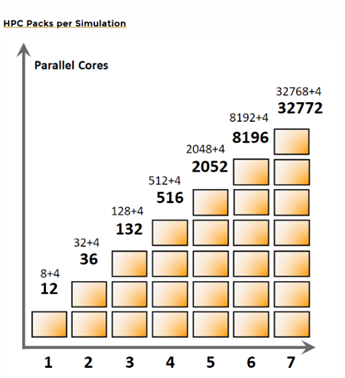
The HPC Pack model provides a flexible way to scale simulation performance without requiring additional solver licenses. As simulation complexity grows, users can expand compute capacity by adding HPC Packs rather than redesigning their Ansys Lumerical licensing strategy.
For most workstation users running moderate simulations, Standard licensing may be sufficient. However, users planning to leverage large GPU servers, multi-GPU acceleration, cloud resources, or future HPC growth often find Enterprise licensing with HPC Packs to be the most scalable long-term solution.
Running Multiple Simulations: Throughput vs. Capacity
When evaluating Lumerical FDTD licensing, it is important to distinguish between simulation capacity and simulation throughput.
Capacity refers to the amount of CPU or GPU resource assigned to a single simulation. Larger simulations may benefit from more CPU cores, GPU SMs, or HPC Packs.
Throughput refers to how many simulations can be completed in a given amount of time. For many photonics workflows, such as parameter sweeps, optimization studies, and design exploration, throughput is often more important than maximizing the core count of one simulation.
Lumerical FDTD can run independent simulations in parallel through the Job Manager or scheduler-based workflows. This applies to sweeps and other workflows where multiple jobs can be distributed across available CPU or GPU resources. In many cases, running several smaller simulations in parallel can complete a design study faster than running each job sequentially with all available resources.
Standard Ansys Lumerical licensing can also support this type of workflow when enough licensed resources are available. For example, one Standard FDTD solver license includes 32 CPU cores or 16 GPU SMs. Those resources can be used for one larger simulation or divided across multiple smaller simulations, depending on the job configuration and available licensing.
The Enterprise level of Ansys Lumerical licensing provides a more scalable path when the number of simulations, CPU cores, GPU SMs, or compute nodes grows. Enterprise uses HPC Packs to expand available compute resources more efficiently for large jobs, multi-GPU workflows, and larger HPC or cloud environments.
The key point is that Standard is not limited to a single simulation workflow. Both Standard and Enterprise can support parallel job execution, but Enterprise is usually more efficient when workloads grow beyond workstation-scale resources.
CPU Scaling Examples
Enterprise licensing uses HPC Packs to expand the number of CPU cores available to a simulation. The following examples illustrate how HPC Packs can be used to match different compute environments.
Example 1: Engineering Workstation
Consider a workstation with 16 CPU cores.
An Enterprise FDTD solver license includes an allowance of 4 CPU cores. Adding HPC Packs increases the available licensed core count. One HPC Pack increases the allowance to 12 cores, while two HPC Packs increase the allowance to 36 cores.
In this scenario, two HPC Packs provide enough licensed capacity to fully utilize the workstation’s available CPU resources.
Example 2: Shared Compute Server
Consider a shared server with 64 CPU cores.
An Enterprise license with two HPC Packs provides access to 36 CPU cores. Adding a third HPC Pack increases the licensed capacity to 132 CPU cores, allowing the simulation to take advantage of all available server cores.
This configuration is common in engineering teams that share a central simulation server.
Example 3: HPC Cluster Environment
For larger cluster environments, HPC Packs allow a single simulation to scale beyond the limits of a single workstation or server.
For example, three HPC Packs provide access to 132 CPU cores, while four HPC Packs increase the licensed capacity to 516 CPU cores. This allows larger simulations to leverage cluster resources when appropriate.
The optimal number of HPC Packs depends on the available hardware, simulation size, and desired runtime. In practice, organizations typically size HPC Packs to match their largest expected workloads while balancing licensing cost and hardware utilization.
GPU Scaling Examples
GPU acceleration has become one of the most effective ways to reduce photonics simulation runtime. Modern versions of Ansys Lumerical FDTD support GPU acceleration, multi-GPU execution, and cloud-based simulation workflows. These capabilities allow engineering teams to leverage modern workstation GPUs, shared GPU servers, and cloud resources to reduce simulation turnaround time and increase engineering productivity.
As GPU hardware continues to evolve, it is important to evaluate both hardware and licensing requirements together to ensure the most effective balance between performance, scalability, and total cost of ownership.
The following examples illustrate typical GPU configurations used by photonics design teams:
| GPU Configuration | Approximate SM Count | Typical HPC Pack Requirement |
| NVIDIA RTX 6000 Ada (single GPU) | 142 | 4 HPC Packs |
| NVIDIA RTX 6000 Ada (dual GPU) | 284 | 4 HPC Packs |
| NVIDIA RTX 5000 Ada (quad GPU) | 400 | 4 HPC Packs |
| NVIDIA H100 (single GPU) | 132 | 3 HPC Packs |
| NVIDIA A100 (dual GPU) | 216 | 4 HPC Packs |
These examples demonstrate how Enterprise licensing can efficiently scale from a single workstation GPU to large multi-GPU servers.
It is important to remember that HPC Pack requirements are determined by the total GPU resources available to the simulation. As GPU performance continues to increase with each hardware generation, evaluating licensing requirements alongside hardware selection becomes an important part of simulation infrastructure planning.
For organizations investing in high-performance GPU systems, Enterprise licensing with HPC Packs often provides the most scalable path for future growth. This is particularly true for multi-GPU servers, shared simulation infrastructure, and cloud-based deployment strategies.
Before purchasing hardware, it is recommended to evaluate both simulation performance requirements and licensing requirements together to ensure the best balance between performance, scalability, and total cost of ownership.
Cloud Burst and On-Demand Computing
For organizations that occasionally need more compute resources than are available locally, Ansys Lumerical provides cloud-based simulation capabilities through Burst workflows.
Cloud-based execution allows engineers to access additional CPU and GPU resources without purchasing or maintaining dedicated HPC infrastructure. Simulations can be submitted directly from the Lumerical environment, and users can estimate cloud resource consumption before launching a job.
Cloud resources are particularly useful for:
- Large optimization studies
- Parameter sweeps
- Peak workload periods
- Project deadlines
- Temporary access to high-performance GPU resources
Rather than investing in hardware that may only be used occasionally, cloud resources provide a flexible way to scale simulation capacity when additional compute power is needed.
Typical Customer Scenarios
Every photonics organization has different simulation requirements, hardware resources, and growth plans. The following examples illustrate common licensing approaches used by Ansys Lumerical customers.
Startup or Small Design Team
A small photonics team typically focuses on device development, proof-of-concept validation, and early-stage design exploration. Simulations are often performed on individual engineering workstations using either CPU or GPU resources.
In these environments, both Standard and Enterprise licensing may be appropriate depending on the expected simulation complexity, hardware configuration, and future growth plans.
Growing Photonics Design Team
As organizations expand, simulation workloads often increase through larger device models, parameter sweeps, optimization studies, and additional engineers requiring access to simulation resources.
At this stage, organizations frequently evaluate their Ansys Lumerical Enterprise licensing and HPC Packs to improve scalability and better utilize shared compute resources, GPU servers, or centralized simulation infrastructure.
Enterprise and Research Environments
Large photonics organizations, research laboratories, and semiconductor companies often support multiple engineers, shared simulation infrastructure, large-scale parameter studies, and advanced GPU-based workflows.
These environments typically require a scalable licensing strategy that can support future growth, larger compute resources, and cloud-based simulation workflows when additional capacity is needed.
The optimal licensing approach depends on the organization’s simulation requirements, hardware infrastructure, and long-term growth strategy.
Ansys Lumerical Licensing Guide
When evaluating Ansys Lumerical licensing options, consider the following factors:
Understand Your Simulation Workloads
Identify the typical size of your simulations, expected runtime requirements, and whether your workload consists primarily of individual simulations or large parameter studies.
Evaluate Your Hardware Strategy
Consider whether simulations will run on engineering workstations, shared servers, GPU systems, HPC clusters, cloud resources, or a combination of these environments.
Consider Future Growth
Many organizations begin with workstation-based simulation and later expand to larger CPU or GPU resources. Selecting an Ansys Lumerical licensing strategy that aligns with future growth can help avoid unnecessary transitions later.
Balance Throughput and Capacity
Some teams prioritize reducing the runtime of a single simulation, while others prioritize running many simulations simultaneously. Understanding which objective is more important helps determine the most appropriate licensing approach.
Evaluate Cloud Resources
Cloud-based simulation resources can provide additional flexibility during peak workload periods, large optimization studies, or deadline-driven projects without requiring permanent hardware investments.
Work with a Licensing Specialist
Licensing requirements can vary significantly depending on hardware configuration, simulation workflows, and organizational goals, especially in Ansys Lumerical. Working with an experienced simulation partner can help ensure the selected licensing model delivers the best balance of performance, scalability, and cost.
Optimize Your Ansys Lumerical Licensing Strategy
Ready to optimize your Ansys Lumerical licensing strategy? SimuTech Group can help assess your simulation workloads, GPU hardware, solver concurrency, HPC needs, and cloud requirements to recommend a licensing configuration built for performance, scalability, and cost control. Request a quote to get started.

Majid Ebnali Heidari, PhD
Engineering Manager – Optics/Photonics, SimuTech Group
Majid Ebnali Heidari, Ph.D., is an Engineering Manager at SimuTech Group with 18+ years of experience in photonics, optics, electronics, EDA simulation, academia, and industry. He specializes in multiscale optics and photonics simulation, optoelectronic device modeling, optical system validation, and technical training. His expertise spans nanoscale photonic structures, micro-scale optoelectronic devices, and system-level optical workflows using Ansys Lumerical, Zemax OpticStudio, Speos, and multiphysics simulation tools. He helps engineering teams apply advanced simulation to real-world product development, design validation, and engineering decision-making.