Contact Us
Introducing Discovery Design Copilot: AI‑Driven Confidence in Simulation Setup
Simulation is only as good as the setup behind it. Even experienced engineers can miss a boundary condition, select an incorrect material, or miss issues with CAD geometry. These small oversights can lead to misleading conclusions and costly rework. To address this challenge, Ansys Discovery introduces Discovery Design Copilot, an AI‑powered assistant designed to help engineers validate simulation setups before those mistakes turn into problems.
Discovery Design Copilot brings artificial intelligence directly into the early stages of simulation, acting as a second set of expert eyes that helps engineers work faster, smarter, and with greater confidence.
What Is Discovery Design Copilot?
Design Copilot is an AI‑driven feature within Ansys Discovery that reviews your simulation setup and proactively looks for potential issues. Rather than waiting for unexpected results or failed convergence to signal a problem, Design Copilot evaluates the model as it is being prepared and highlights areas that may need attention.
Specifically, it helps identify potential mistakes related to:
- Material selection – ensuring materials align with the intended physics and application
- Boundary conditions and Connections – flagging missing, conflicting, or unrealistic constraints, loads, and connections
- CAD Geometry Issues – checking whether the CAD geometry dimensions are within similar values for similar applications
By focusing on these common sources of error, Design Copilot helps engineers avoid the most frequent setup pitfalls before simulation results are generated.
Why Catching Setup Mistakes Early Matters
In simulation-driven design, time is one of the most valuable resources. A single incorrect assumption can lead to hours or days of re-runs, design revisions, and validation cycles. Discovery Design Copilot delivers value by catching issues early, when they are easiest and least expensive to fix.
Key benefits include:
- Reduced rework – Fewer failed or misleading simulations
- Improved result confidence – Greater trust in early design decisions
- Faster iteration cycles – Less time spent debugging setups
- Support for less experienced users – Embedded guidance without disrupting workflow
For organizations focused on accelerating design while maintaining accuracy, this early feedback loop can significantly improve overall engineering productivity.
How Discovery Design Copilot Works
To illustrate how Design Copilot fits into a real workflow, consider a thermal analysis of an electronics enclosure.
In this example, an engineer is evaluating whether the enclosure design can adequately manage heat generated by internal components. The goal is to ensure that temperatures remain within acceptable limits during operation.
Step 1: Provide a Project Description and Define the Quantity of Interest
The engineer inputs “Thermal Analysis of an Electronics Enclosure” as the project description and selects “Thermal Hotspots” as the quantity of interest. This choice tells Discovery Design Copilot what matters most in the analysis such as areas where excessive temperatures could impact reliability or performance.
Step 2: AI‑Assisted Setup Review
With the quantity of interest defined, Discovery Design Copilot evaluates the simulation setup, looking for potential issues that could affect the accuracy of hot spot predictions. For example, it may highlight:
- A material assignment that does not reflect the actual enclosure material
- Missing convection boundary conditions on external surfaces
- Inadequate monitoring of maximum temperature locations
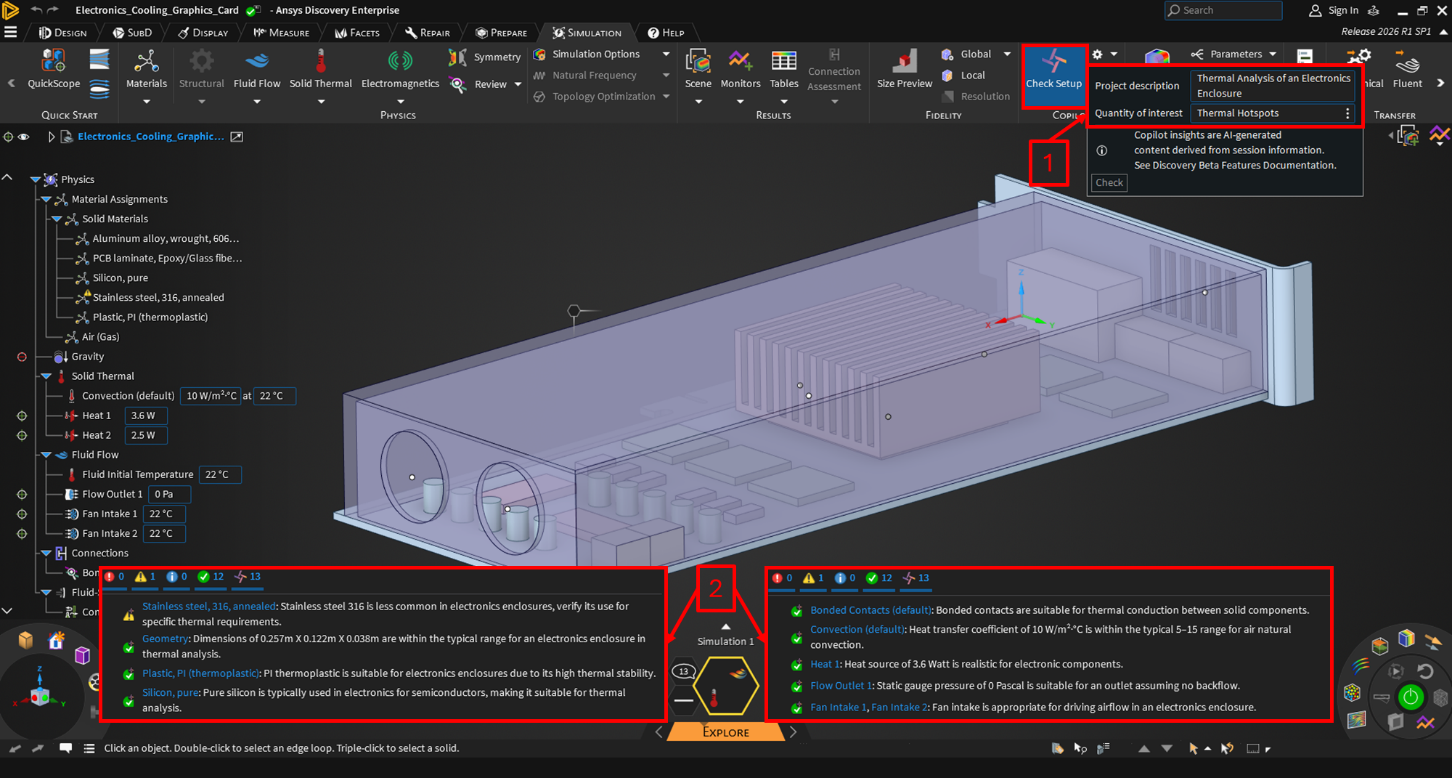
Instead of discovering these problems after reviewing results, the engineer receives immediate, actionable feedback during setup.
See It in Action: Demo Video Walkthrough
To complement this workflow, the blog is accompanied by a short demo video that walks through Discovery Design Copilot in action. The video shows how the AI assistant evaluates the thermal analysis setup, identifies potential concerns, and helps guide the user toward a more robust simulation configuration.
This visual walkthrough makes it easy to see how Discovery Design Copilot integrates seamlessly into the Discovery interface without disrupting established workflows.
Summary: Smarter Setup, Better Results
Discovery Design Copilot represents a meaningful step forward in simulation usability and reliability. By embedding AI directly into the setup process, Ansys Discovery helps engineers catch common mistakes early and before they impact results or design decisions.
Whether you are running a thermal analysis of an electronics enclosure or exploring other physics in Discovery, you’ll gain added confidence that your simulation is set up correctly, aligned with your objectives, and ready to deliver meaningful insights.
As simulation continues to move earlier in the design process, tools like Discovery Design Copilot will play a critical role in helping engineers move faster without sacrificing accuracy.
Explore AI-Assisted Simulation Setup with Ansys Discovery
SimuTech Group can help you evaluate how Ansys Discovery and Discovery Design Copilot fit into your simulation workflow, from early design exploration and setup review to faster iteration and more confident engineering decisions. Contact us for a complimentary consultation.

Eric Alana
Senior Staff Engineer, SimuTech Group
Eric Alana is a Senior Staff Engineer at SimuTech Group and a finite element analysis specialist with a Bachelor’s in Mechanical Engineering from Georgia Institute of Technology. His experience includes nonlinear analysis, fatigue, material selection, seismic evaluation, pressure-system analysis, and thermal-structural simulation for electronics and aerospace applications.