 Contact Us
Mesh Quality Issue in CFD Simulations
Geometry-based mesh adaption helps CFD simulations improve accuracy and efficiency by refining the mesh around important geometric features. In CFD analysis, mesh quality directly affects how well physical phenomena are captured, while poor mesh quality can lead to errors and costly design flaws. High-quality meshes are especially important for complex geometries, where fluid behavior may be sensitive to boundary changes. Refining the mesh in key areas helps balance computational cost and solution accuracy, making mesh quality essential for effective simulations.
Improve Meshing with Mesh Adaption in Ansys Fluent
In CFD analysis, selecting between adaptive mesh refinement (AMR) and static handcrafted mesh refinement greatly affects simulation accuracy and efficiency. AMR adjusts mesh density dynamically based on solution features, enabling finer resolution in critical areas and coarser meshes elsewhere. This approach enhances CFD run speed by reducing mesh density where gradients are minimal.
Ansys Fluent‘s adaptive meshing process begins with a coarse mesh and refines regions with high gradients using various criteria, including error estimates, solution gradients, curvature, and user-defined functions. Also, the mesh can be modified by refining or coarsening it based on Cell Registers through Manual or Automatic mesh adaption. Additionally, Ansys Fluent offers predefined criteria tailored to applications in aerodynamics, combustion, and multiphase flow. Effectively applying these criteria is crucial for enhancing the accuracy of CFD simulations and capturing key simulation features accurately.
Setting suitable adaption thresholds is crucial to avoid over-refinement and the associated computational expenses. Use Ansys Fluent controls to maintain a balance between detail capture and computational efficiency.
Advanced Mesh Adaption: Geometry-Based Reconstruction
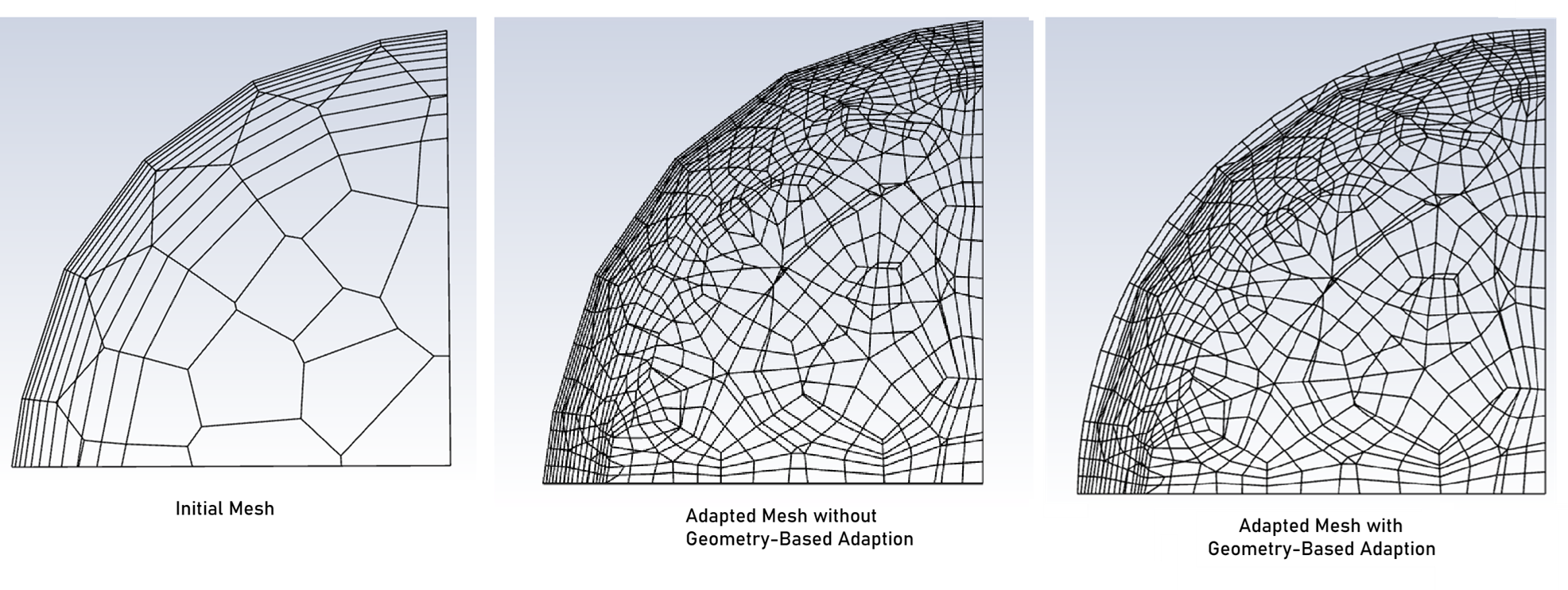
For mesh adaption, starting with a quality mesh is crucial, especially in complex regions, to ensure effective adaption. A coarse initial mesh may fail to capture flow characteristics, worsening the mesh after adaption. If the geometry includes curved profiles and sharp corners with a coarse mesh, the adapted mesh might not fully restore these features at the geometry’s perimeter, as shown below for spherical geometry. During the mesh adaption, the cross-sectional area remains constant, causing the default adaption function to increase the cell count while the boundary still exhibits sharp corners. However, with geometry-based adaption, the newly generated nodes are positioned in a manner that creates a finer mesh that more closely resembles the original geometry, as shown below.
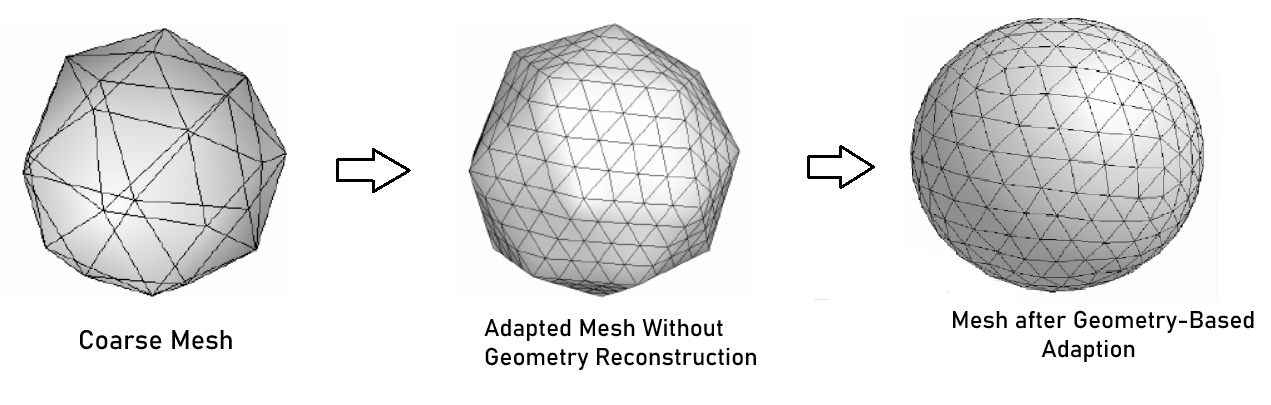
Geometry-based mesh adaption in Ansys Fluent refines the mesh around complex features like edges, corners, and curved surfaces. This advanced technique focuses on critical areas, improving mesh resolution for more accurate simulations. If geometry-based adaption is not used with mesh adaption, the refinement can increase the cell count, but the boundary of the curved domain keeps its initial shape with the corners created by the initial mesh.
Geometry-based adaption benefits precision industries by reconstructing or refining details. In aerospace, it enhances turbine simulations, and in automotive, it optimizes engine design, improving efficiency and reducing emissions. These examples show how advanced mesh adaption boosts CFD simulation precision and reliability.
Setup Geometry-Based Mesh Adaption
To implement geometry-based mesh adaption, follow these essential steps. Here is an overview of the process:
- Define Auxiliary Geometry: initially generate a fine surface mesh from the same geometry using Fluent Meshing and read it as a background surface mesh in the auxiliary geometry definition in Ansys Fluent.
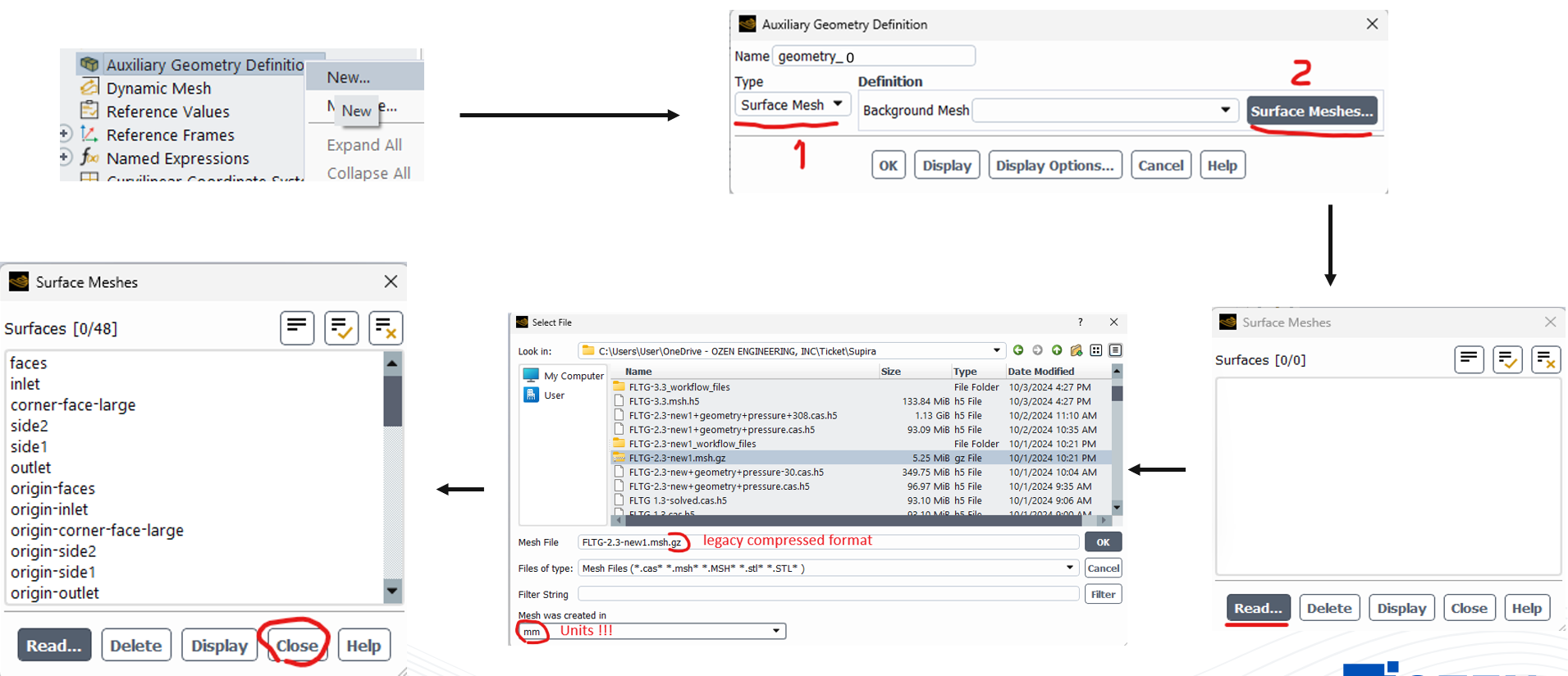
- Create distinct auxiliary geometry for each wall zone. It is crucial to effectively partition the outer boundaries of the domain, especially around critical areas with geometric features such as curved boundaries, and assign separate wall zones to each.
- Use auxiliary geometries for mesh adaption through General Adaption Control.
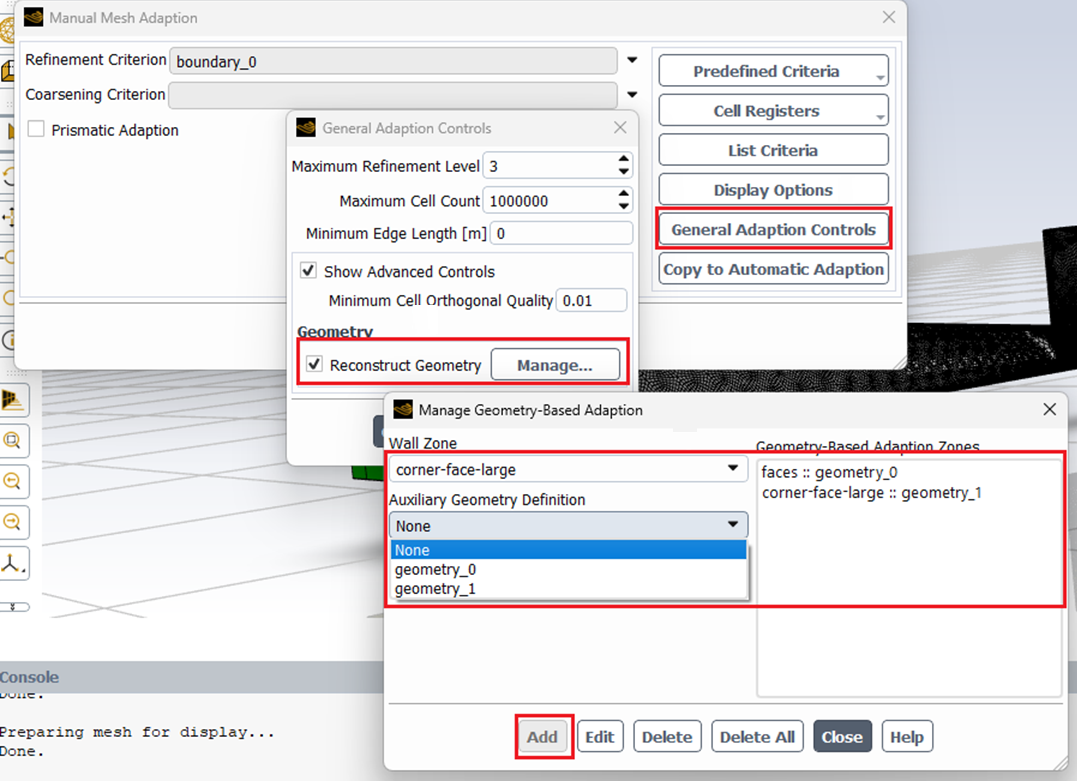
- Establish additional mesh adaptions using criteria such as flow feature gradients or boundaries necessary for mesh refinement in critical areas and boundary layers at walls. The geometry-based mesh adaption will work alongside these adaptions during the solution process. Subsequently, the initial coarse mesh will be selectively refined in the specified regions, with their shapes restored to match the original geometry.
A Case Study
The successful implementation of geometry-based mesh adaption is illustrated in two videos featuring an example with curved boundaries and a sharp corner.
Video Part 1:
In Part 1, you’ll observe mesh adaption performance without geometry-based techniques. The demonstration covers model setup and mesh adaption focused on wall boundary layers and pressure gradients. It aims to show how these adaptions work and evaluate their effectiveness in calculating pressure drop without relying on geometry-based methods.
Video Part 2
In Part 2, the video explains the steps for implementing geometry-based adaption alongside other mesh adaption methods for boundary layer and pressure gradient and how it matches the meshing on curved boundaries in this example with the original geometry.
This figure illustrates the adapted meshes at the curved cross-section of the sharp corner in this example, both with and without geometry based mesh adaption.