Contact Us
Introduction to Ansys Lumerical Burst
If you’ve ever waited hours—or even days—for a full‑wave FDTD simulation to finish, you know how quickly those delays can bottleneck a photonics project. Whether you’re tuning a waveguide or sweeping parameters for a metasurface, speed matters. With Lumerical Burst and GPU acceleration, engineers can access scalable cloud compute resources to reduce simulation turnaround time without relying solely on local hardware.
This post shows how much faster — and more cost‑effective — your simulations can run with GPUs in Ansys Lumerical. You’ll see benchmark results, learn why GPUs are a natural fit for FDTD, and pick up optimization tips for both on‑prem and cloud hardware.
Overview of Finite‑Difference Time‑Domain (FDTD) Simulation
FDTD solves Maxwell’s equations directly in the time domain, making it highly flexible for broadband problems and complex 3‑D geometries. The trade‑off is computational cost: fine spatial resolution, long propagation times, and large meshes quickly balloon to billions of Yee cells—especially in integrated photonics and nanophotonics design.
Why GPU Computing for FDTD?
GPUs contain thousands of lightweight cores that can update Yee cells concurrently, whereas CPUs rely on a few heavyweight cores. Because each cell update is independent, FDTD maps almost perfectly onto GPU hardware, yielding order‑of‑magnitude speed‑ups and superior energy efficiency.
Whether you start with a workstation‑class RTX A6000, scale up to a server‑grade A100, or burst to multi‑GPU L40S nodes in the cloud, GPU acceleration can slash turnaround time from hours to minutes.
For supported features and best practices for running FDTD on GPU with Lumerical Burst, see Ansys Knowledge Base: Getting started with running FDTD on GPU.
Benchmarking Methodology
To provide actionable insights, we benchmarked the performance using the Ansys metalens Lumerical file (~0.85 B Yee cells), which is attached to this page for reference. This model represents a realistic, computationally demanding scenario. Consistent settings were maintained across all simulations, employing an auto-shutoff criterion when the field energy decayed to 10⁻⁵. This consistency ensures performance comparisons focus purely on hardware capability.
We evaluated multiple hardware platforms reflecting diverse user scenarios, ranging from local workstations and enterprise HPC clusters to scalable cloud solutions.
Hardware Configurations Tested
- CPU Queue (Burst Cloud): 63-core instance (c6i.32xlarge), 239 GiB RAM, tested via A-c6i_32xlarge_noHyperthread-ONDM-AL queue
- Workstation GPU: NVIDIA RTX A6000, 48 GiB GPU memory, 111 GiB system memory, Windows 11
- Server GPU: NVIDIA A100 80 GB PCIe, 500 GiB system memory, Rocky Linux 8.9
- Burst Cloud – 4× L40S GPUs: NVIDIA L40S ×4, 739 GiB system memory, high-speed NVMe & 200 Gb/s fabric
- Burst Cloud – 8× L40S GPUs: NVIDIA L40S ×8 on A-g6e_48xlarge, 1480 GiB system memory, completed simulation in 398.9 s (~6.6 min) at 59,691 Mnodes/s
Lumerical Burst Benchmark Results
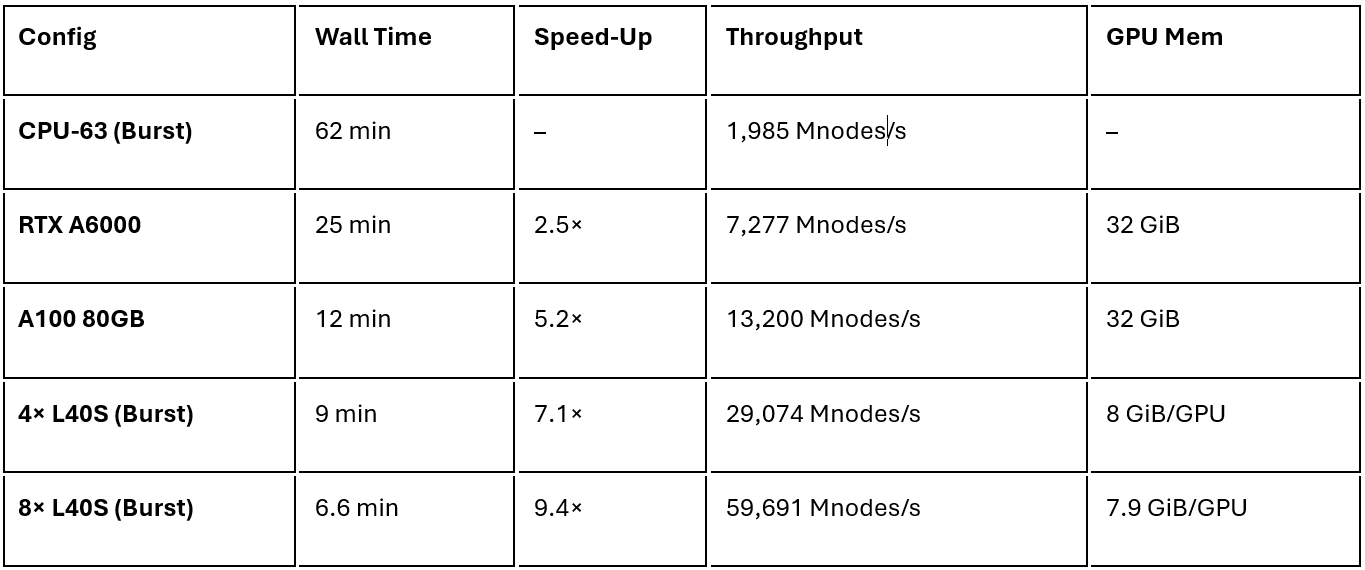
The performance improvements are clear and compelling. Transitioning from traditional CPU clusters to modern GPUs yields dramatic speed‑ups. A single NVIDIA A100 GPU outperforms a large CPU cluster by over 5×, and the 8‑GPU Burst configuration cuts wall time to 6.6 minutes.
Key Observations
- Cloud‑scale GPUs finish in under 10 minutes—even faster (≈ 6.6 min) when scaling to eight L40S devices.
- A single A100 delivers more than 5× speed‑up versus a 63‑core CPU cluster.
- Solver throughput scales almost linearly from four to eight GPUs (29 k → 60 k Mnodes/s), confirming strong parallel efficiency on Burst.
Practical Setup Considerations
Maintain Consistent Benchmark Criteria: Use the same auto-shutoff level (like 10⁻⁵) or fixed simulation time when comparing hardware, to ensure the performance data is accurate and fair. Use fixed auto-shutoff thresholds or predefined simulation times for accurate comparisons
Advantages of Ansys Cloud Burst
For an in-depth overview of how Ansys Lumerical Burst works—including queue management, licensing, and job submission—see the official Ansys documentation: Ansys Lumerical Burst – How it Works
- Rapid Scalability: Instantly scale simulations across multiple GPUs without capital expenditures.
- Flexible Licensing: Leverage Ansys Credits to use Ansys Cloud Burst Compute with Lumerical.
- High-Performance Infrastructure: NVMe storage and 200 Gb/s network connections support heavy computational tasks.
- Easy Accessibility: Access cloud resources securely via browser-based interfaces, eliminating local GPU driver management.
- Massive Cost Savings: In real-world testing, the GPU configurations demonstrated significantly lower simulation costs—often under a few dollars—compared to CPU runs which can cost an order of magnitude more.
Accelerate FDTD Simulations with Lumerical Burst
Waiting hours for simulation results can slow design decisions and limit iteration. SimuTech Group can help you evaluate your Ansys Lumerical workflows, GPU requirements, and cloud compute options to determine whether Lumerical Burst is the right fit for faster, more scalable FDTD simulation.

Majid Ebnali Heidari, PhD
Engineering Manager – Optics/Photonics, SimuTech Group
Majid Ebnali Heidari, Ph.D., is an Engineering Manager at SimuTech Group with 18+ years of experience in photonics, optics, electronics, EDA simulation, academia, and industry. He specializes in multiscale optics and photonics simulation, optoelectronic device modeling, optical system validation, and technical training. His expertise spans nanoscale photonic structures, micro-scale optoelectronic devices, and system-level optical workflows using Ansys Lumerical, Zemax OpticStudio, Speos, and multiphysics simulation tools. He helps engineering teams apply advanced simulation to real-world product development, design validation, and engineering decision-making.