Contact Us
Unlocking the secrets of vortex dynamics in stirred tanks through advanced modeling techniques.
Why Vortex Prediction in Stirred Tanks Is Computationally Demanding
Predicting vortex dynamics in stirred tanks poses significant challenges due to the complex fluid-flow behaviors involved. The turbulence and chaotic nature of fluid movement in these systems make it difficult to accurately model and predict vortex formation.
Traditional computational fluid dynamics (CFD) simulations, while accurate, are computationally intensive and time-consuming. This poses a problem for industries that require quick turnaround times for simulations and optimizations.
What Are Reduced Order Models (ROMs) and Why Use Them?
Reduced Order Models (ROMs) offer a promising solution to the challenges posed by traditional CFD simulations. ROMs reduce the computational complexity by capturing the essential dynamics of a system with significantly fewer degrees of freedom.
ROMs are created by identifying the most important modes or features of the system and constructing a simplified model that retains the critical characteristics of the original system. This approach not only speeds up the simulation process but also makes it more feasible to conduct multiple iterations and optimizations.
Engineering Solution: Building a ROM for Stirred Tank Vortex Prediction in Ansys Fluent
At Ozen Engineering, Inc., we leverage our expertise in ANSYS simulation software to develop precise and efficient Reduced Order Models for vortex prediction in stirred tanks. Our process begins with detailed CFD simulations to understand the fundamental behaviors of the fluid system.
We then employ advanced model reduction techniques to extract the key dynamics and construct a ROM that accurately predicts vortex formation. This ROM is validated against experimental data to ensure its reliability and robustness.
Setting Up the Fluent Model and Geometry
In this application, we use the same stirring tank example that we demonstrated how to create a Fluent model for vortex prediction1. The tank is an unbaffled cylinder, agitated with a Rushton turbine impeller. The geometry and the mesh details on the cross-sectional plane are shown in Figure 1
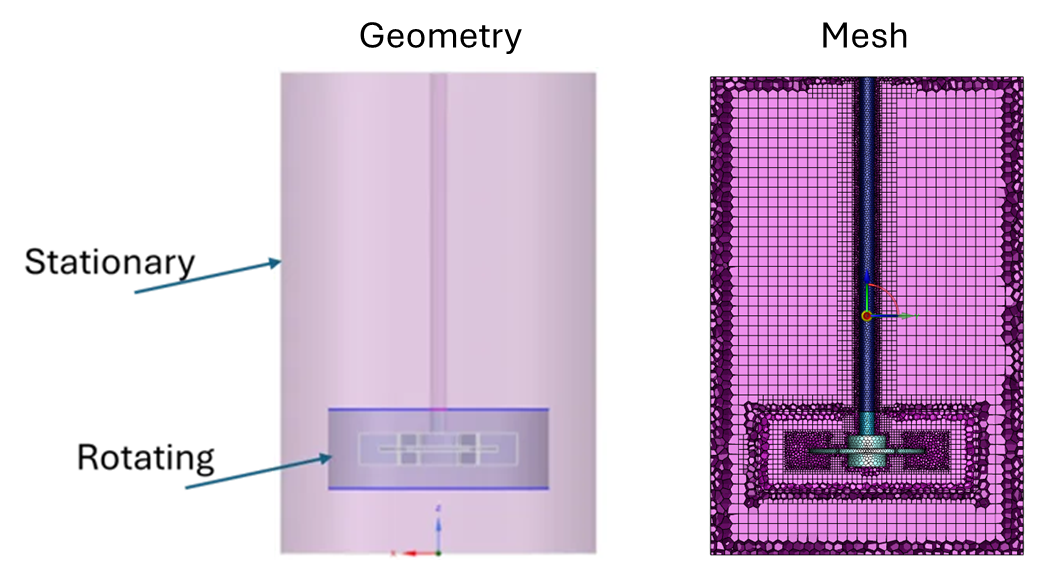
Figure 1. The Geometry Model and Mesh
Connecting to the 3D ROM Module in Ansys Workbench
The Ansys Workbench project layout is shown in Figure 2. The geometry is connected to the Fluent session where the necessary model settings and input/output parameters are described1. The 3D ROM module is then dragged and dropped onto the project screen, after which it automatically connects to the rest of the project.
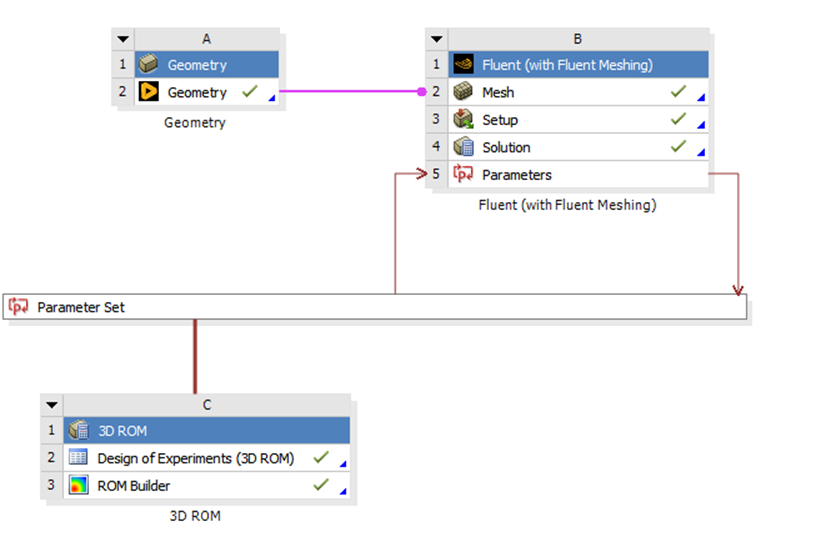
Figure 3. The Ansys Workbench Project with the Addition of 3D ROM
Running the Initial Simulation
Before doing the Design of Experiments (DOE), a better practice is to solve the first data set based on the inputs (DP0). This allows for monitoring the simulation, post-processing, and determining if there are issues. Once this simulation is complete, the parameters screen shows the corresponding output parameters (Figure 4).
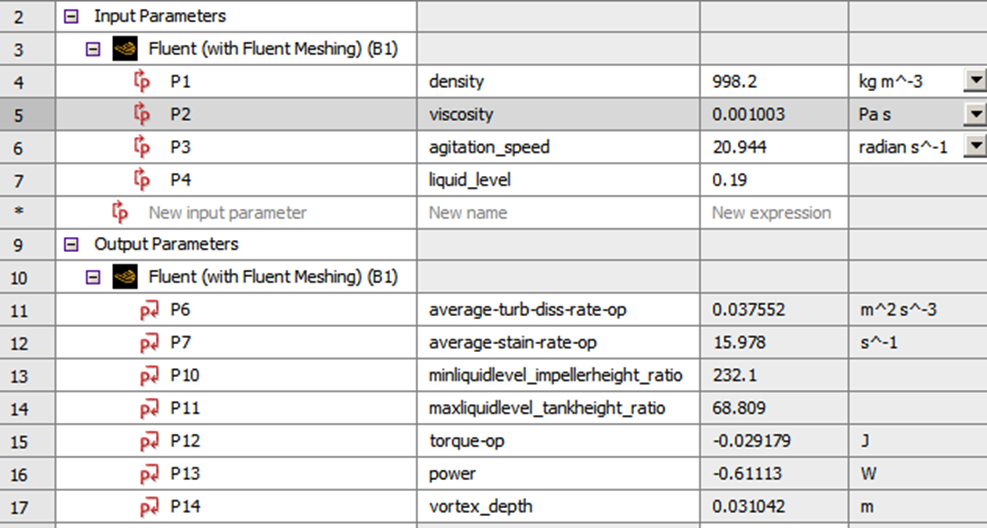
Figure 4. The Input and Outputs for the First Simulation (DP0).
Configuring and Running the Design of Experiments
The properties of the DOE can be adjusted with the table (Figure 5), which appears once the Design of Experiments (3D ROM) is clicked. The default selection of “Optimal Space-Filling Design was used with 32 samples. This number is calculated by the software based on the number of input parameters. In this case, we have 4 inputs, and 8 configurations per input, making the total number of samples.
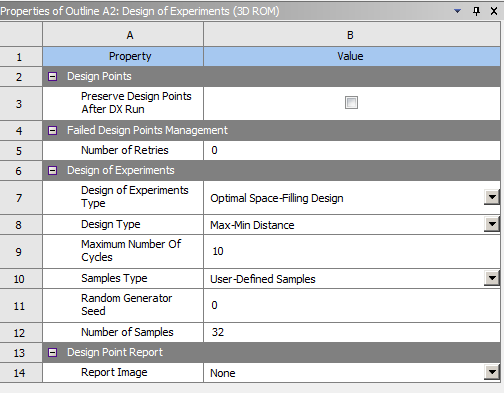
Figure 5. The DOE Settings
Once the DOE simulations are complete, a green check mark appears, as shown in Figure 3. The designs with the associated results are available to review (Figure 6)
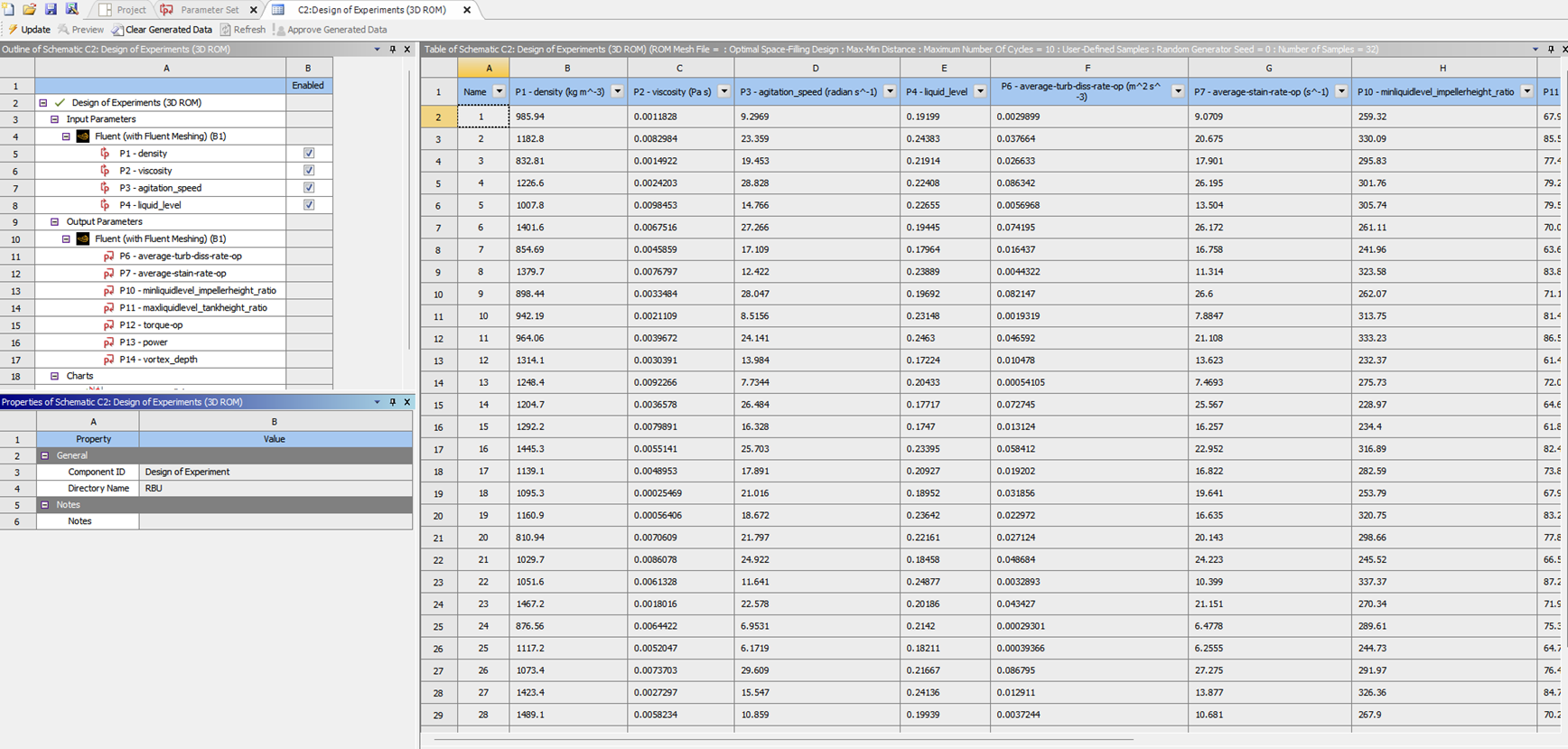
Figure 6. The DOE Results Screen
Exporting and Evaluating the ROM
The next step is to click the ROM Builder and Export ROM (Figure 7). There are two options to export: either the ROMS file or the FMU file. The ROMs can be read with a new Fluent session. The FMU can be imported to the TwinBuilder for further analysis. In this example, we exported to a ROMS file.

Figure 7. Export ROM
The final step is to open a new Workbench file, bring up the Fluent session, and import the ROM. Once the Fluent session opens, click the Reduced order Model in the Models menu. In the panel, click the “Evaluate” tab. Choose the appropriate post-processing tool, such as contours, and select the ROM Cell Functions to visualize. Changing the parameters used for ROM creation can be observed. Figure 8 shows that a lower speed does not generate a vortex, whereas a high speed does.
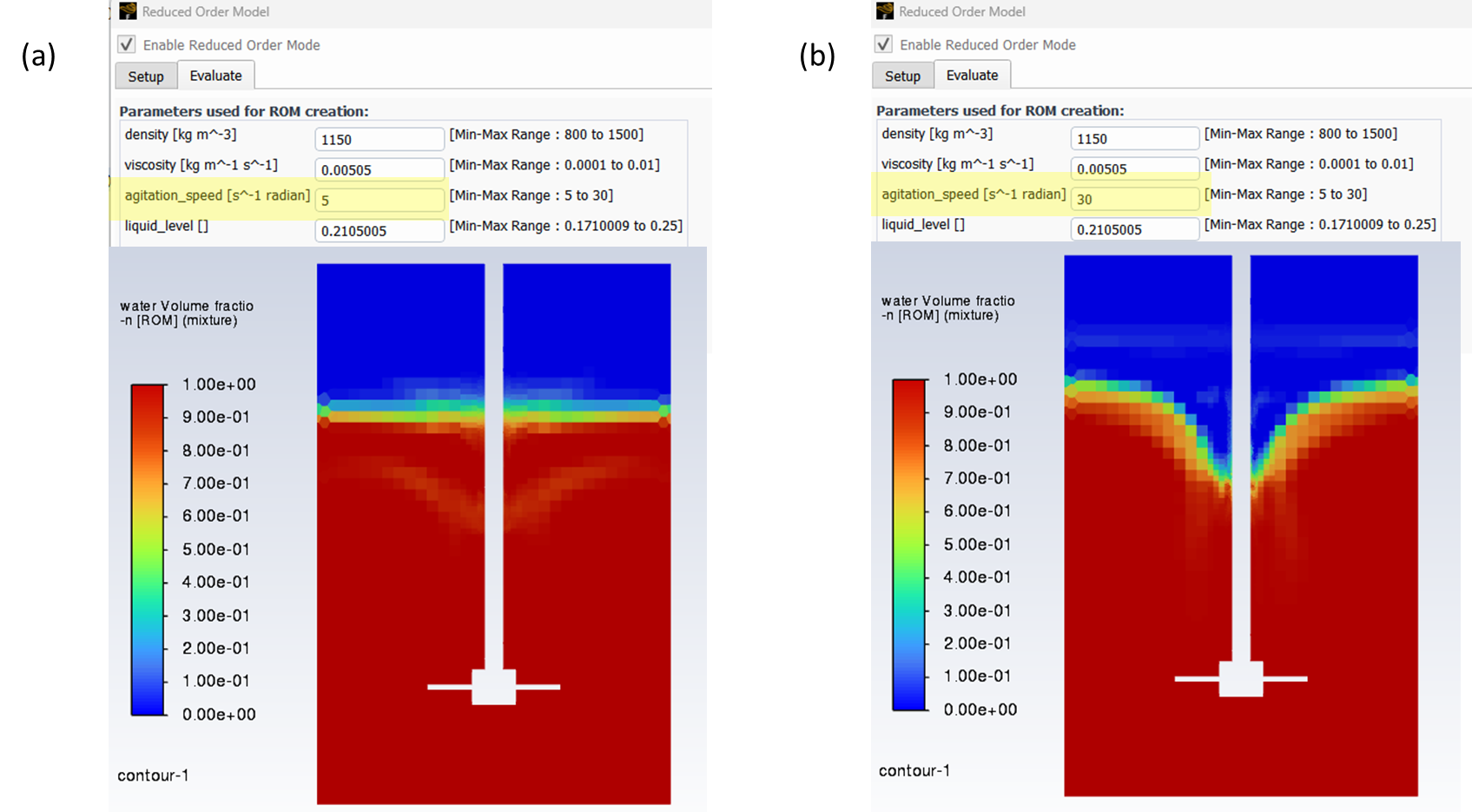
Figure 8. The Evaluation of ROM for two different cases
From this point on, the user can explore many different combinations of the input parameters. The result appears on the screen within seconds.
Key Benefits of ROMs for Stirred Tank Simulation
The primary benefit of using ROMs in vortex prediction is the significant reduction in computational time and resources. This allows for rapid prototyping and optimization, leading to shorter development cycles and cost savings.
Additionally, ROMs enable real-time simulations and control, which is particularly beneficial in industrial applications where quick decision-making is crucial. The ability to conduct multiple what-if scenarios also enhances the overall design and operational efficiency.
The details of the ROM generation are in the video below.
Need help building Reduced Order Models or setting up parametric CFD workflows? SimuTech Group’s CFD consulting engineers use Ansys Fluent, ROM Builder, and TwinBuilder for mixing, water treatment, and process engineering applications. For more on Fluent’s capabilities, read our article on the evolution of user-friendly CFD in Fluent. Contact us to discuss your simulation needs.