
 Contact Us
Bayesian optimization in Ansys optiSLang gives engineers a smarter alternative to brute-force design exploration. This blog demonstrates how the Probabilistic Inference for Bayesian Optimization (PI-BO) module works on a simple 2D CFD benchmark case solved with Ansys Fluent.
Why Traditional Methods Struggle with Complex Manufacturing Problems
Manufacturing industries today face a myriad of challenges, ranging from maintaining efficiency and quality to minimizing production costs and downtime. As markets become more competitive, the pressure to innovate and optimize processes grows exponentially.
Traditional optimization methods often fall short in addressing the complexity and variability of modern manufacturing environments. This necessitates the adoption of advanced techniques that can handle uncertainty and provide robust solutions.
How Bayesian Optimization Works in the Ansys optiSLang PI-BO Module
Bayesian Optimization (BO) is a powerful strategy for optimizing complex, expensive, and noisy functions. It is particularly useful in scenarios where each function evaluation is costly, such as in manufacturing process optimization.
By leveraging techniques such as Gaussian Processes, probabilistic inference enables efficient exploration of the parameter space, guiding the optimization process towards the most promising regions and avoiding unproductive areas.
Ansys optiSLang has an embedded Probabilistic Inference for Bayesian Optimization (PI-BO) module to perform optimization analysis in a user-friendly manner.
2D Benchmark Case: Geometry and Setup
To illustrate the efficacy of PI-BO, we considered its application to a simple 2D benchmark case (Figure 1). The geometry has inlet and outlet regions, as shown, with six circular holes, the diameters of which were set as input parameters for optimization. This geometry could be considered a simplified shower head, and the target could be to maximize the pressure change between the inlet and the outlet and to achieve a uniform pressure distribution.
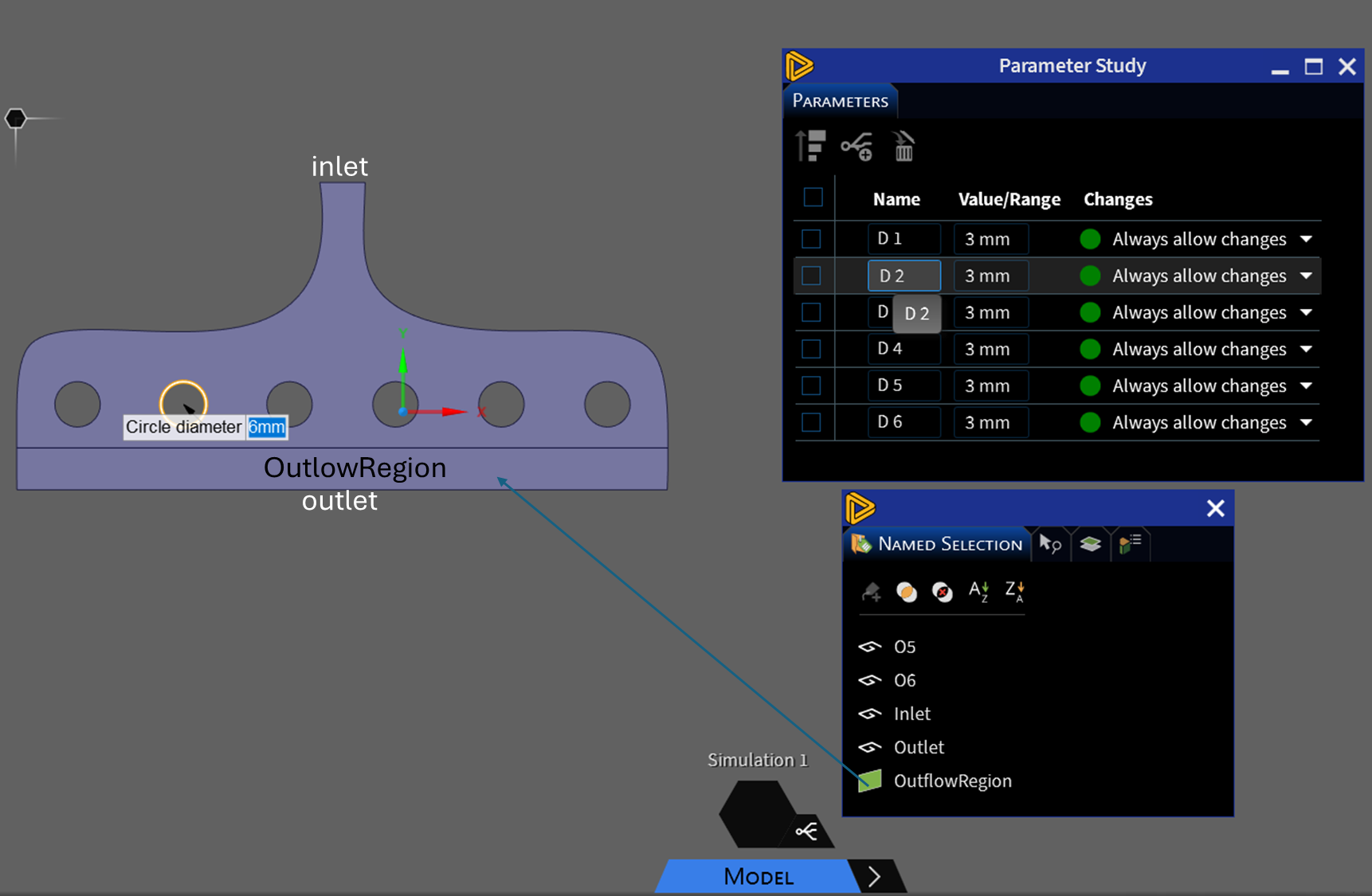
Figure 1. 2D Benchmark case with inlet/outlet regions and parametric dimensions
The Ansys Workbench project is shown in Figure 2.
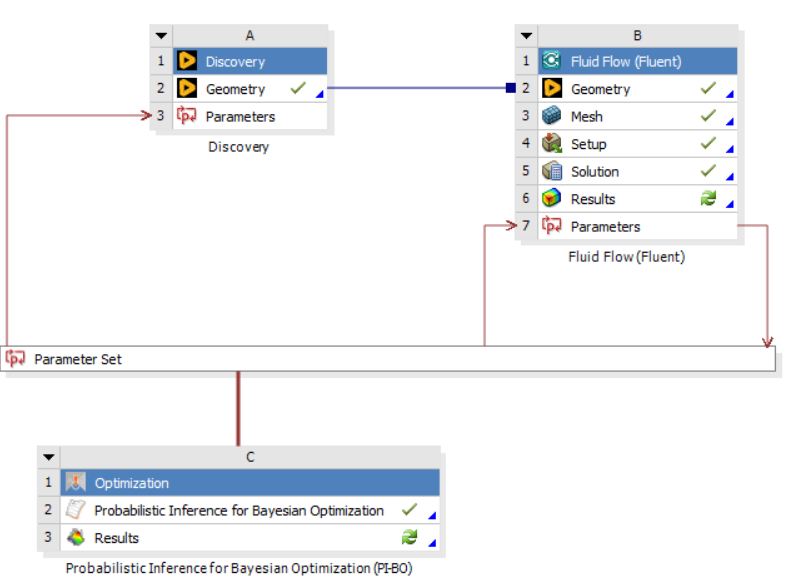
Figure 2. Ansys Workbench project
The “Named Expressions” in the Fluent setup can also be used for input and output parameters (Figure 3).
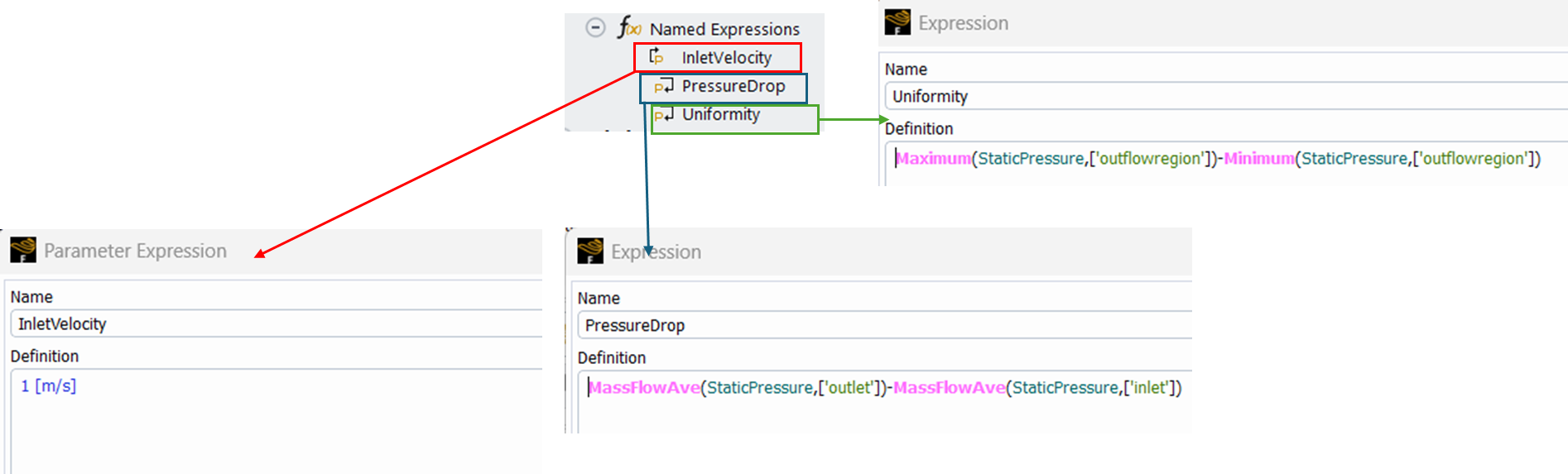
Figure 3. Named Expressions for input and output parameters for optimization
The velocity inlet with a defined inlet velocity above, and zero pressure outlet conditions were imposed. Before setting the optimization features, the best practice is to run the model with the variables at their initial conditions to test whether the results make sense and to ensure no failures are observed.
Configuring Bayesian Optimization Settings in Ansys optiSLang Workbench
The optimization module from the Toolbox on the left should be dragged as a standalone system to the Project Schematic screen. That opens the window to select the optimization parameters and set their ranges. This screen gives the user the option to convert a parameter into a constant. For this example, the following settings were used (Figure 4):
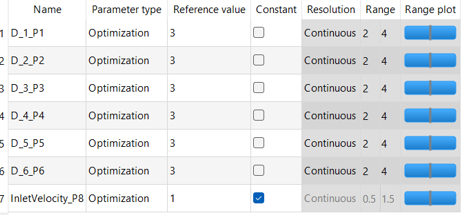
Figure 4. The parameter settings for optimization
Following that, the objectives have to be described. As mentioned before, the maximum pressure drop and minimum uniformity are the criteria for the optimization (Figure 5).
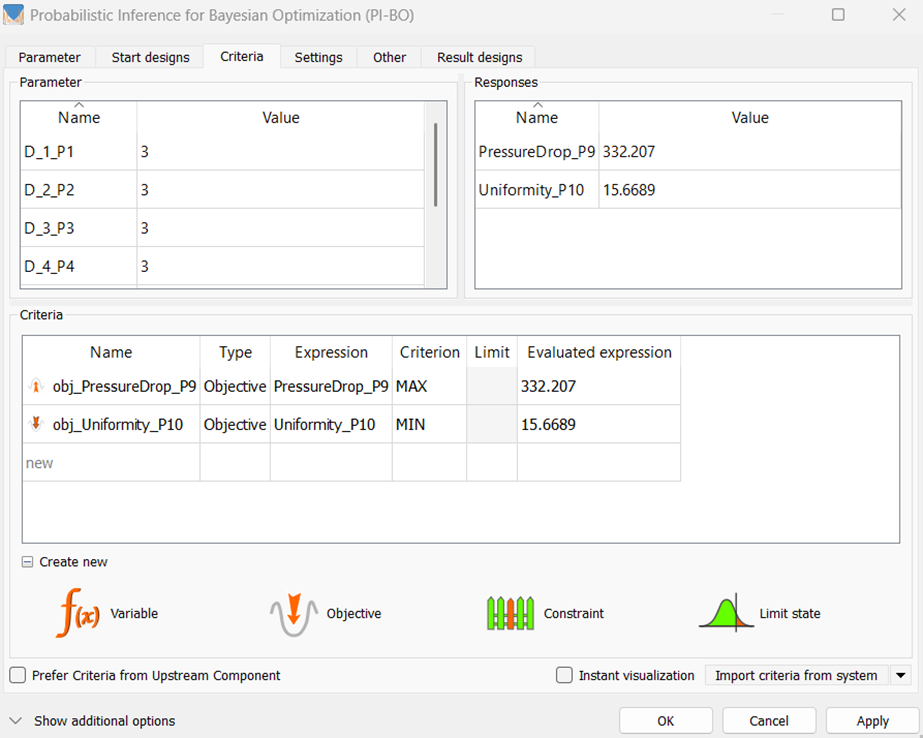
Figure 5. The criteria setting
The next screen asks the user to select the optimization method. The default setting is the One-Click Optimization. In this application, the PI-BO option is selected under Manual optimizer selection (Figure 6).
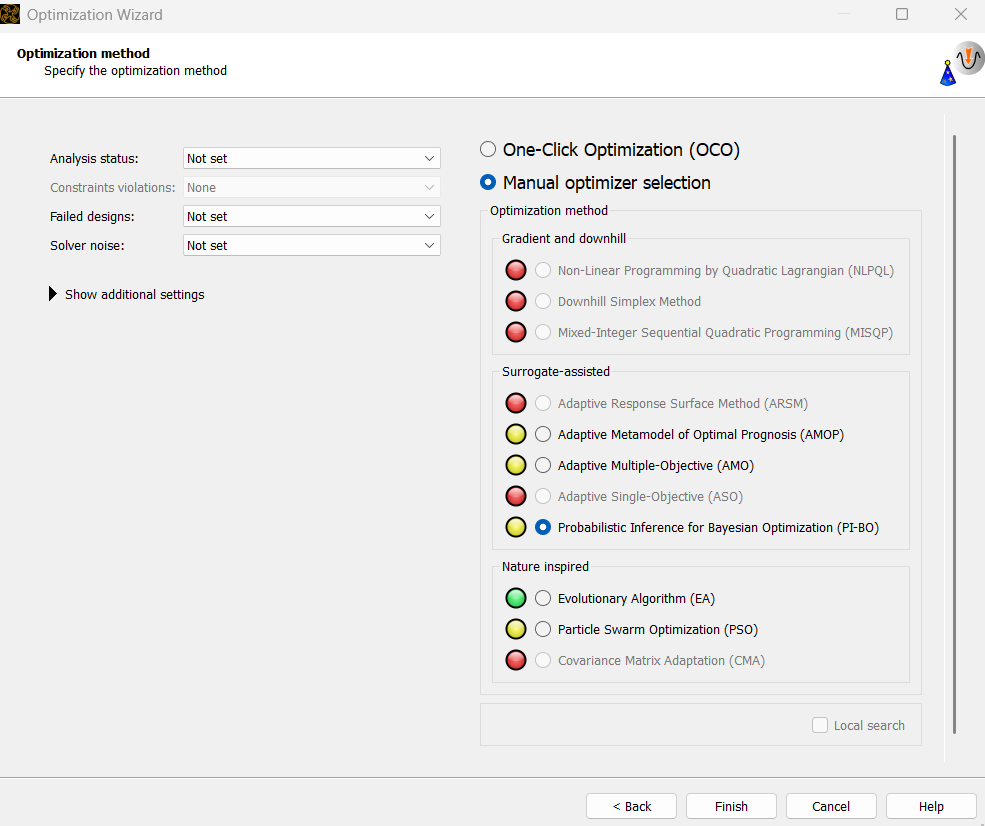
Figure 6. The PI-BO optimization method selection
After these settings, the optimization module will be connected to achieve the project structure shown in Figure 2. Double-clicking the “Probabilistic Inference for Bayesian Optimization” opens the optimizer settings to select the number of iterations. The default maximum number of iterations is 90. For this example, 10 was selected (Figure 7). This means that, including the new start designs, the total number of designs to be explored will be 20. The user should explore a different number of iterations depending on the application.

Figure 7. The number of designs to be iterated
After the optimization starts, the optimization monitoring screen pops up. The final stage of the optimization is shown in Figure 8.
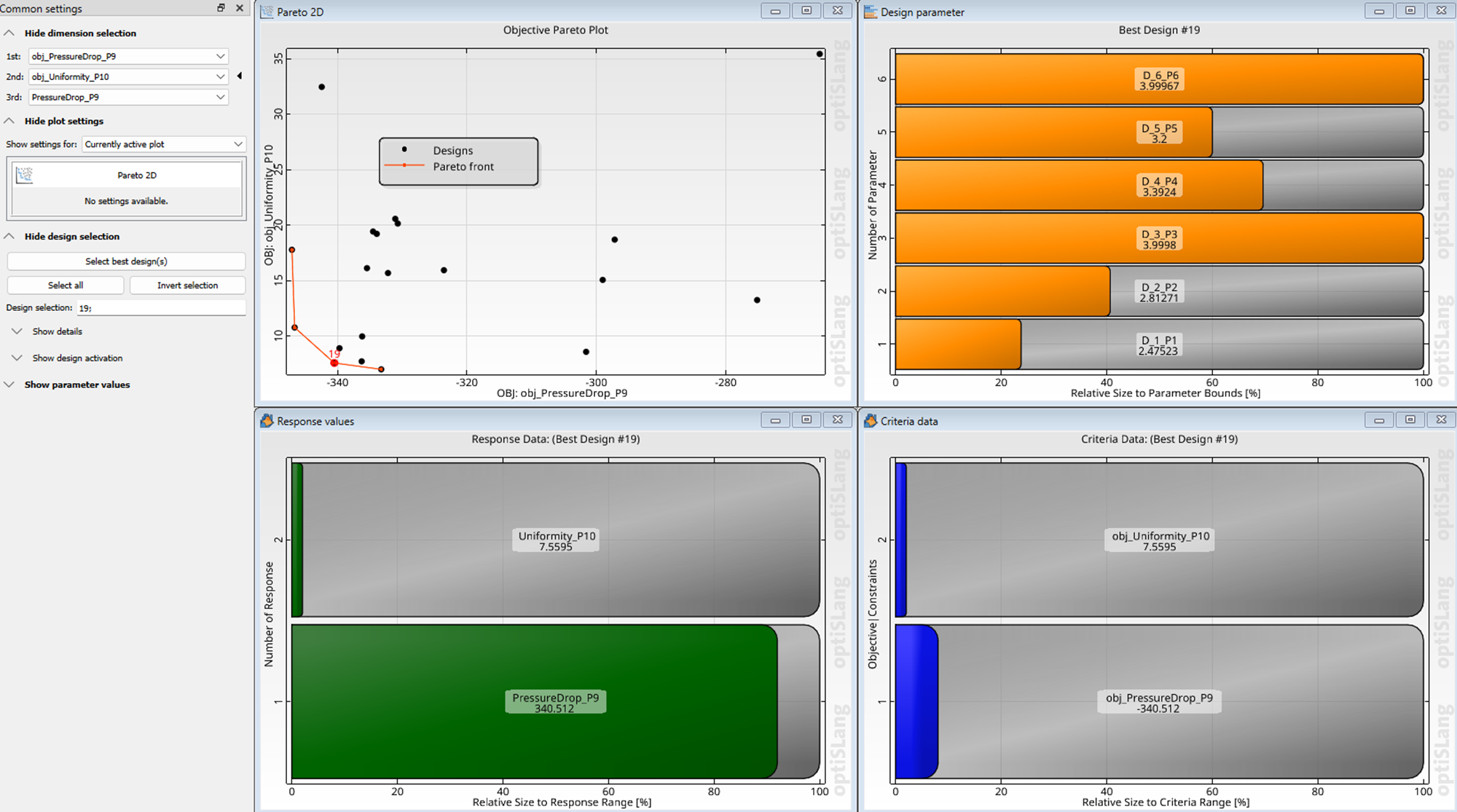
Figure 8. The optimization monitoring screen
The best performing designs will be shown to the user with the corresponding parameter settings. The user can hover over the Objective Pareto Plot window to pick different designs, and the corresponding parameters are shown on the Design Parameter window.
Advantages of PI-BO Over Default One-Click Methods
The use of PI-BO optimization will provide a robust, resilient process with fewer designs than the default One-Click Optimization setting.
Looking ahead, the integration of advanced optimization techniques such as Bayesian Optimization will continue to revolutionize the manufacturing industry. As these methods become more sophisticated, their application will expand beyond traditional boundaries.
The details of this application can be found in the video below:
Exploring Bayesian optimization or advanced design exploration for CFD problems? SimuTech Group’s CFD consulting engineers work with Ansys optiSLang, Fluent, and the full Workbench design exploration suite. For more on AI-driven motor and component design, see our article on Bayesian optimization for electric motor design using Stochos and Motor-CAD. Learn more about Ansys optiSLang or contact us to discuss your project.