Contact Us
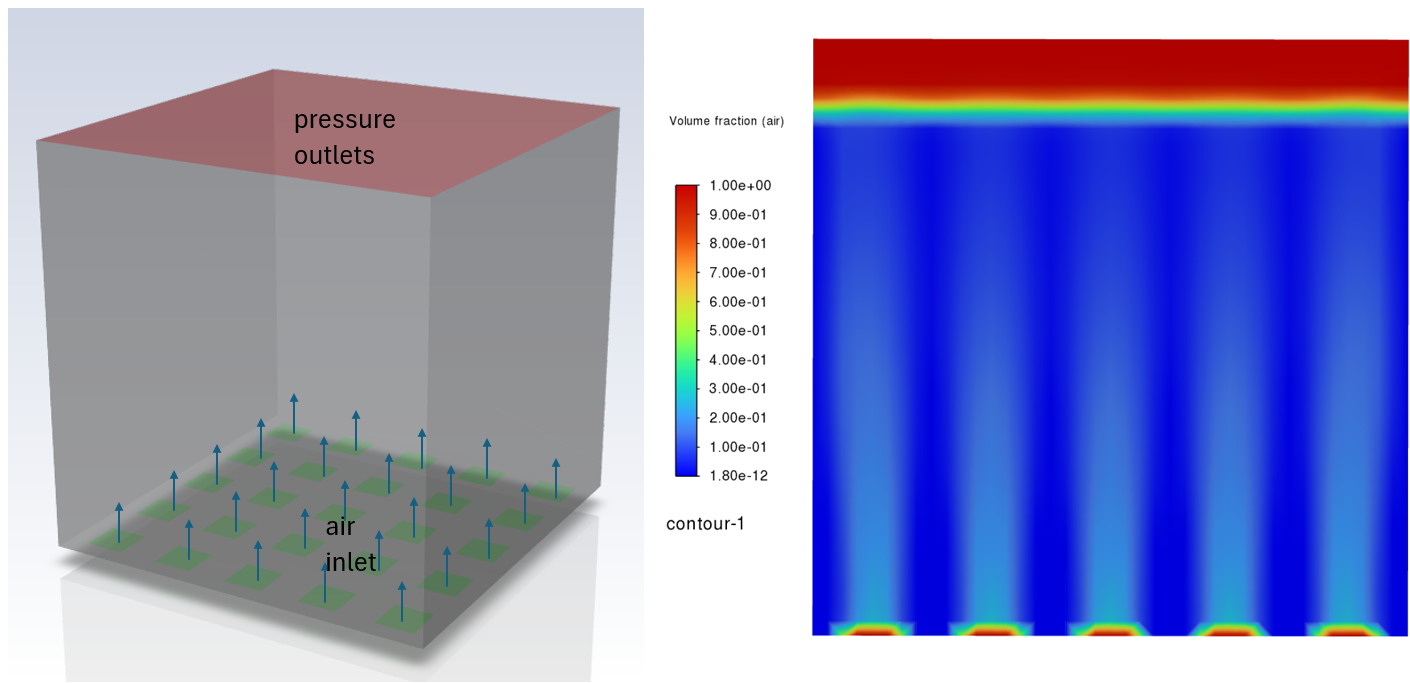
Discover how Fluent and Rocky coupling can be leveraged for efficient CFD + DEM simulations. Here, we modeled an aerated tank to simulate the dynamics of granules commonly used in water treatment processes.
Why CFD-DEM Coupling Matters for Water Treatment Simulation
In water treatment processes, improving mixing efficiency and controlling particle dynamics are key to achieving high performance. One promising approach is to combine Computational Fluid Dynamics (CFD) with the Discrete Element Method (DEM) using tools such as Ansys Fluent and Rocky DEM. This 2-way coupling allows engineers to capture the mutual interactions between fluid and solid phases in complex systems, such as aerated tanks.
In water treatment applications, mixing is often enhanced by aeration. Air bubbles rising from diffusers at the tank bottom induce turbulence and circulation, which in turn promote mass transfer and suspension of solid particles. When solid carriers or granules are introduced (e.g., in Moving Bed Biofilm Reactors or aerobic granular sludge systems), their movement strongly depends on the flow field. Conversely, the presence of particles alters the local flow through drag, momentum exchange, and turbulence.
How Two-Way CFD-DEM Coupling Works
This interaction cannot be easily captured accurately with CFD alone or DEM alone. That’s where 2-way coupling comes in:
- CFD (Fluent) resolves the continuous fluid phase, accounting for turbulence, bubble-induced mixing, and aeration effects.
- DEM (Rocky) tracks each particle or granule individually, resolving collisions, particle shape effects, and settling tendencies.
- Coupling exchanges data at every timestep: the fluid exerts drag and lift on particles, while particles affect the momentum of the fluid field.
Case Study: Aerated Mixing Tank with Granules
Here, we modeled a square-shaped water treatment tank with aeration at the base. Air bubbles rise. Granules are suspended in the liquid. The modeling objectives are:
- Mixing Efficiency – ensuring particles remain uniformly distributed instead of settling.
- Granule Dynamics – predicting collision frequency, clustering, and residence time.
- Flow–Particle Interaction – quantifying how granule particles modify circulation and turbulence levels.
Setting Up the Fluent Multiphase Model
The first step is to set up a Fluent case with the desired geometry. In this simple design, air flows from the bottom of the domain as bubbles.
Three phases are selected here. The phases are described below:
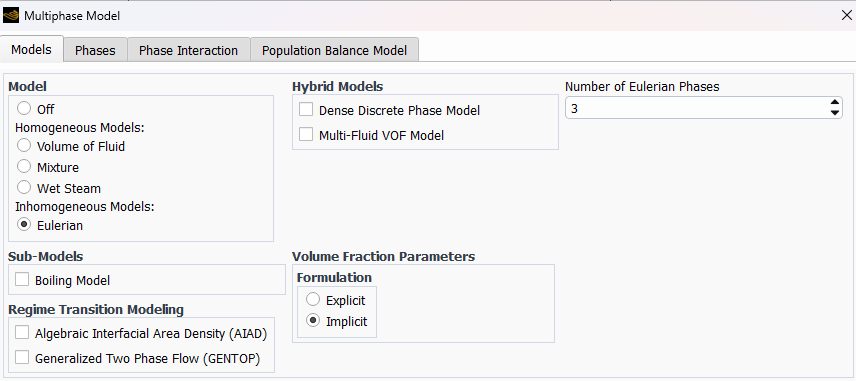
- Primary phase: water
- First secondary phase: air, monodispersed with a diameter of 5 mm
- Second secondary phase: particles, monodispersed with a diameter of 1 mm
The particle phase will be reserved as the DEM phase used by Rocky once the coupling is established.
An initial volume of water is patched as an initial condition, and only air flows through from the mass flow inlets at the bottom. Once the model is set up in transient mode, we can run it for a few iterations to ensure it converges on its own before moving it over to Rocky.
Configuring Rocky DEM for Two-Way Coupling
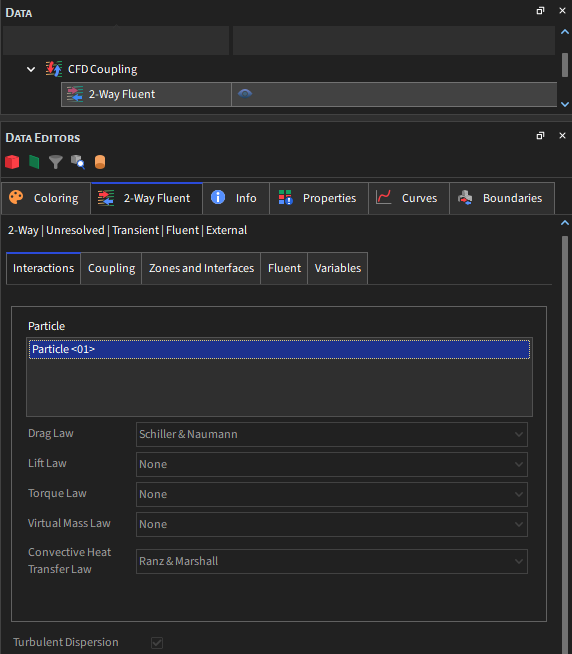
In Rocky, we first need to enable coupling by right-clicking in the Study and selecting 2-way coupling with Fluent. Note that we also need to create a particle in Rocky, with a prescribed density and size distribution.
Rocky also allows for easy transfer of boundaries from Fluent. We would also need to load the corresponding case file. To initialize using the data file generated in Fluent, check the Use Data Initialization option in the Fluent tab in the 2-Way Fluent (Data tree), and load the data file.
The proper modules would also need to be selected. Here, I chose the CFD Coupling Particle Statistics, Contacts Overlap Monitor, Inter-Group Collision Statistics, and the Inter-particle Collision Statistics.
Running and Visualizing the Coupled Simulation
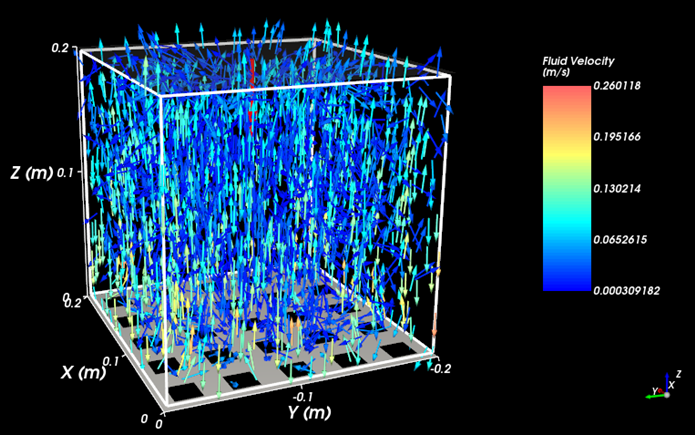
Particles are added into the system for the first 1 second at a rate of 0.04 tons/h, and the simulation is run for a total of 3 seconds. While the simulation is in progress, we can visualize the flow field from Fluent as it interacts with the DEM particles.
For more detailed visualization, we can use EnSight to view particle dynamics within the tank, colored by key parameters.

Details about the simulation setup are shown in this video:
Downloadable Resources
- Mesh file [Link]
Key Benefits of CFD-DEM Coupling for Water Treatment Design
- More Realistic Mixing Predictions – captures the non-uniform suspension and segregation tendencies of granules.
- Process Optimization – helps optimize aeration rates, tank geometry, and carrier loading.
- Scale-Up Reliability – provides insights beyond empirical correlations, supporting industrial design.
- Biofilm Systems Design – enables better understanding of how biofilm-laden carriers behave in dynamic aerated environments.
By leveraging the 2-way coupling of Fluent and Rocky, engineers can model aerated tanks with high fidelity. This approach captures the essential physics of bubble-driven mixing, particle suspension, and fluid–solid interaction. As a result, it becomes a powerful tool for designing and optimizing advanced treatment processes.
Need help with CFD-DEM coupling or multiphase simulation? SimuTech Group’s CFD consulting engineers use Ansys Fluent, Rocky, and EnSight for mixing, water treatment, and particle flow applications. For more on Fluent’s capabilities, read our article on the evolution of user-friendly CFD in Fluent. Contact us to discuss your simulation needs.