 Contact Us
Automating the conversion of CFX optimization results into standardized VTK and JSON datasets for simulation intelligence workflows.
Introduction
Optimization-driven CFD workflows are becoming increasingly common in engineering design, enabling the automatic evaluation of hundreds or even thousands of design variations. While these workflows provide valuable insights into design performance, they also generate large volumes of simulation data that are often difficult to use in modern AI and machine-learning applications.
In a typical Ansys CFX and OptiSLang workflow, simulation results are stored in proprietary CFX result files (.res), while design variables are maintained separately within the optimization project structure. Although these formats are well suited for traditional post-processing, additional preparation is typically required before the data can be used for data-driven workflows.
For Ansys Fluent users, direct VTK-based export capabilities simplify this transition. Ansys CFX, however, does not provide a similarly straightforward path to VTK PolyData (.vtp) files, creating an additional challenge when preparing datasets for visualization, analytics, and AI applications.
The objective of this project is to develop an automated workflow that transforms a CFX optimization study into a structured dataset containing:
- Surface-based CFD results in VTK format (.vtp)
- Design variables stored in JSON format
- A standardized directory structure suitable for downstream AI workflows
The resulting process eliminates repetitive manual post-processing and provides a scalable solution for converting large optimization studies into AI-ready datasets.
Challenges
Several challenges arise when preparing optimization data for AI workflows.
Proprietary Simulation Data
CFX simulation results are stored in proprietary result files that are not directly compatible with many visualization, analytics, and machine-learning tools. Converting these results into an open and portable format is therefore a key requirement.
Separating Geometry and Solution Data
Surface geometry and CFD solution data are exported through different mechanisms. While the surface mesh defines the geometric representation of the design, the solution variables contain the physical information required for analysis. These datasets must be combined into a single representation while preserving both geometry and field data.
Automation of Large Design Studies
Optimization studies typically contain many design points, making manual post-processing impractical. A scalable workflow requires fully automated processing capable of exporting, converting, and organizing simulation results without user intervention.
Association of Inputs and Outputs
AI workflows require a consistent relationship between design parameters and simulation results. Design variables and CFD outputs often reside in different locations and formats, requiring a mechanism to extract, organize, and pair both datasets systematically.
Dataset Standardization
Downstream AI applications benefit from a predictable dataset structure. Consistent file naming, folder organization, and data formats simplify data ingestion and reduce preprocessing effort when working with large numbers of designs.
Background: Ansys CFX to SimAI Pro
This article focuses on automating the preparation of AI-ready datasets from an existing Ansys CFX optimization study. The setup of the parametric model, sensitivity analysis, and optimization workflow is outside the scope of this article.
Readers interested in the complete optimization process—including geometry parameterization, OptiSLang integration, sensitivity analysis, and design optimization—are encouraged to refer to the previous blog:
From Blade Modeling to Design Optimization: A Parametric CFD Workflow in Ansys Workbench
The output of that workflow serves as the starting point for the automated dataset-generation process described below.
Ansys CFX to SimAI Pro Workflow Implementation
The source optimization study contains two primary types of data:
- Simulation outputs stored in CFX result (.res) files.
- Design variables stored within the OptiSLang project structure.
The objective is to transform these data sources into a structured dataset in which each design point contains a surface representation of the CFD results together with its corresponding design parameters.
Step 1 – Creating a CFD-Post Session for Automated Exports
Since CFX does not provide a direct export path to VTK PolyData (.vtp), an intermediate workflow is required. CFD-Post is selected as the export tool because it can access both the surface mesh and the associated solution data contained within a CFX result file.
The workflow begins by loading one representative design point in CFD-Post. Figure 1 summarizes the process used to generate the reusable CFD-Post session file that serves as the foundation of the automation workflow.
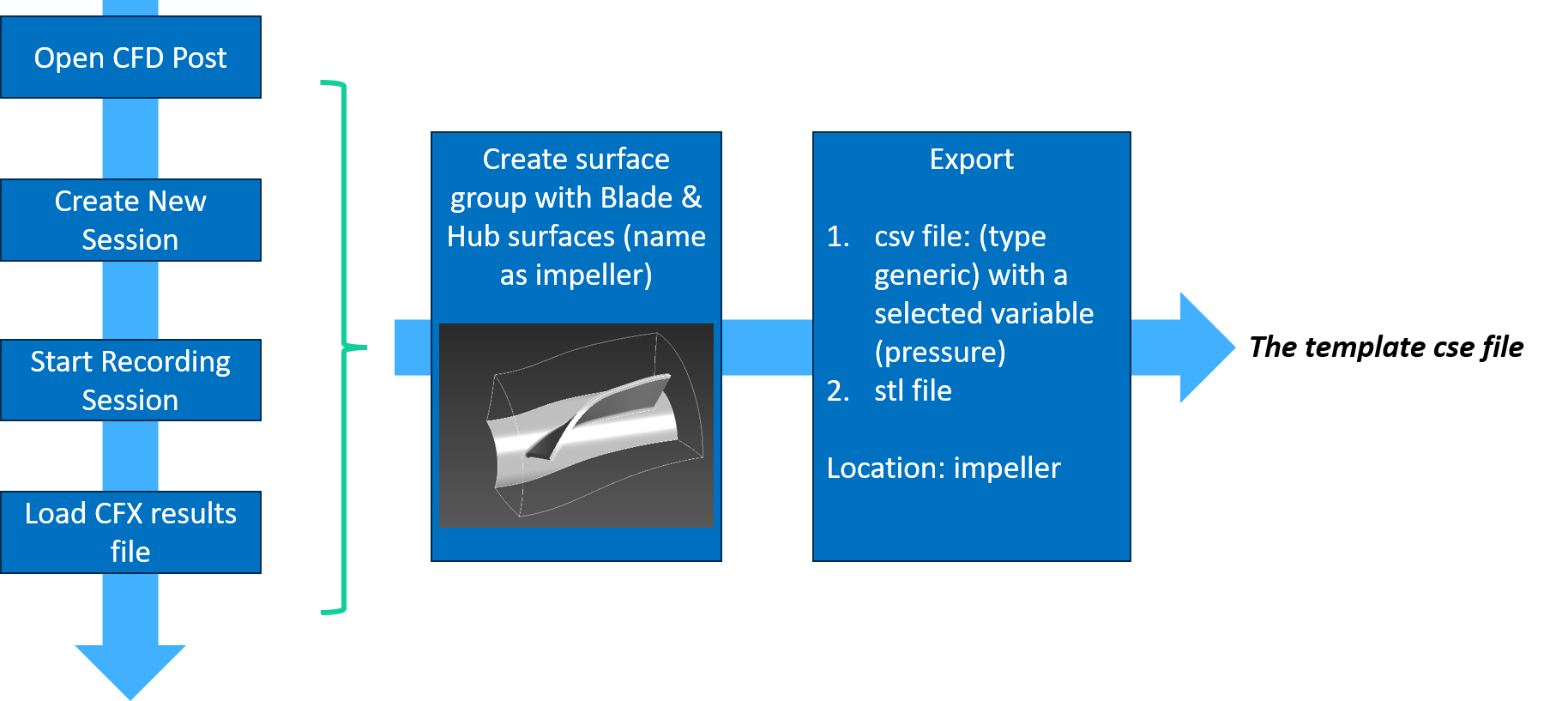
Why export both files? The STL file provides the blade surface mesh and connectivity, while the CSV file provides the CFD solution data (coordinates and pressure values). Both are required to reconstruct a pressure-colored surface in VTK (.vtp) format.
Step 2 – Automating CFD-Post Exports for All Design Points
Once the template session file (cfxsession.cse) is created, the export process is automated for every design point in the optimization study.
The optimization directory contains a collection of design-point folders (dp1, dp2, etc). Each design point contains a CFX results file. Rather than manually opening each result file, a Python script was developed to automatically:
- Discover all design-point folders.
- Create a temporary CFD-Post session file for each design.
- Launch CFD-Post in batch mode.
- Generate STL and CSV exports automatically.
One of the key advantages of using CFD-Post session files is that CFD-Post does not need to be opened interactively. The automation script calls CFD-Post using “cfdpost -batch cfxsession.cse”. In batch mode, CFD-Post runs entirely in the background to load the results, export the stl and csv files, and exit.
Step 3 – Reconstructing a Surface-Based VTK Dataset
Once the CFD-Post batch workflow completes, each design point contains two intermediate files: export.stl and export.csv. A Python workflow based on PyVista, Pandas, and a KD-tree nearest-neighbor search combines these files into a single surface dataset.
The STL mesh is used as the geometric foundation, and the pressure values from the CSV file are mapped onto the surface nodes. The resulting output is “surface.vtp” which contains both the surface geometry and variable (pressure in this case) distribution.
Step 4 – Extracting Design Variables
In addition to simulation outputs, each design point contains parameter information stored within the OptiSLang project structure.
The automation script locates the corresponding JSON file for each design and extracts only the design parameters, removing optimization responses and other metadata.
Step 5 – Building the Dataset Structure
The automation script creates a dedicated folder for every design point, while storing intermediate processing files separately (Figure 2).
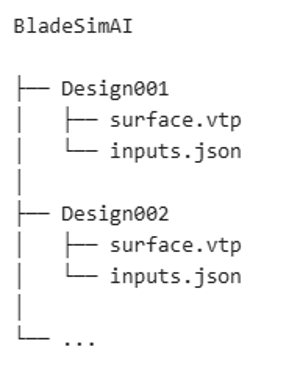
A key requirement for SimAI Pro is the use of a consistent folder and file naming convention. Rather than embedding the design identifier in the file names, the design number is stored in the folder name, while the files themselves use standardized names.
Step 6 – Fully Automated Processing
Once the workflow was assembled, processing a complete optimization study became a single-step operation.
The automation script:
- Locates all design points.
- Executes CFD-Post in batch mode.
- Exports STL and CSV files.
- Generates VTP surface datasets.
- Extracts input parameters.
- Organizes the final dataset structure.
Using the Ansys CFX Dataset in SimAI Pro
Once the dataset was generated, it was imported into SimAI Pro for model training and validation. The study consisted of 100 design points, 90 for training and 10 for testing.
A particularly useful feature of SimAI Pro is the automatically generated Model Evaluation Report, which provides a detailed assessment of model performance. The report includes:
- Confidence scores for each individual test case
- Overall model quality metrics
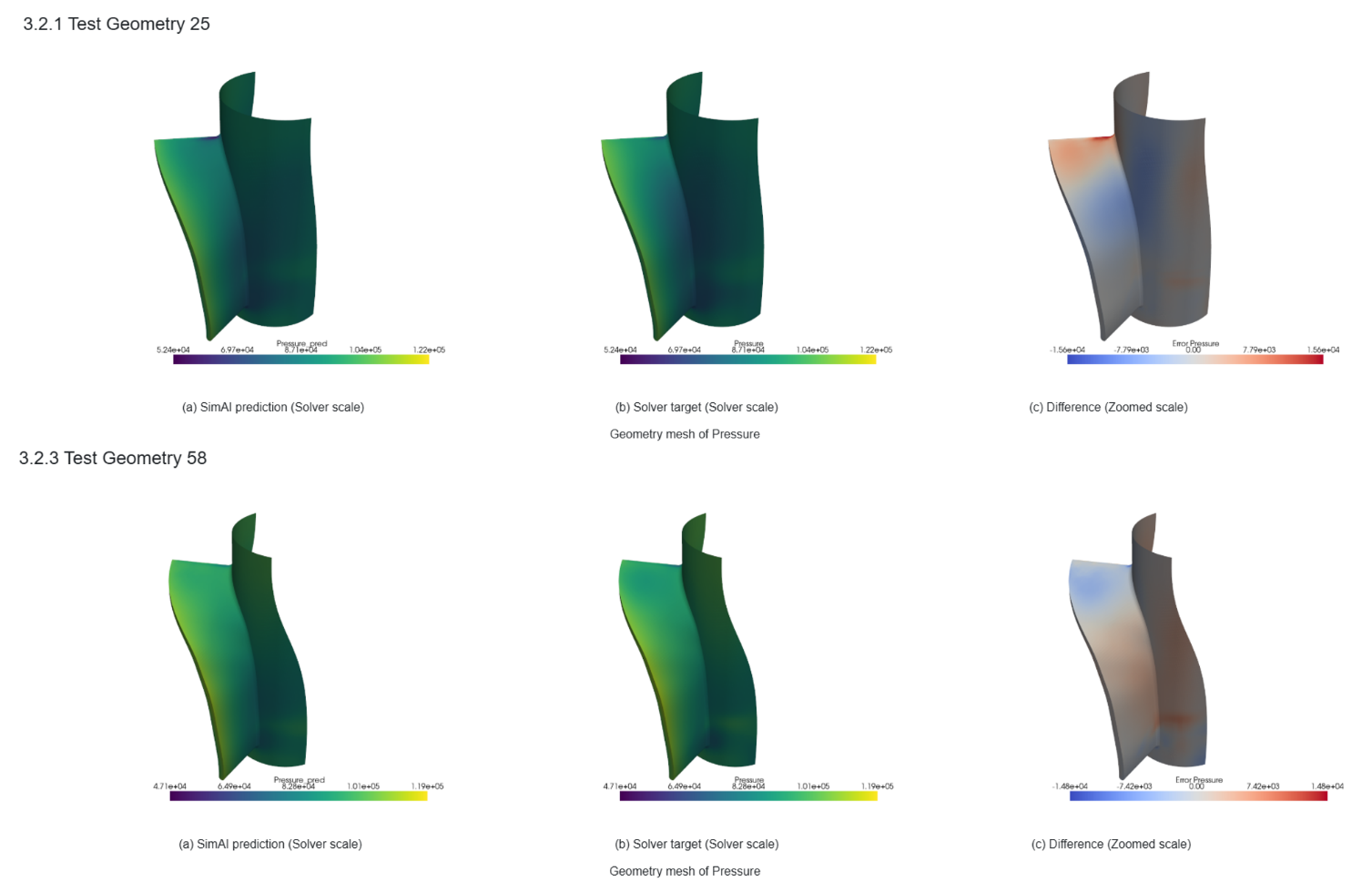
- Side-by-side comparisons between CFD results and AI predictions
- Visual comparisons of predicted and simulated pressure distributions on the blade surface
These visual comparisons provide an intuitive way to assess prediction accuracy and identify any regions where deviations may occur.
For this study, the trained model achieved an overall confidence score of 0.99 (Figure 3), indicating excellent agreement between the AI predictions and the original CFD simulations. The side-by-side pressure distribution comparisons showed that the trained model successfully captured the dominant flow features and pressure trends across the blade surface.
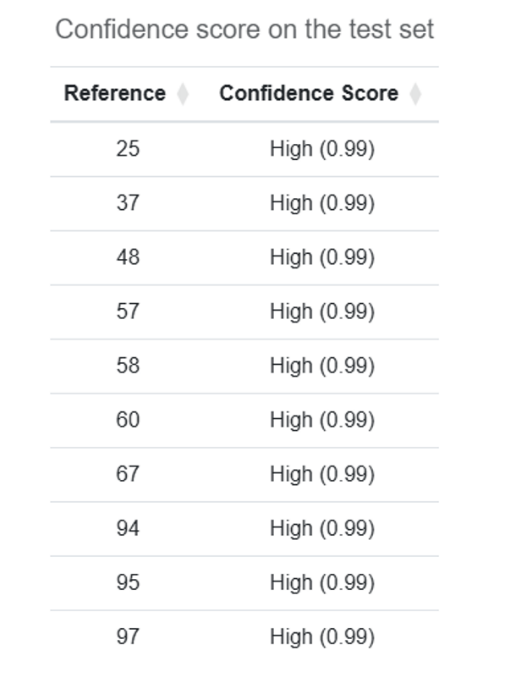
Figure 4 shows the side-by-side comparison from the Model Evaluation Report for two representative test cases.
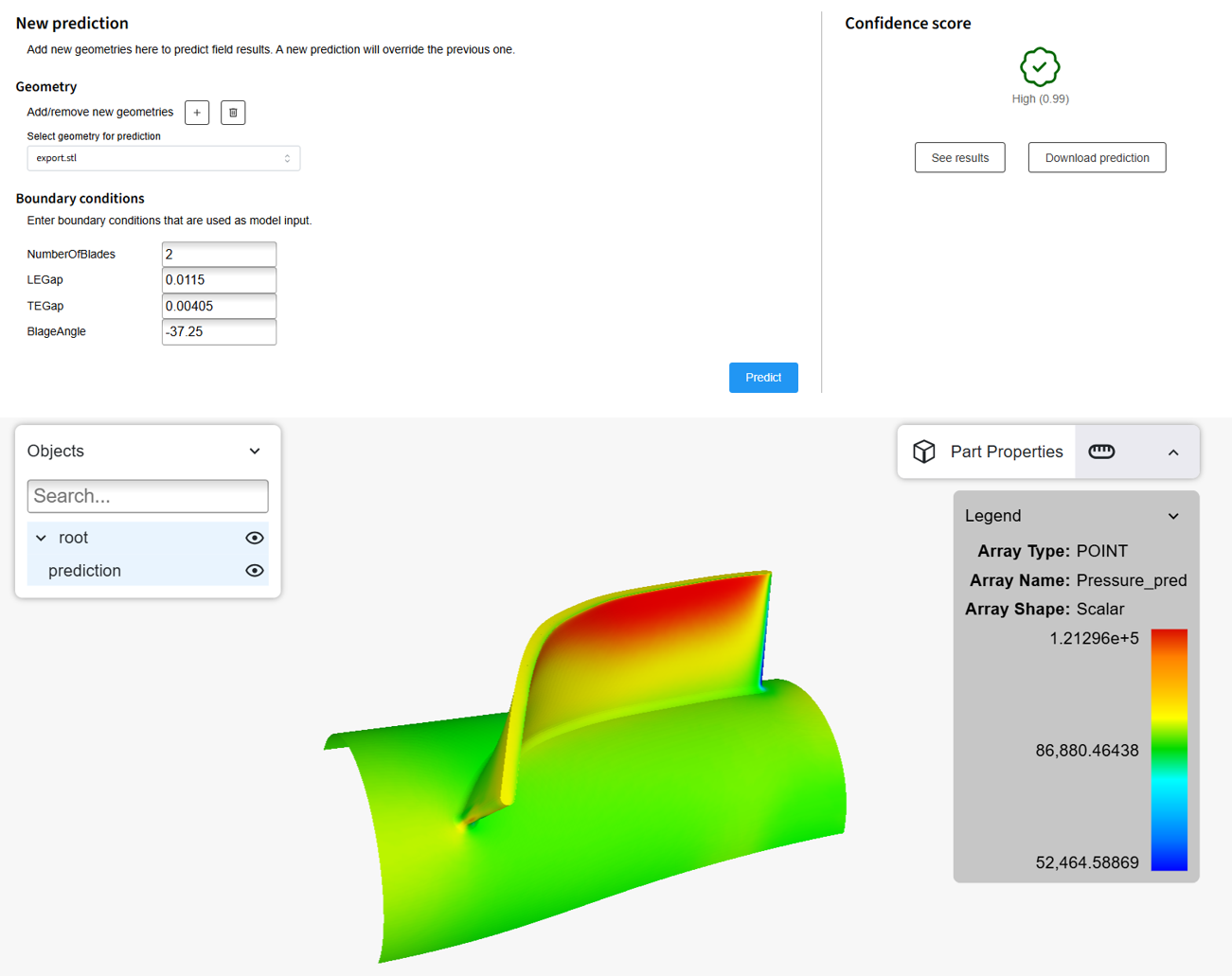
A useful feature of SimAI Pro is that model training is only the first stage of the workflow. Once training is complete, the generated model can be used to predict field results for new design conditions without running additional CFD simulations.
As shown in Figure 5, users can specify a new set of input parameters, such as:
- Number of blades
- Leading-edge gap (LEGap)
- Trailing-edge gap (TEGap)
- Blade angle
and request a prediction directly from the trained model.
Conclusion: Ansys CFX to SimAI Pro Workflow
This article presented an automated workflow for transforming Ansys CFX optimization studies into structured datasets suitable for data-driven engineering applications. By combining CFD-Post batch processing, Python-based surface reconstruction, and automated extraction of design parameters, the workflow converts simulation results and optimization metadata into a standardized dataset consisting of surface.vtp and inputs.json files for every design point.
The workflow eliminates repetitive manual post-processing and scales efficiently from a few design points to large optimization studies containing hundreds of designs. In addition, the use of a consistent dataset structure simplifies integration with downstream visualization, analytics, and AI workflows.
The generated dataset was successfully imported into SimAI Pro, where a model trained using approximately 100 design points achieved an excellent confidence score during validation. The resulting workflow demonstrates how existing CFD optimization studies can be transformed into reusable datasets that extend the value of simulation data beyond traditional post-processing.
By establishing an automated bridge between Ansys CFX and modern data-driven workflows, engineers can more effectively leverage optimization results for future design exploration, predictive modeling, and simulation intelligence applications.
Additional Resources
The following video provides a step-by-step walkthrough of the complete workflow described in this article, including CFD-Post export automation, dataset generation, import into SimAI Pro, model training, evaluation using the Model Evaluation Report, and prediction of new design conditions using the trained model.

Ertan Taskin, Ph.D., Chemical Engineering
Principal Engineer, SimuTech Group
Ertan is a Principal Engineer with more than two decades of experience in CFD, fluid-structure interaction, and biomedical device design. He has advanced ventricular assist devices, transcatheter heart valves, and artificial lungs through hydraulic optimization, in vitro validation, predictive modeling, and AI-driven data analysis. His recent work integrates machine learning for performance prediction and design optimization. His career includes senior engineering roles at Medtronic, HeartWare, Roketsan, and Ozen Engineering, where he led projects spanning medical devices and aerospace propulsion. Ertan’s expertise includes blood damage modeling, uncertainty quantification, integrated thermo-fluid systems, and AI-assisted simulation workflows. He holds a Ph.D. in Chemical Engineering from Worcester Polytechnic Institute, along with Master’s and Bachelor’s degrees in Chemical Engineering from Middle East Technical University.