Contact Us
Introduction
As of now, Ansys Mechanical Solution Combination does not natively support certain result types, including joint probes and beam connection probes. This post demonstrates a Python-based workaround for combining joint probe results from baseline analyses, helping users evaluate load combinations without repeatedly solving large numbers of individual load cases.
Overcoming Solution Combination Limits in Ansys Mechanical
In industries such as aerospace, a set of loads is often combined in different ways to generate a large number of load cases — sometimes several hundred. Based on customer feedback, we realized how useful it can be to analyze only the baseline loads separately and then combine results through the Solution Combination tool.
This approach can save computational time, limit file storage size, and allow users to modify combination coefficients or add new combinations without requiring additional solve time.
However, this option is currently only natively available in Mechanical for deformations, stresses, and strains. The example in this post was designed for joint probes, but it can also be applied to beam connection probes with a few simple changes.
Using Python to Combine Joint Probe Results
The code is divided into four functions:
1. Creating Joint Probe Result Objects
create_result_objects: This function populates the solution of each analysis in the tree with joint probes for each joint defined in the model. The result objects are named based on the rslt_name variable.
Choosing a unique name for this variable helps avoid potential conflicts with other result objects already existing in the analysis. This variable is also used in the next step to identify the result objects of interest and retrieve data from them.
This function can be skipped by setting create_joints = False if the results were already created manually.
2. Extracting Probe Results from Tabular Data
extract_results: This function loops through all result objects previously defined for all analyses in the tree and collects their results from the tabular data.
This portion of the workflow is based on a previous example developed by Pat Tessaro, “Using Python to Export Tabular Data from within Ansys Mechanical.”
3. Combining Baseline Analysis Results with Coefficient Matrices
combine_results: Results collected in the previous extract_results function are then sent to the combine_result function, which linearly combines the force reactions from the baseline analyses for each joint.
The combinations are defined through the coefficients matrix, where each row represents a single linear combination.
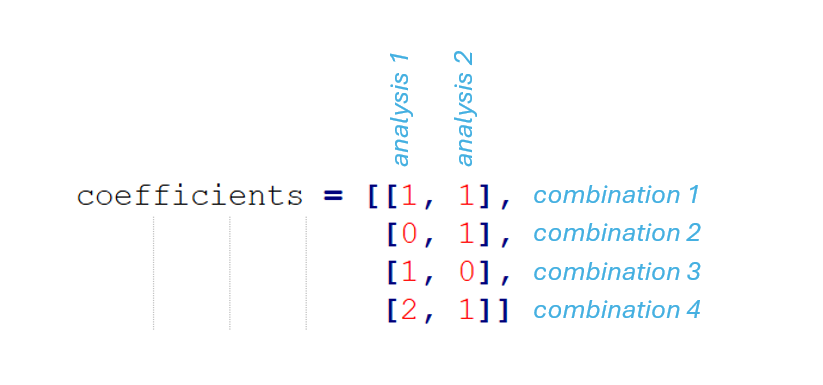
In the example above, the first combination is simply the sum of the results from the two baseline analyses. The second combination only accounts for the second baseline analysis, the third only accounts for the first analysis, and the fourth combination doubles the results from the first analysis before adding them to the results from the second analysis.
More combinations can be added by writing additional rows in the matrix. The example shown is for two baseline analyses, but more analyses can be added to the combination by introducing more columns.
By default, results from the last timestep of the baseline analyses are considered in the combination. However, users can specify a different timestep from which the results should be retrieved by replacing the coefficients with a tuple.
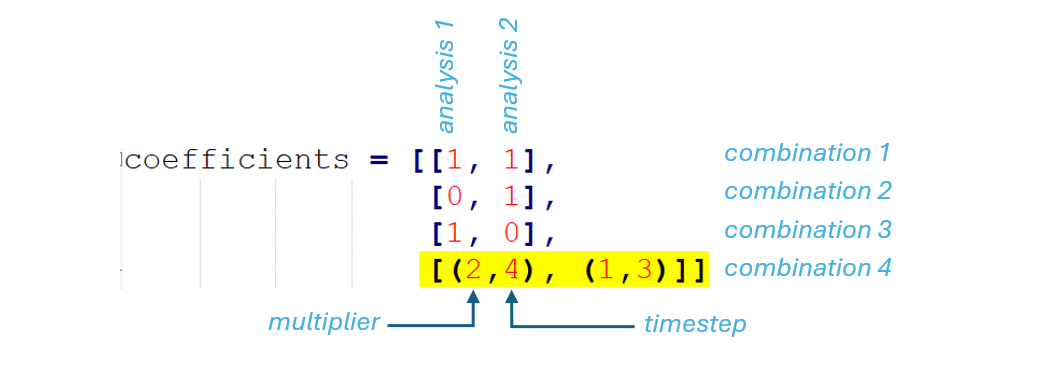
The first number in the tuple represents the multiplying coefficient, and the second represents the timestep number in the analysis. In the example shown, the last combination combines the fourth timestep of analysis 1 with the third timestep of analysis 2. Timestep numbers correspond to the order displayed in the tabular data for each result.

4. Exporting Combined Joint Probe Results to CSV
write_csv: Finally, this function exports the combined results into a series of .csv files that can be opened in Microsoft Excel for additional processing.
For convenience, this example exports each component of the results — x, y, and z — into a different file. The combine_results function was designed to combine only one component of the results at a time.
In the .csv files, each column represents a different combination, and each row represents a different joint. However, this structure can be modified to organize results differently depending on the user’s needs. Headers could also be added to the .csv file with a few additional commands.
Python Script for Combining Joint Probe Results
import csv

def create_result_objects(n_results, analyses_list, rslt_name):
    for curr_analysis in analyses_list:
        for j in range(0, n_results):
            new_joint_probe = curr_analysis.Solution.AddJointProbe()
            new_joint_probe.Name = rslt_name + str(j+1)
            new_joint_probe.BoundaryConditionSelection = all_joints[j]
    curr_analysis.Solution.EvaluateAllResults()


def extract_results(analyses_list, rslt_name):
    results_table = []

    for curr_analysis in analyses_list: # loops through all the analyses
        solution = curr_analysis.Solution
        results_col = []

        for j, item in enumerate(solution.Children): # loops through all the objects in the current analysis
            if item.GetType() == Ansys.ACT.Automation.Mechanical.Results.ProbeResults.JointProbe:
                if rslt_name in item.Name:
                    item.Activate()

                    data = []
                    del data[:]

                    Pane = ExtAPI.UserInterface.GetPane(MechanicalPanelEnum.TabularData)
                    Con = Pane.ControlUnknown

                    for R in range(1, Con.RowsCount+1):
                        data.append([])
                        for C in range(2, Con.ColumnsCount+1):
                            data[-1].append(Con.cell(R,C).Text)

                    results_col.append(data)

        results_table.append(results_col)

    return results_table


def combine_results(results_table, coefficients, n):
    # n is the component: n=0 --> X, n=1 --> Y, n=2 --> Z
    comb_table = []
    n_combinations = len(coefficients)

    for k in range(0, n_combinations):
        comb_column = []

        for j in range(0, n_joints):
            comb_result = 0

            for i in range(0, n_analyses):
                if type(coefficients[k][i]) == int:
                    time_step = -1
                    coeff = coefficients[k][i]

                elif type(coefficients[k][i]) == tuple:
                    time_step = coefficients[k][i][1]
                    coeff = coefficients[k][i][0]

                comb_result += coeff * float(results_table[i][j][time_step][n+1])

            comb_column.append(comb_result)

        comb_table.append(comb_column)

    transposed = list(map(list, zip(*comb_table))) # transposes the table

    return transposed


def write_csv(filename, data):
    with open(filename, 'wb') as csvfile:
        spamwriter = csv.writer(
            csvfile,
            delimiter=',',
            quotechar='|',
            quoting=csv.QUOTE_MINIMAL
        )

        for row in data:
            spamwriter.writerow(row)


all_joints = Model.GetChildren(DataModelObjectCategory.Joint, True)
all_analyses = Model.Analyses

n_joints = len(all_joints) # counts the number of joints in the model
n_analyses = len(all_analyses) # counts the number of analyses in the tree

rslt_name = "JointProbe" # naming convention for the result objects to be created

path = 'C:\Temp\\'
file_name = 'my_joint_results'

# coefficients for linear combination of each baseline analysis
coefficients = [
    [1, 1],
    [0, 1],
    [1, 0],
    [2, 1]
]

create_joints = True

if create_joints == True: # creates probe results for each joint in all analyses
    create_result_objects(n_joints, all_analyses, rslt_name)

my_results = extract_results(all_analyses, rslt_name)

my_combined_results_X = combine_results(my_results, coefficients, 0)
my_combined_results_Y = combine_results(my_results, coefficients, 1)
my_combined_results_Z = combine_results(my_results, coefficients, 2)

write_csv(path + file_name + '_X.csv', my_combined_results_X)
write_csv(path + file_name + '_Y.csv', my_combined_results_Y)
write_csv(path + file_name + '_Z.csv', my_combined_results_Z)
Final Thoughts on Automating Solution Combinations
For load-case-heavy workflows, especially in industries such as aerospace, combining baseline analysis results can reduce unnecessary solve time and simplify post-processing. While Ansys Mechanical Solution Combination does not currently support joint probes and beam connection probes natively, Python scripting offers a practical workaround for users who need to extract, combine, and export probe-based results more efficiently.
Need help extending or automating your Ansys Mechanical post-processing workflow? Connect with SimuTech Group to learn how our simulation experts can help you streamline complex load-case studies, reduce manual effort, and get more value from your Ansys tools.

Emiliano Ximenes, PhD
Mechanical Engineer, SimuTech Group
Emiliano Ximenes is a PhD mechanical engineer at SimuTech Group with expertise in structural dynamics, vibration analysis, and nonlinear finite element modeling. His research background includes the study of highly ordered frictional mesh materials, with a focus on their damping and stiffness properties through vibrational analysis, nonlinear FEM, and analytical modeling. Emiliano applies advanced simulation techniques to help engineering teams better understand complex mechanical behavior and improve confidence in design performance.