Contact Us
Introduction to Magnetic Hysteresis Modeling
Whether you are interested in modeling hysteresis core loss, magnetization of permanent magnets, or the remanent dipole of a magnetic structure, defining a material with accurate hysteresis characteristics is the first hurdle to overcome. In this article I will demonstrate how to extract hysteresis data from a plot image and then use this data to define a material hysteresis model in Ansys Maxwell.
Finding and Extracting Hysteresis Data
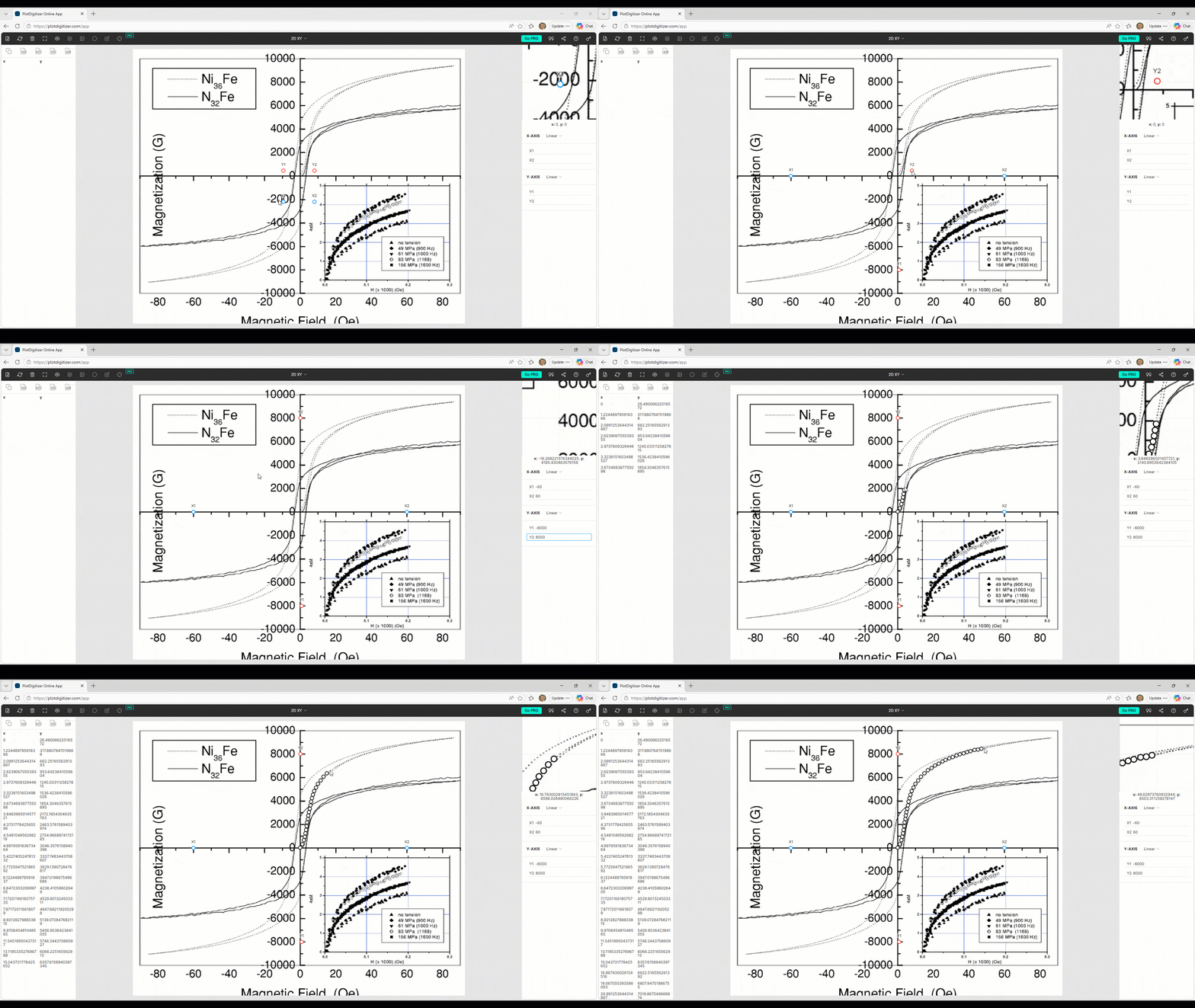
It is often difficult to source nonlinear BH curve or hysteresis loop data for your material of interest. Sometimes it can only be found in the form of a plot image, such as within an academic research paper. With the help of freely available online plot digitizer tools, we can produce a CSV data file from these static images. The plotdigitizer.com tool, for example, allows you to define your X and Y axes and then add datapoints guided by the background image. In our case, we will first recover the initial magnetization curve starting at [0,0] and then recover the full descending major hysteresis loop curve for use in magnetic hysteresis modeling.
Cleaning Up the Data
After exporting the data as a CSV file, a spreadsheet program like Microsoft Excel can be used to process the data into an acceptable format to be used in Ansys Maxwell.
Convert Units
The first step is to convert the units for H and B respectively into Amps-per-meter [A/m] and Tesla [T] (in this case from Oersted [Oe] and Gauss [G]).
Ensure Odd Symmetry for First and Last Points of Descending Major Loop Curve
If we are working with major hysteresis loop data for magnetic hysteresis modeling, we only need the descending curve since Maxwell will mirror it across both axes to reproduce the ascending curve. One requirement for this to be possible is that the first and last points of the descending major loop curve have to be odd symmetric, meaning both coordinates should be identical magnitude but opposite sign. To do this, we can simply copy one of the endpoints and flip the signs after using it to replace the other endpoint. Do make sure the curve is still monotonically increasing after doing so.
Ensure [0,0] Start for Initial Magnetization Curve
If we are working with a nonlinear BH curve such as the initial/virgin, commutation/normal, or anhysteretic/ideal magnetization curves we want to make sure our first datapoint is [0,0] even if it means slightly modifying the extracted data.
Export as Tab Delimited File
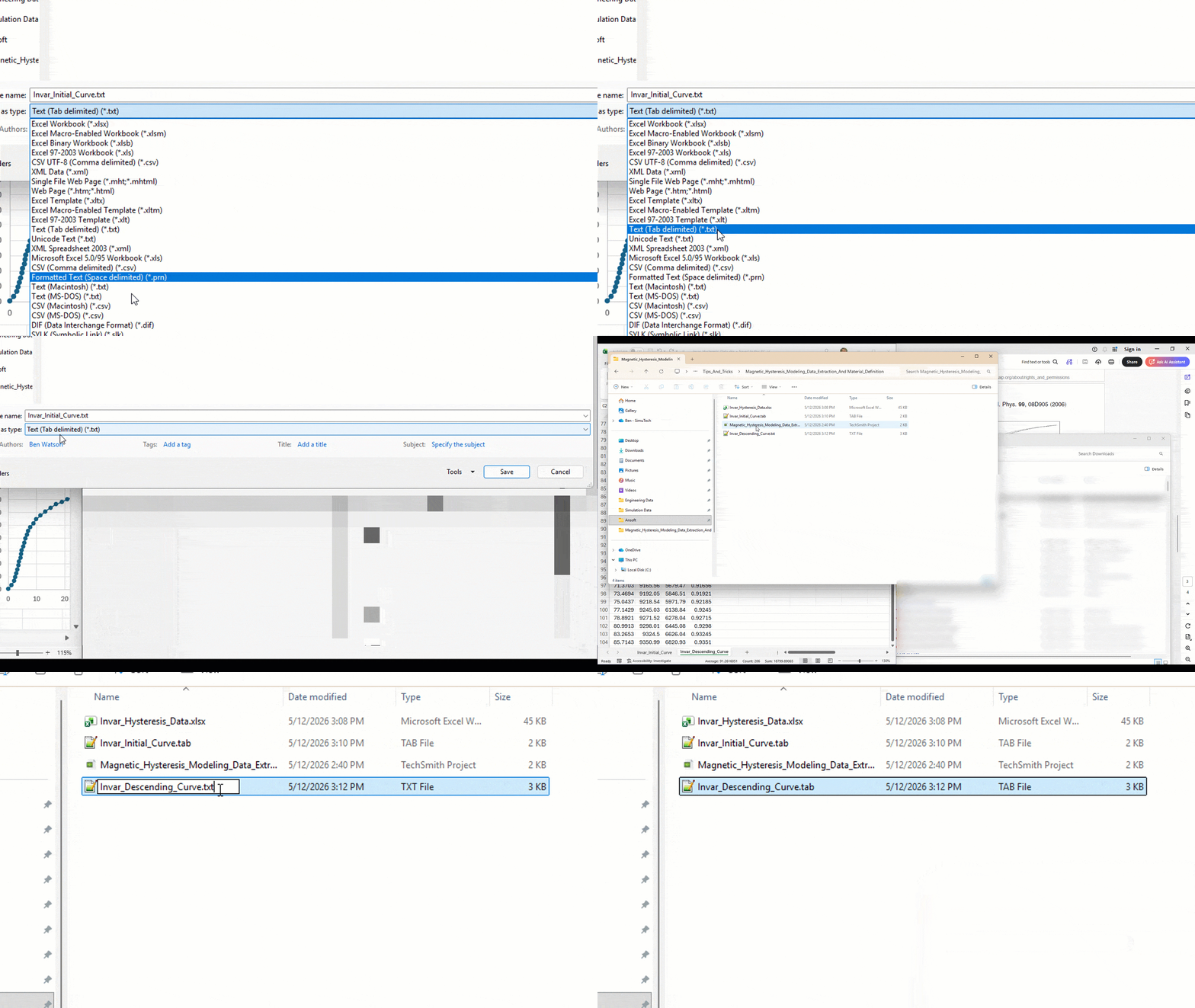
With our datasets cleaned up we can copy only the data to a new Excel file and save it as a “Text (Tab delimited) (*.txt)” file. Then, after saving, go to the file in the file explorer and change the extension from “.txt” to “.tab”. This will allow the file to be read into Ansys Maxwell.
Major vs Minor Loop Formulations
Within Ansys Maxwell, there are two methods by which we can define a materials magnetic hysteresis: the “major loop formulation” and the “minor loop formulation”.
Major Loop Formulation
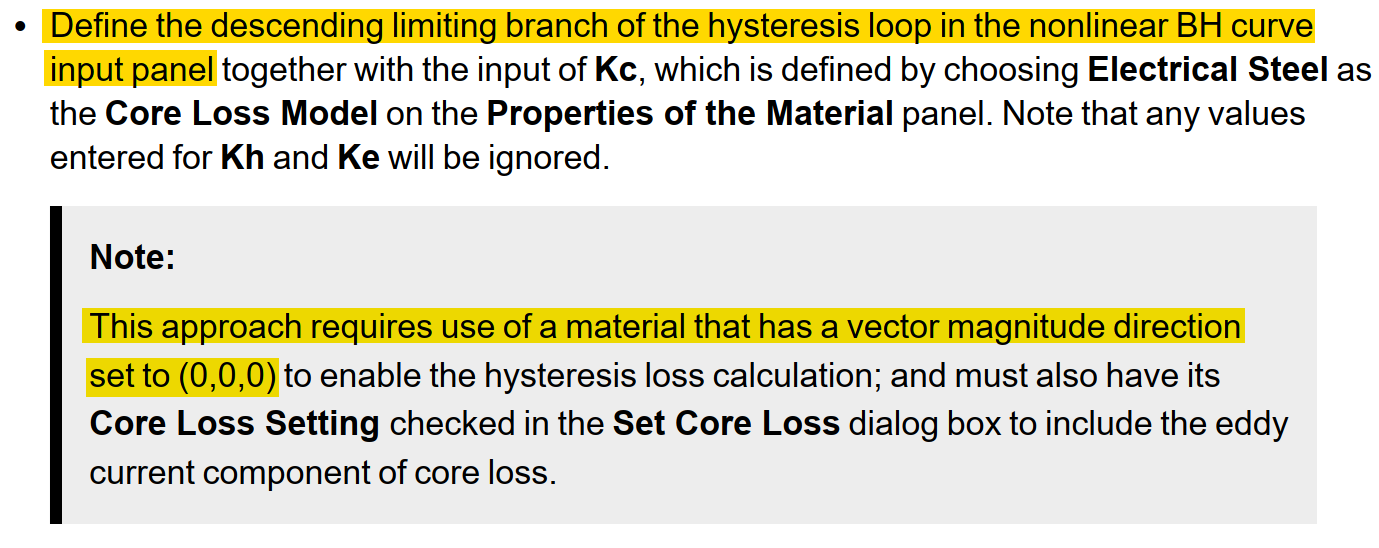
The major loop formulation uses the descending branch of the major hysteresis loop for magnetic hysteresis modeling. This method requires an isotropic material such that the Magnetic Coercivity vector components are set to [0,0,0] and the descending curve endpoints are odd symmetric. It allows you to model core loss with the Electrical Steel core loss model and is ideal when you want to exactly define your material’s major hysteresis loop. The downside is that its minor loop behavior is only defined by a fixed-slope recoil line back to the major loop.
Minor Loop Formulation
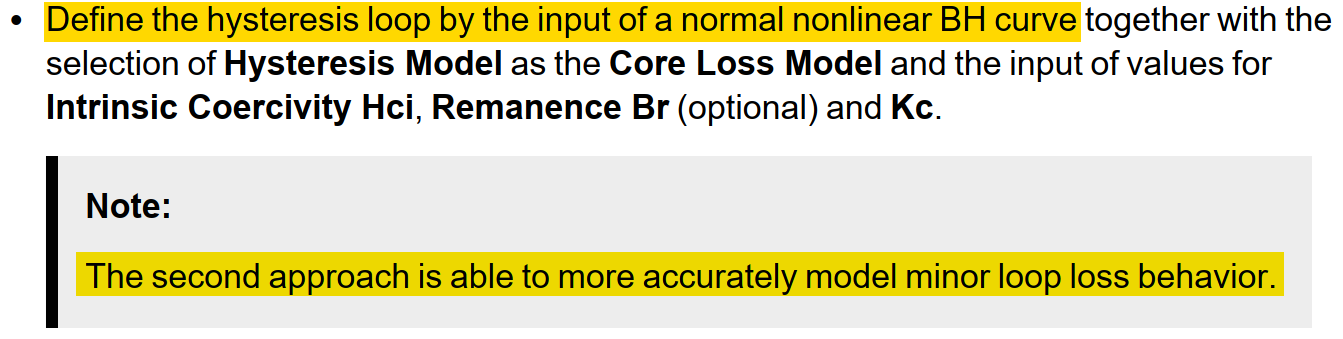
The minor loop formulation on the other hand only requires you to input the “normal” or commutation nonlinear BH curve in the first quadrant, though depending on data availability you may have to use the initial or anhysteretic curve or even a quasi-anhysteretic curve created by simply averaging the ascending and descending major loop curves. This method requires you to enable the Hysteresis Core Loss Model and to define the Intrinsic Coercivity (Hci) and optionally the Remanence (Br) which are used by an internal algorithm to fit a major hysteresis loop to your nonlinear BH curve data. This method is ideal when anisotropy and/or accurate minor loop behavior is needed, whether for loss or remanence, as it includes a variable slope recoil line.
Defining Materials for Magnetic Hysteresis Modeling
The final step is to define a magnetic material in Ansys Maxwell using either of these datasets and methods.

Major Loop Material
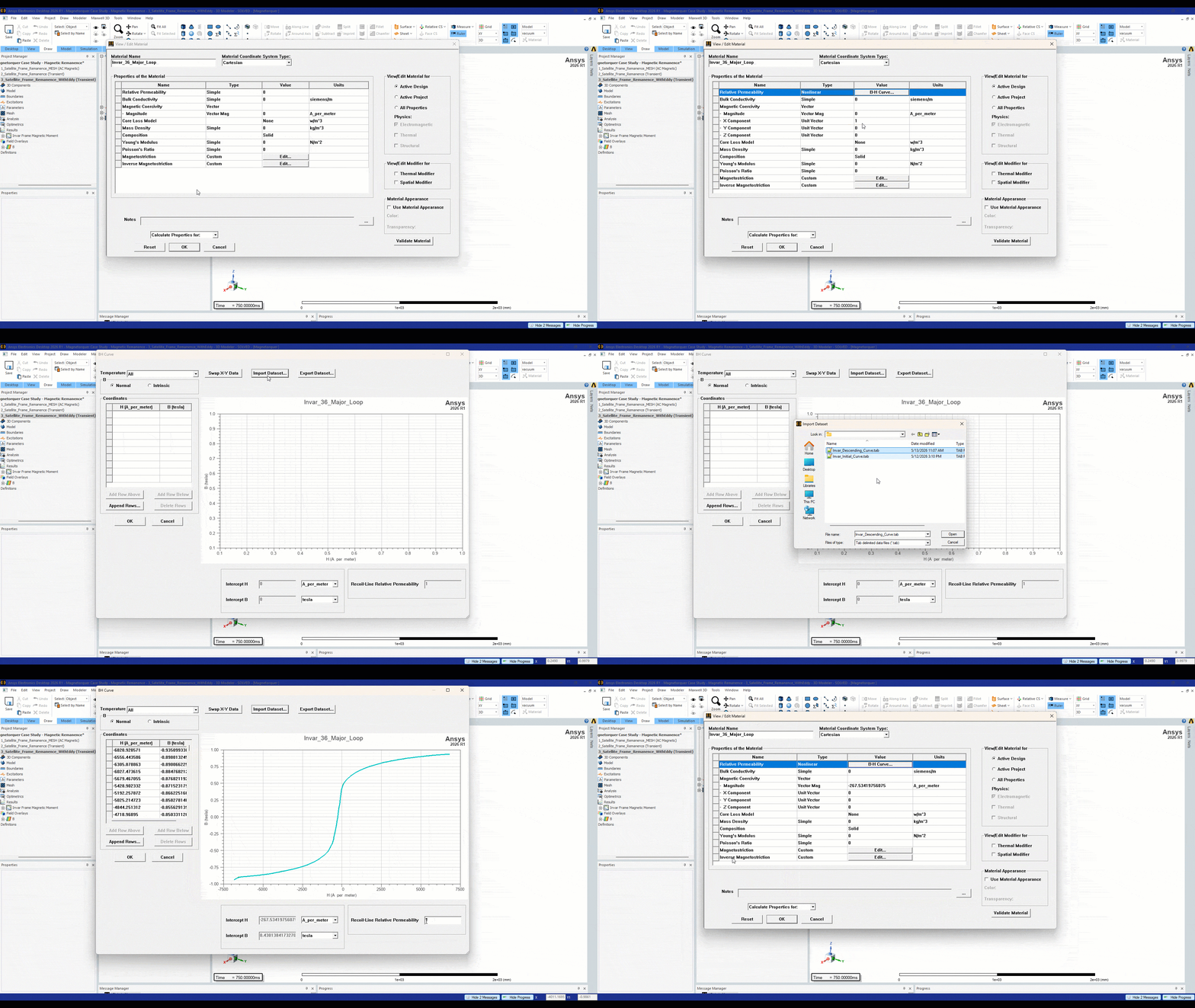
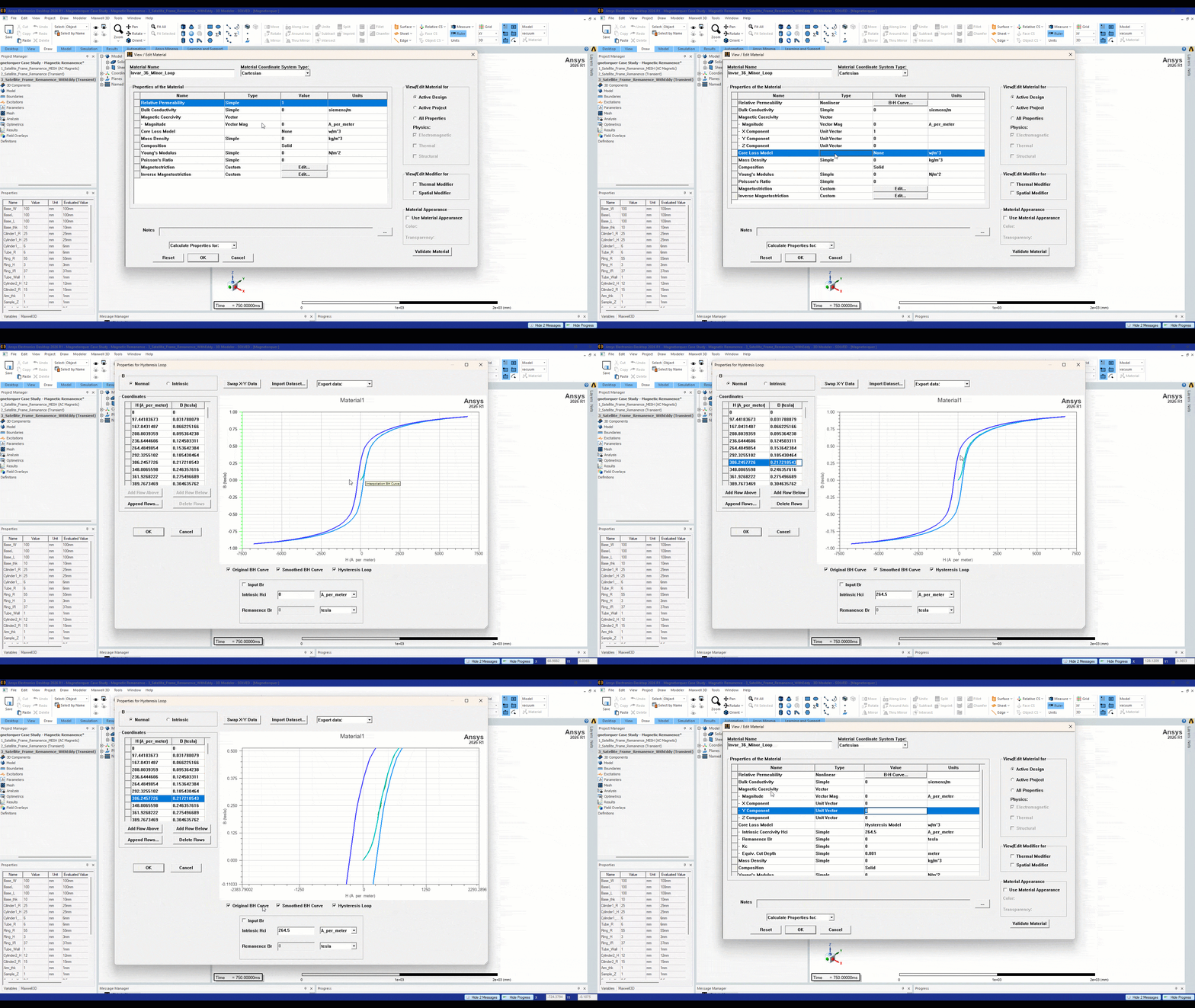
To define a material with the major loop formulation first change the Relative Permeability type to “nonlinear”, then change the Magnetic Coercivity vector components all to zero (typically the X component defaults to 1). Next click on the BH curve value and click Import Dataset. Change the file type to .tab in order to see your exported datasets and select your Descending Curve. If the curve is valid for use with the major loop formulation you should see the an editable Recoil-Line Relative Permeability value, otherwise, if for example your endpoints are not odd symmetric, this value will be greyed out.
Minor Loop Material
Next, we can define a minor loop material with the normal BH curve by following the same initial step of changing the relative permeability from Simple to Nonlinear, clicking on the B-H Curve value and importing the .tab data file. After defining the BH curve data we need to change the Core Loss Model to Hysteresis Model and then select Hysteresis Loop from the “Calculate Properties for:” dropdown. Here you can define your materials intrinsic coercivity and optionally its remanent flux. Note that when entering a value for remanent flux it will only take effect if the value is larger than the initial value calculated by the fit hysteresis loop (you can not force a smaller Br value). If you have a valid nonlinear curve which starts at [0,0] you should see the Smoothed BH Curve and Hysteresis Loop on the plot with your original data. Note that the minor loop formulation supports anisotropy, so you can input X, Y, and Z vector components or zero them out for an isotropic material.
Bringing Hysteresis Data into Practical Maxwell Workflows
Accurate magnetic hysteresis modeling starts well before the solve. When material data is only available as a plot image or partial BH curve, engineers need a reliable way to extract, clean, format, and validate that information before using it in Ansys Maxwell.
By converting source data into the correct units, checking curve symmetry and starting points, and selecting the appropriate major or minor loop formulation, users can create magnetic material definitions that better reflect real-world hysteresis behavior. This helps improve confidence when modeling core loss, magnetization, remanence, anisotropic effects, and other electromagnetic performance concerns tied to nonlinear magnetic materials.
Need Help Defining Magnetic Materials in Ansys Maxwell?
SimuTech Group helps engineering teams build, troubleshoot, and validate electromagnetic simulation workflows in Ansys Maxwell, including nonlinear BH curve setup, hysteresis material definition, core loss modeling, and magnetic field analysis.
Connect with our electromagnetic simulation experts to improve material setup and modeling confidence in Ansys Maxwell.
- Huang, Lin & Zhou, Yongjian & Tingwen, Guo & Han, Dong & Gu, Yu & Pan, Feng. (2022). Investigation of Temperature-Dependent Magnetic Properties and Coefficient of Thermal Expansion in Invar Alloys. Materials. 15. 1504. 10.3390/ma15041504.
- Online PlotDigitizer Free App. (n.d.). PlotDigitizer. https://plotdigitizer.com/app

Ben Watson, MS, Electrical Engineering
Senior Staff Electrical Engineer, SimuTech Group
Ben Watson is a Senior Staff Electrical Engineer at SimuTech Group, where he supports customers with advanced simulation workflows using Ansys software. His background includes Pulsed Power Engineering in the space, defense, and nuclear fusion research industries. Ben holds both a master’s and bachelor’s degree in electrical engineering with a focus in electromagnetics from Arizona State University.