Contact Us
Discover how Singular Value Decomposition (SVD) Reduced Order Model (ROM) can be applied to a battery module thermal simulation.
Why Battery Module Thermal Simulation Is Computationally Demanding
As battery modules become increasingly critical in electric vehicles and energy storage systems, managing their thermal performance presents major engineering challenges. High power densities generate significant heat, which, if not properly dissipated, can lead to cell degradation, performance loss, or even thermal runaway. The complexity increases when accounting for the variability in cell arrangements, materials, and cooling strategies. Designers must ensure uniform temperature distribution across cells while meeting stringent packaging constraints and weight targets. Moreover, accurate thermal simulations are often computationally expensive, particularly during transient loading conditions or large-scale simulations. This makes iterative design and optimization slow and sometimes infeasible, especially in early-stage development when many design parameters are still in flux.
Cooling Strategies and the Need for Model Reduction
Engineers typically rely on a combination of active and passive cooling strategies to manage battery thermal behavior. Liquid cooling is widely used for its efficiency, with designs incorporating cooling plates, cold plates, or direct immersion. Air cooling, though less efficient, is sometimes preferred for cost-sensitive applications. However, testing these configurations requires detailed 3D CFD simulations and often hardware prototypes, both of which can be costly and time-consuming. Engineers must often strike a balance between performance, manufacturability, and thermal reliability, all within compressed development timelines and increasingly tight regulatory requirements.
To overcome these challenges, engineers are increasingly adopting model-reduction techniques such as Singular Value Decomposition (SVD) ROMs in ANSYS Fluent and Twin Builder. These Reduced Order Models enable the creation of lightweight, yet highly accurate, thermal models from high-fidelity CFD simulations. Using SVD, complex simulation data are compressed onto a reduced basis that captures dominant thermal behaviors at a fraction of the computational cost. Once deployed in Twin Builder, these ROMs enable real-time system-level evaluations and design iterations across cooling strategies, operating conditions, and control algorithms. This integration empowers engineers to simulate thermal responses interactively, accelerate design cycles, and explore more design variants without sacrificing simulation fidelity.
Setting Up SVD ROM Training in Ansys Fluent
Setting up a battery module thermal simulation with SVD ROMs using Ansys Fluent and Ansys Twin Builder involves several steps. These steps include training in Fluent, ROM construction and analysis in Twin Builder, and ROM post-processing in Fluent.
Training in Ansys Fluent
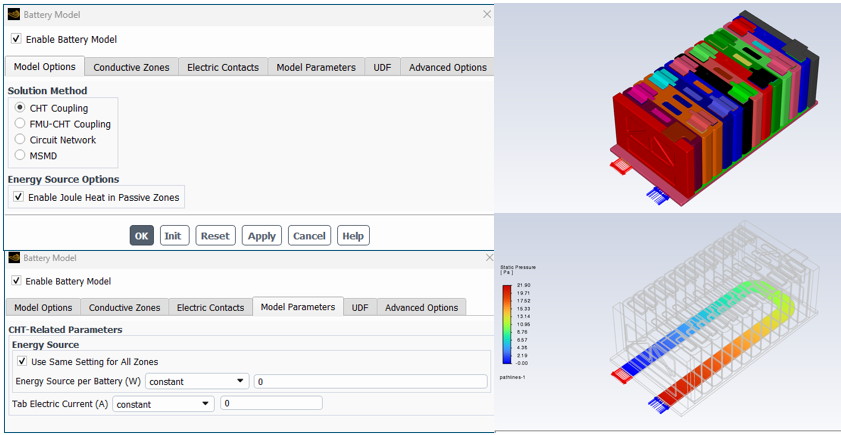
A battery module with 12 cells and a liquid-cooled cold plate is used in this example. A cold plate is not necessary, but if included, a “cold flow” steady-state simulation should be performed first with only the flow equations active to solve for the fluid flow distribution. The battery model is on with Joule heating enabled in passive zones; however, the energy source and current values are set to zero.
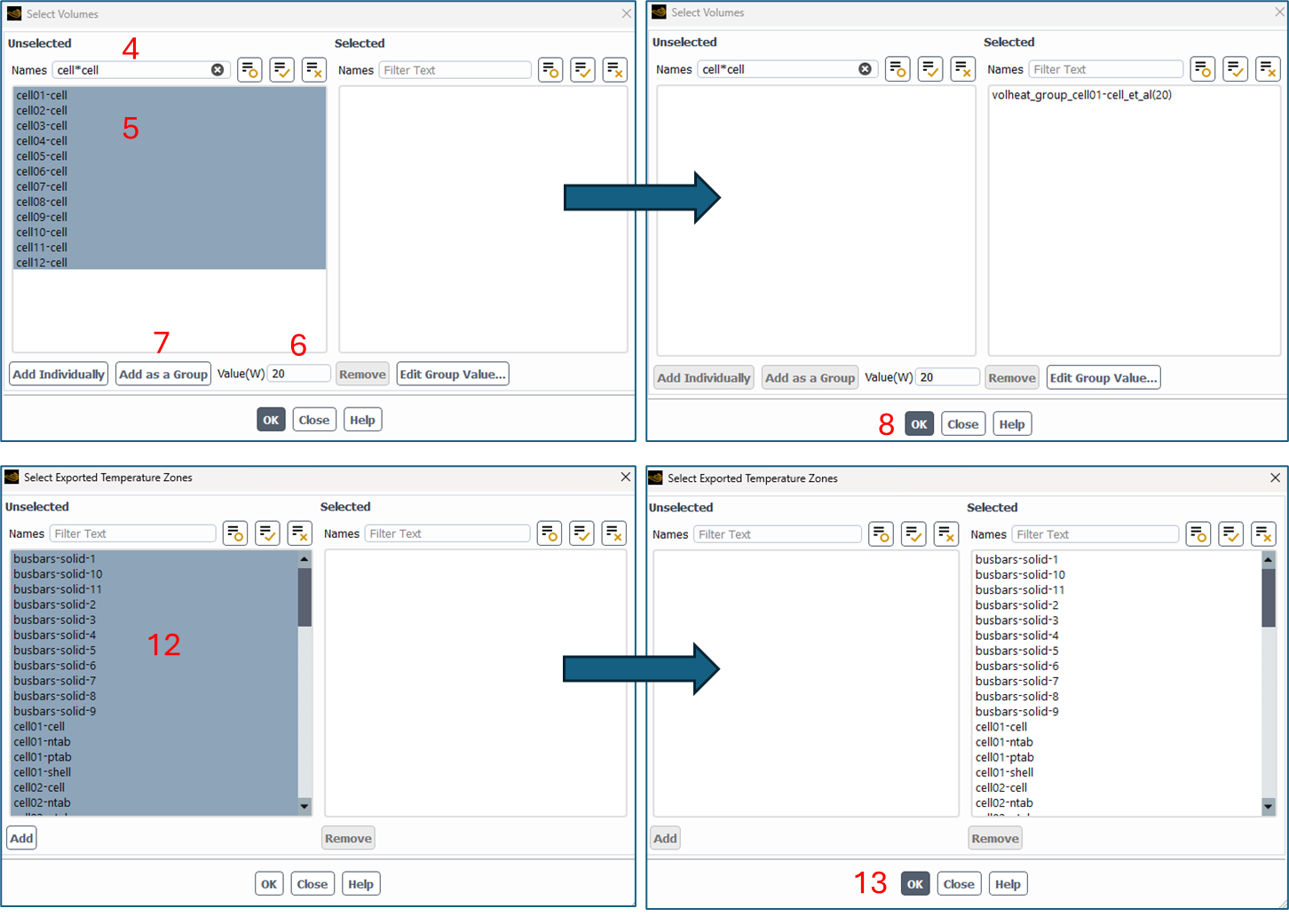
The Battery ROM Tool Kit is available in the Advanced Options tab of the Battery Model. The following images display a numbered sequence of tasks over multiple panels. The ROM type is set to SVD. The ROM Input Parameters use the Volume Heat of the active cells. The cells should be added as a group after setting a power value in Watts. The option for Input Tab Current for Joule Heat can be added, along with a value in Amps. The Exported Temperature Zone of the SVD-ROM Zones can be used to select the cell zones of interest. In this example, all cell zones are selected.
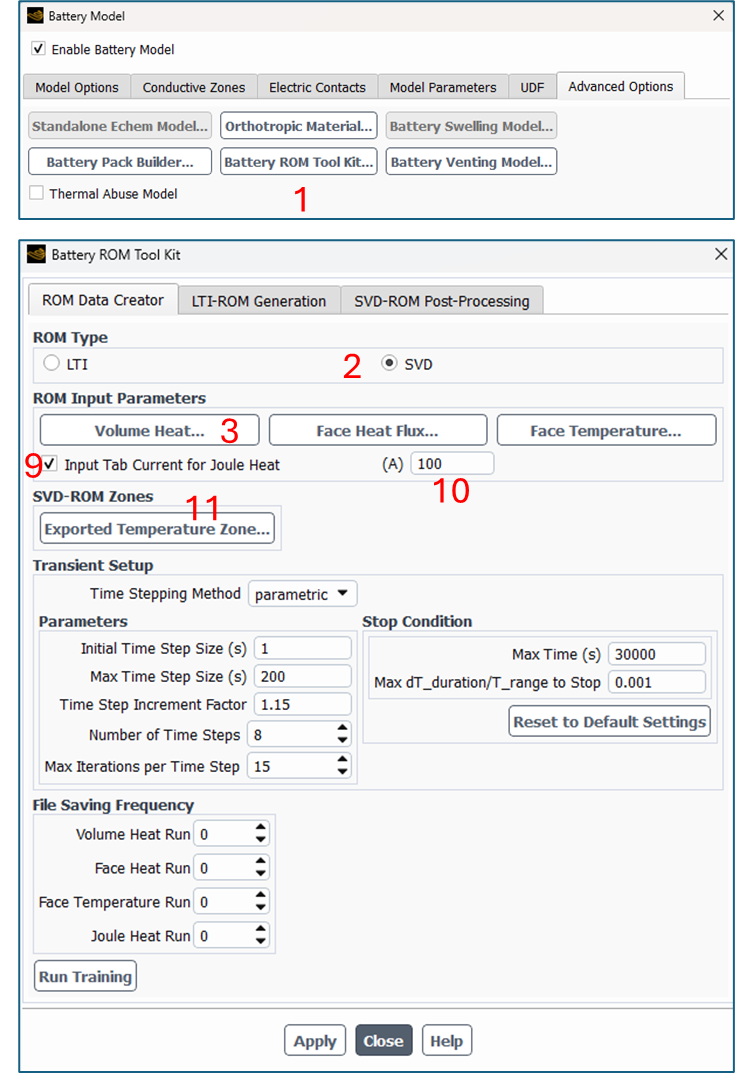
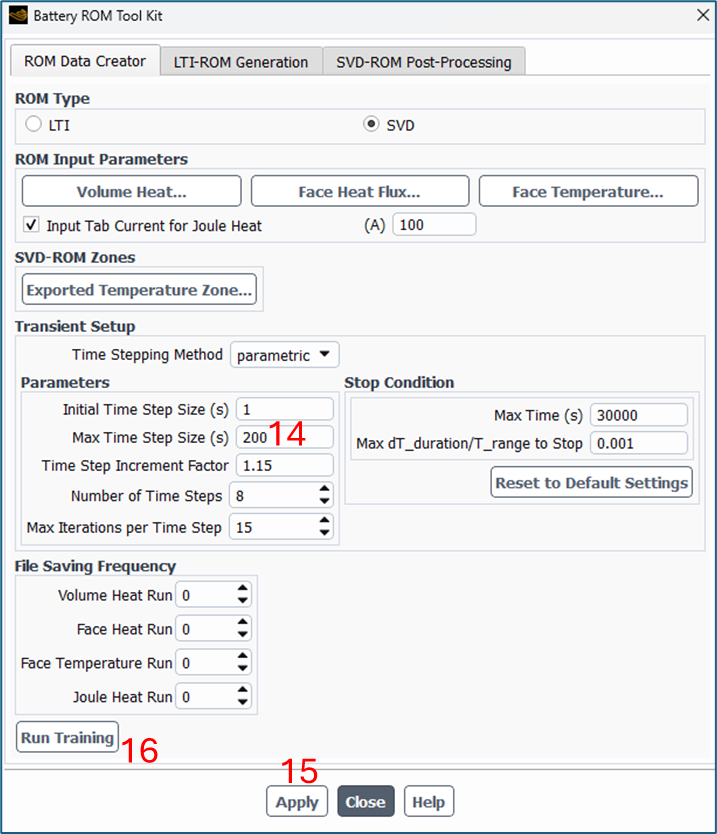
The Max Time Step Size in this example was increased to 200 seconds from the default. Apply is used to enforce the settings, and training is started by selecting Run Training.
When training is complete, a new folder named SVD appears. This contains files necessary for import into the Twin Builder SVD ROM Identification toolkit.
ROM Construction in Twin Builder
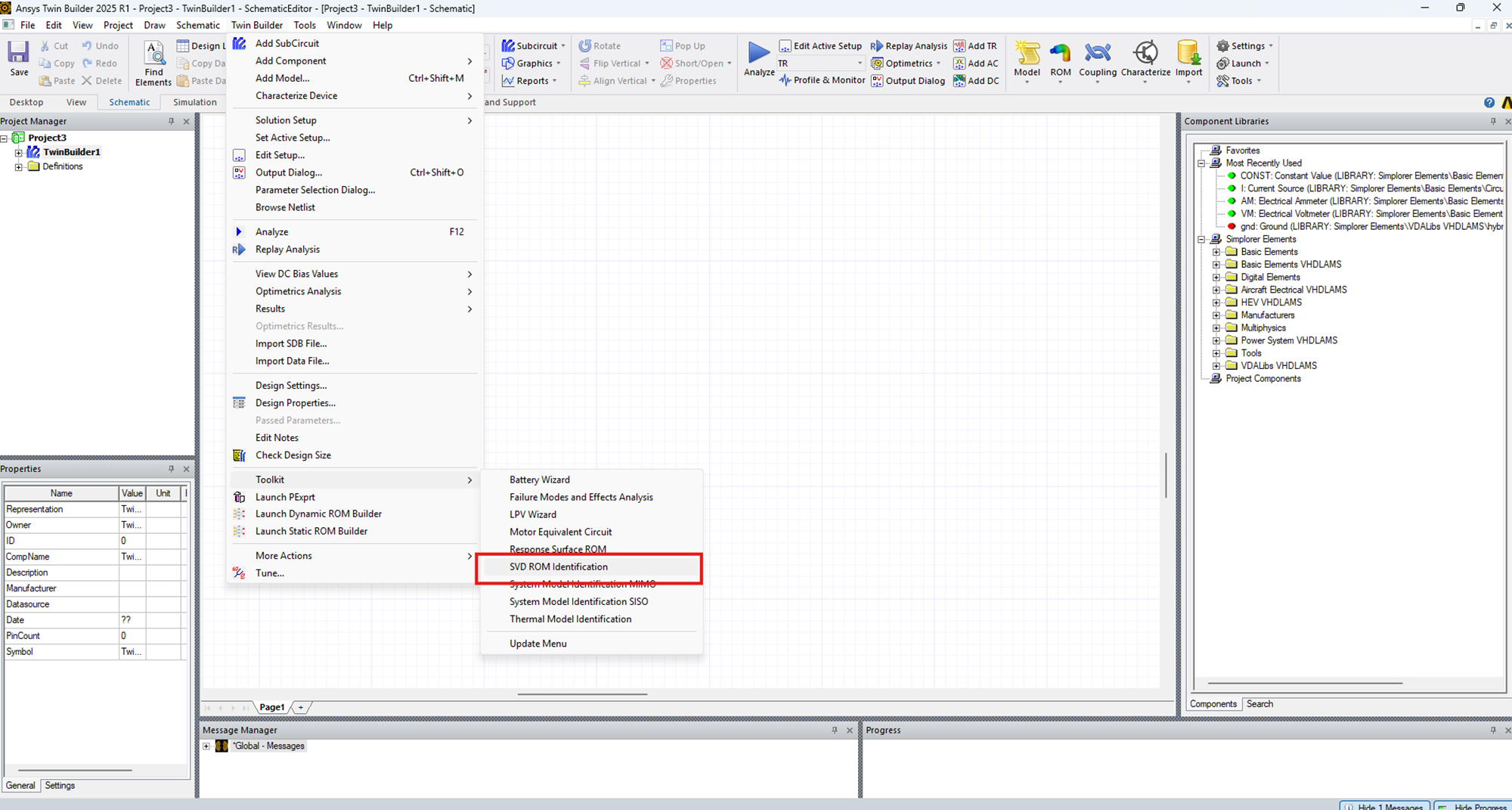
ROM construction in Twin Builder is performed using the SVD ROM Identification Toolkit, accessed as shown below.
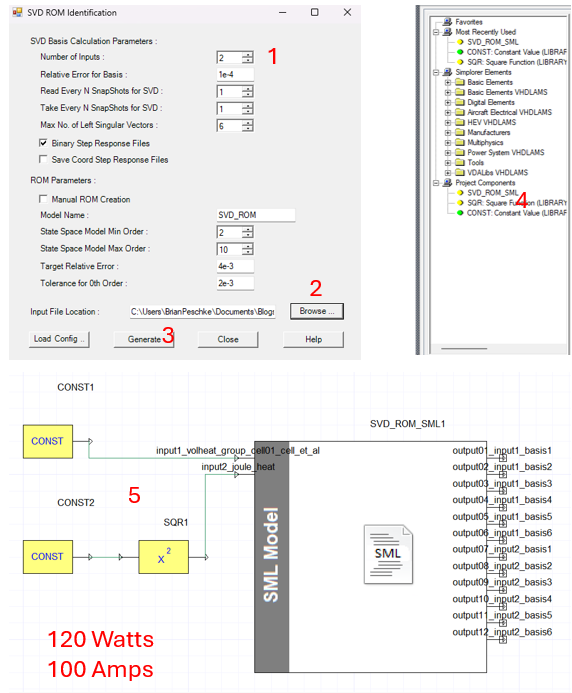
In this example, there are two inputs, the cell power and the tab current; therefore, the Number of Inputs is set to 2. The Browse button is used to select the folder containing the output from the Fluent training. After clicking Generate, an SVD_ROM_SML project component is generated. This component is dragged into the schematic. Components for constant input of 120 Watts and 100 Amps are added and connected to the ROM component. A square component follows the constant 100 Amp component to accommodate the Joule heat input.
A transient analysis can be set with an End Time of 30,000 seconds, a minimum time step size of 0.1 seconds, and a maximum time step size of 10 seconds. A report containing a rectangular plot is constructed using the 12 SVD_ROM_SML outputs. After running the brief analysis, the plot is opened, and the output is exported. When exporting, the results are saved to a .csv file using Export Uniform Points. In this example, the export writes data for every 200 seconds until 10,000 seconds are reached.
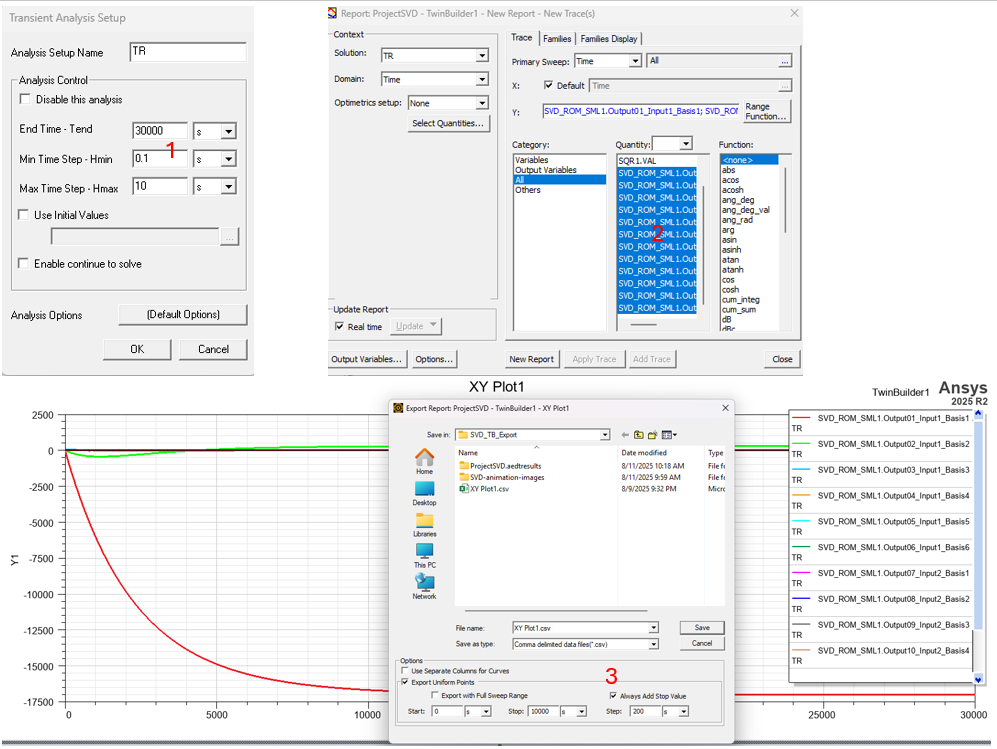
In addition to the CSV file, two other files are generated. These are basis files. The basis files, the CSV file, and the two Fluent SVD-rom-initial_file files (from training) should be located in a new folder, for example, SVD_TB_Export.
ROM Post-Processing in Fluent
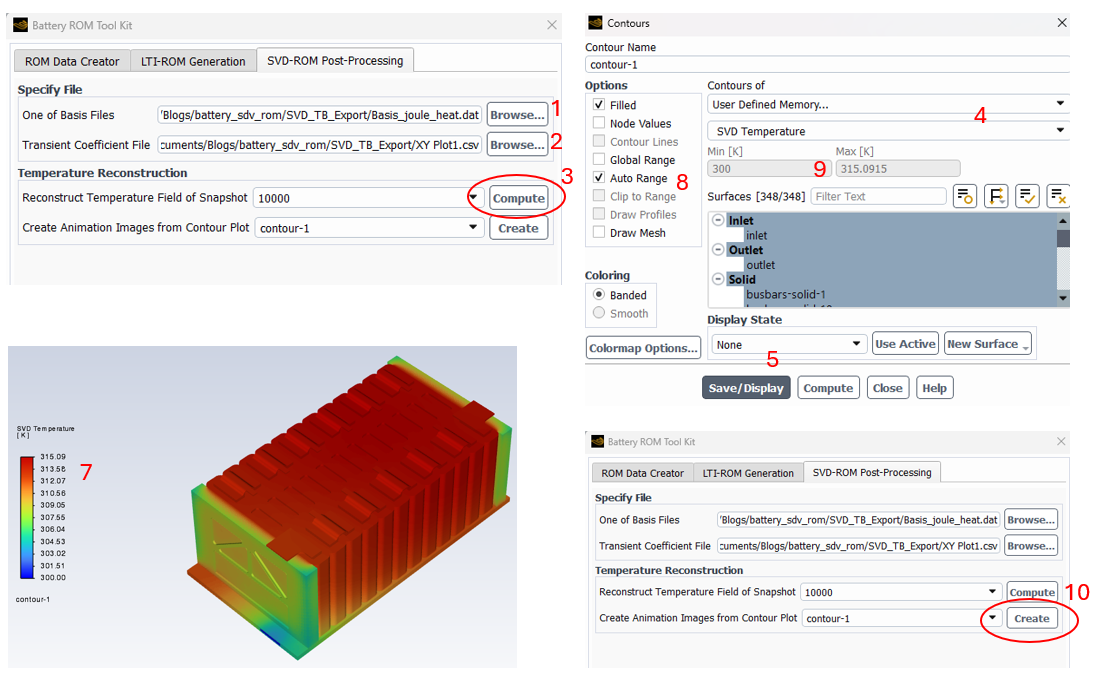
A significant benefit of the SVD ROM is that one can generate contour graphics of the results at various times. These graphics can be generated in a fraction of the time compared to running a full transient Fluent analysis, and the view orientation can be changed without rerunning a transient analysis. A new session of Fluent using the folder containing the basis, CSV, and initial cas/dat files is started. After reading the case and data files and entering the Battery Model Advanced Options tab, the SVD-ROM Post-Processing tab is selected. One of the basis files is selected, and the CSV file is selected. A time snapshot can be selected and activated with Compute. A contour plot using Contours of User Defined Memory… > SVD Temperature is generated to set up a future animation with desired Surfaces, Range, and Display State. This animation is activated by selecting “Create Animation Images from Contour Plot” and then selecting the desired contour object. Individual animation frames are saved to a new folder at each snapshot time in the CSV file.
ROM Animation
Videos can be generated from the animation files with tools such as Ansys EnVe. Below are animations from the ROM (top) and from a corresponding transient Fluent simulation (bottom). The animations show the small temperature difference between the two solutions.
Video of Setup Process
The following video highlights the setup.
Benefits of SVD ROMs for Battery Thermal Analysis
Ansys offers advanced capabilities for simulating battery module thermal systems, which offer numerous benefits, including enhanced design optimization, improved reliability, and cost savings. By accurately predicting battery module performance per usage cycles, manufacturers can design products that meet specific requirements more efficiently.
Singular Value Decomposition Reduced Order Models provide a way to greatly reduce simulation time for transient thermal analysis of battery modules. The example shown above uses a constant energy source and a constant tab current; however, a time-varying input can be used to address usage cycles. ROM-generated contour plots could be generated in a fraction of the time needed for a transient Fluent simulation with similar time-dependent heat loads.
Ansys Fluent and Digital Twin enable the evaluation of multiple design/input factors, such as constant or variable heat loads. A battery thermal engineer can evaluate multiple design options with Digital Twins to understand the thermal behavior in real time. Beyond Twin Builder and Fluent, Ansys provides tools such as LS-Dyna, DesignXplorer, OptiSLang, and Mechanical for further design parametrization and evaluation.
Looking to speed up battery thermal simulation or build digital twins for your battery systems? SimuTech Group’s CFD and thermal consulting engineers work with Ansys Fluent, Twin Builder, and the full battery simulation suite. For more on EV simulation, see our guide on advanced cooling techniques for EV traction motors. Learn more about Ansys Fluent or contact us to discuss your project.