Contact Us
In this blog post, we’ll explore how to automate different current excitation datasets for electric motor simulations using a custom function in Ansys Maxwell.
By default, when current or voltage sources are defined as AC expressions in Maxwell, the solver generates pure sinusoidal waveforms. However, real-world applications—such as evaluating the performance of electric motors or transformers—often require including harmonic content in the excitation signals. Typically, this means manually simulating each dataset individually, which can be time-consuming and error-prone, especially in parametric studies or optimization loops.
To streamline this process, we’ll introduce a simple function that lets you automate injecting different current or voltage waveforms into your design. This makes it possible to run batch simulations across datasets for parametric sweeps, optimization studies, or even multiphysics workflows—all with a single click.
Importing Datasets into Ansys Maxwell
The first step is to import the current excitation datasets that will be used in your simulation. In this example, we’ll use three sets of current waveforms—one for each phase of a 3-phase PMSM (Permanent Magnet Synchronous Motor).
For reference, you can download the sample dataset file here: Sampledatasets.zip
To insert the datasets into Ansys Maxwell, follow these steps:
-
Open Ansys Electronics Desktop and navigate to your project.
-
From the top-left corner, click on Maxwell 2D (or select the relevant design type for your project).
-
From the dropdown menu that appears below, choose Design Datasets….
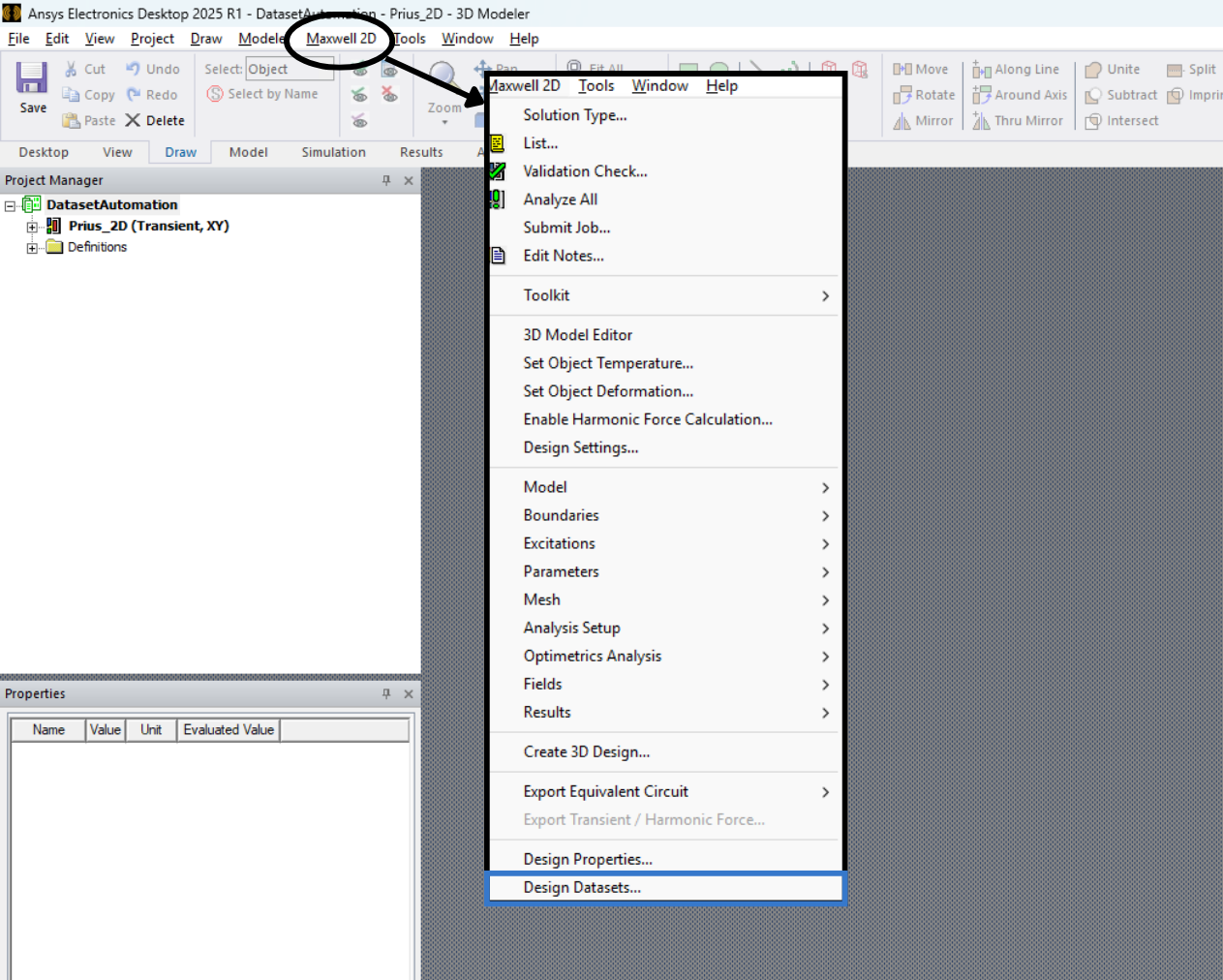
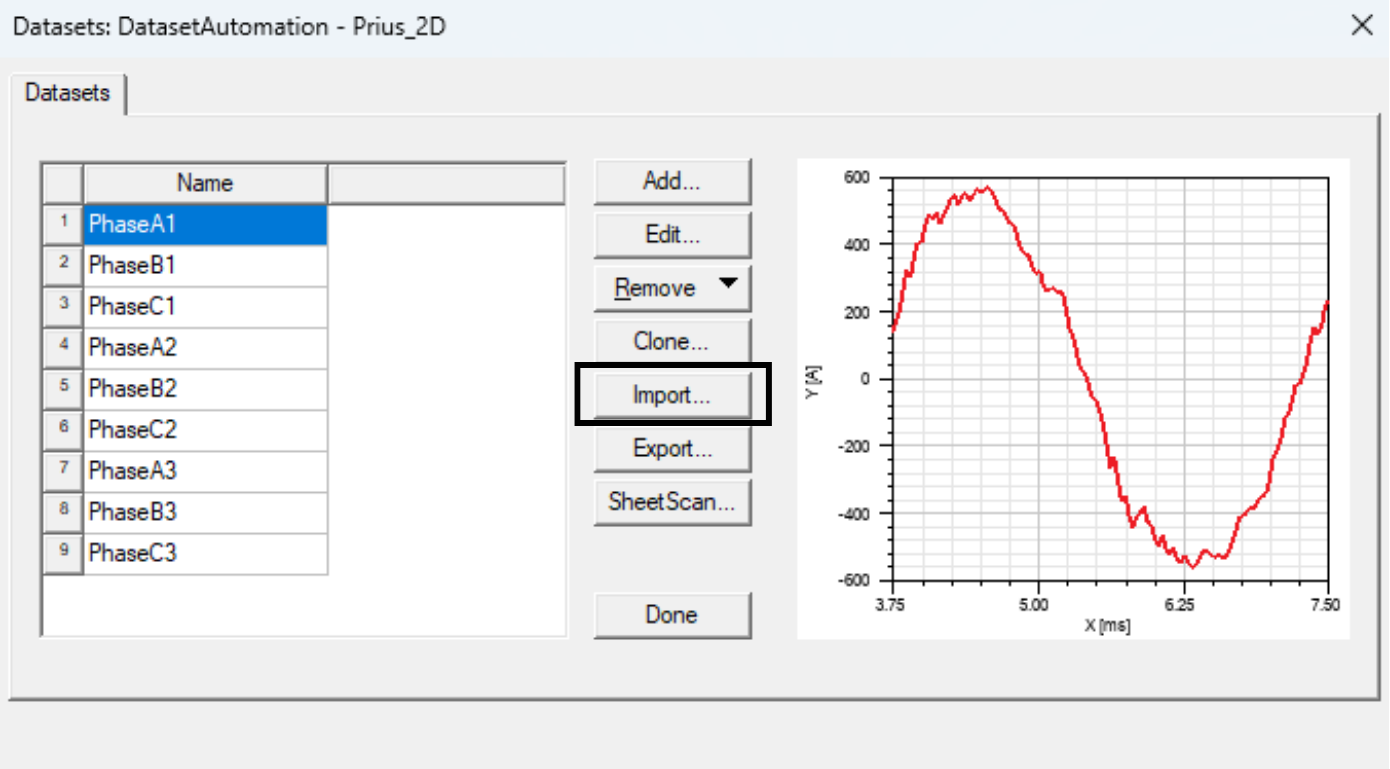
This will open the dataset editor, where you can add, edit, and manage the waveform data that will drive your simulation. It is worth noting that Ansys Electronics supports .tab files for data reading. You can import your datasets by clicking Import….
Creating a Custom Function to Call Datasets by Parameter
To use the imported datasets dynamically during simulation, you’ll need to create a custom function that pulls the appropriate dataset based on a specified parameter—such as motor speed, torque, or any design variable.
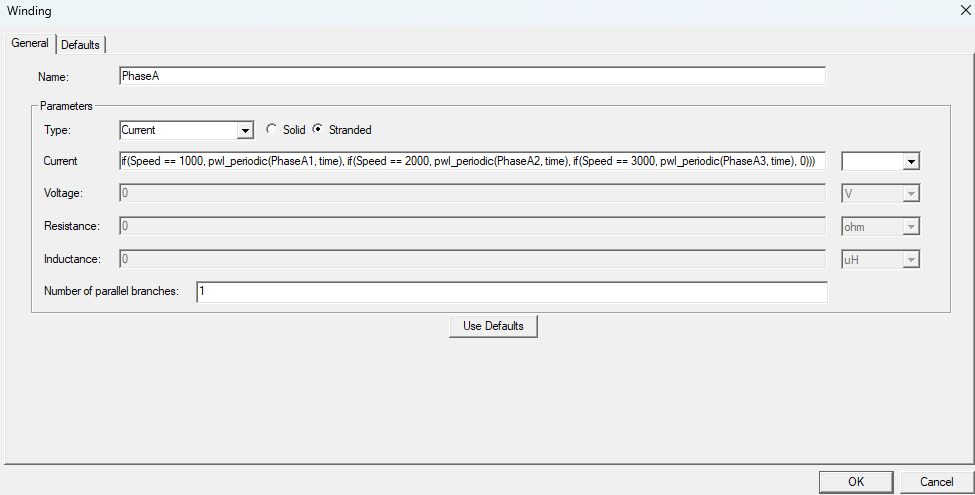
For example, if you want to apply a different current excitation waveform for each motor speed, you can use the following sample function structure:
if(Speed_mech == 1000, pwl_periodic(PhaseA1, time), if(Speed_mech == 2000, pwl_periodic(PhaseA2, time), if(Speed_mech == 3000, pwl_periodic(PhaseA3, time), 0)))
In this function, the parameter speed_mech dynamically controls the electric motor’s rotational speed, allowing different current waveforms to be applied at each operating point.
To properly call the datasets in Ansys Maxwell, the function must use the pwl_periodic expression, which allows for time-based waveform definition using the imported datasets.
Verifying the Automation with a Parametric Sweep
To confirm that the dataset automation is functioning correctly, you can run a parametric sweep analysis.
In this example, the speed parameter is swept from 1000 RPM to 8000 RPM in steps of 2000 RPM. This allows the simulation to automatically select the appropriate current excitation dataset for each speed value using the function defined earlier.
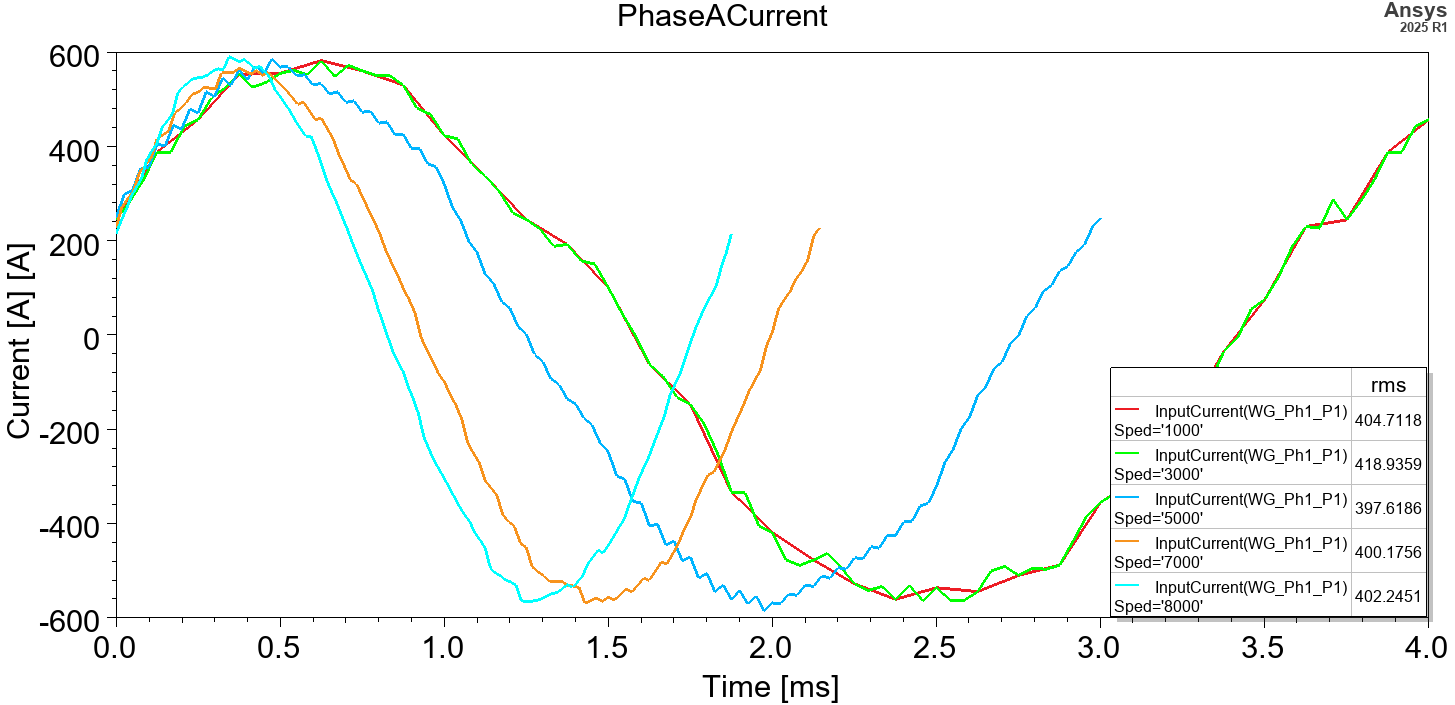
The figure above shows one electrical cycle of current for each simulation point. As you can see, when the speed changes, the corresponding dataset is automatically pulled and applied—proving that the function-driven waveform selection is working as intended.
Impact of Harmonic Current Excitation on Motor Performance
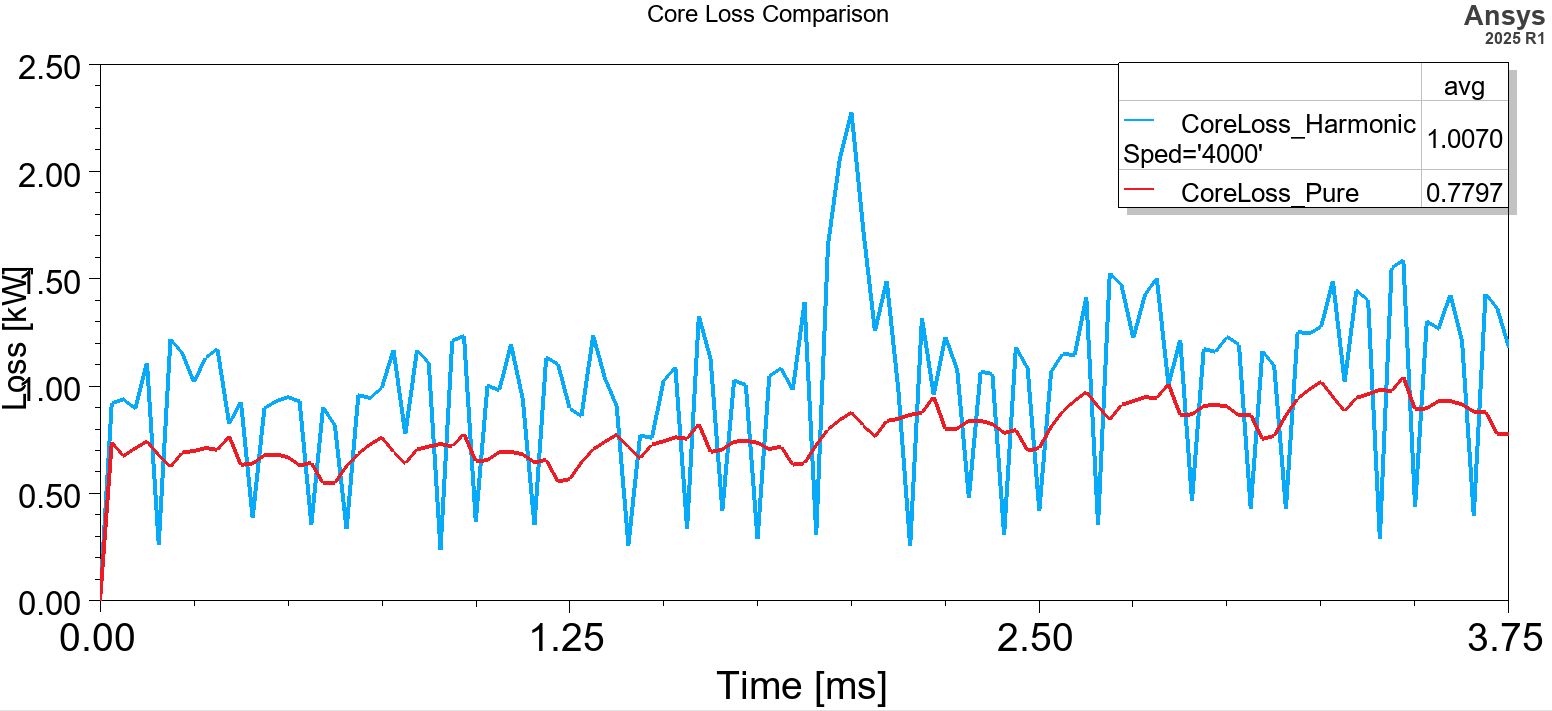
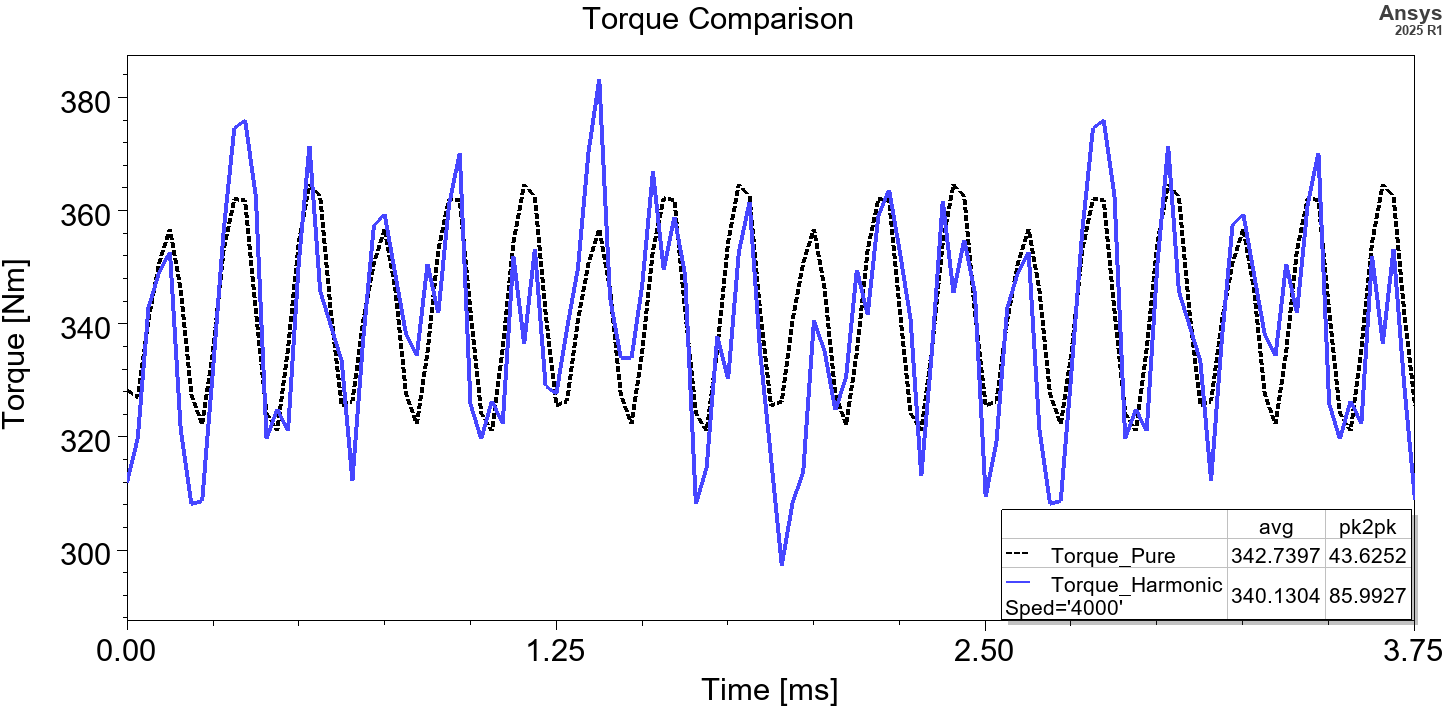
The torque, torque ripple, efficiency, etc., of electric motors depend on the current waveform applied. Based on an electric motor example, the following changes are observed with harmonic current excitation compared to a pure sinusoidal waveform:
1. Core Loss = 28% higher AC core loss in stator and rotor laminations due to additional harmonics in the current waveform.
2. Torque Ripple = Although the average torque remains the same due to equal RMS values, the torque ripple increases by 12.5% compared to the pure sinusoidal waveform.
Beyond the results shown above, this automation can also be used to analyze thermal performance differences under various excitations by coupling with Ansys Fluent, and to evaluate Noise, Vibration, and Harshness (NVH) performance differences by coupling with Ansys Mechanical.
For more advanced multi-physics simulations using harmonic current excitation, feel free to reach out to us! We’re happy to help.
The reference simulation can be downloaded here: MaxwellPMSMExample.
SimuTech Expertise
Want to take your electric motor simulations further? SimuTech Group offers Ansys Maxwell training covering setup, solving, and post-processing for electromagnetic simulations. For a broader look at motor design workflows, see our guide on electric machine design in Ansys. Contact us to discuss your electromagnetic simulation needs.